Mastering Object-Oriented Design in Java
Unit 3: Class Creation
1. Anatomy of a Class
In Java, a Class is the fundamental building block of object-oriented programming. It serves as a formal description of a set of objects.
Concepts and Definitions
- Class: A programmer-defined blueprint or template from which objects are created. It defines state (variables) and behavior (methods).
- Object: A specific instance of a class. It represents a real entity with a specific state.
- Instance: Synonymous with "object." When you creating an object, you are "instantiating" a class.

The Relationship: Blueprint vs. House
Think of the class as the architectural blueprint for a house. The blueprint defines where the walls, windows, and doors go. The objects are the actual houses built from that blueprint. You can build multiple houses (objects) from one blueprint (class), and each house can have different colored paint or furniture (state), but they share the same structure.
Basic Syntax Structure
public class NameOfClass {
    // 1. Instance Variables (State)
    private type variableName;

    // 2. Constructors (Initialization)
    public NameOfClass(params) { ... }

    // 3. Methods (Behavior)
    public returnType methodName(params) { ... }
}
2. Encapsulation and Access Modifiers
Encapsulation is the practice of bundling data (variables) and methods within a class and restricting access to the inner workings of that object. This is a core pillar of Object-Oriented Programming (OOP).
Visibility Modifiers
Java uses keywords to define how accessible a component is:
| Modifier | Keyword | Visibility | Usage Guideline for AP CSA |
|---|---|---|---|
| Private | private | Visible only strictly within the class file. | ALWAYS use for instance variables (fields). |
| Public | public | Visible to any class in the project. | Use for constructors and methods intended for external use. |
Instance Variables (Fields)
These store the state of an object.
- They are declared inside the class but outside any method.
- Rule: Instance variables are always declared
privateto prevent unauthorized modification. This is data hiding. - Default Values: If not initialized, Java assigns defaults:
0forint,0.0fordouble,falseforboolean, andnullfor objects (likeString).
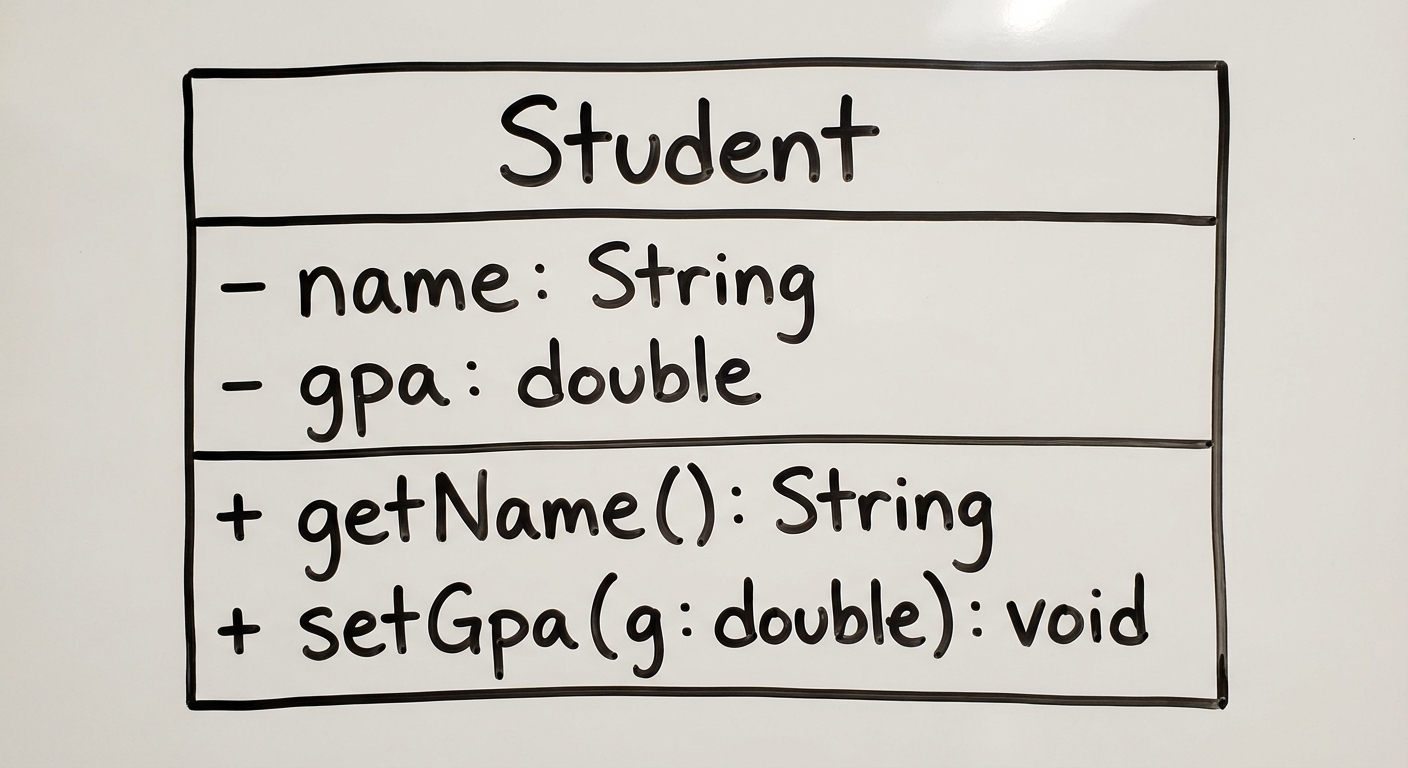
public class Student {
    // Private visibility enforces encapsulation
    private String name;
    private double gpa;
    private int idNumber;
}
3. Constructors
A Constructor is a special block of code used to initialize a newly created object. It sets the initial state (values of instance variables) of the object.
Key Rules for Constructors
- Name: Must match the Class Name exactly.
- No Return Type: Constructors do NOT have a return type, not even
void. If you addvoid, it becomes a regular method. - Invocation: Called automatically when using the
newkeyword.
Types of Constructors
A. The No-Argument (Default) Constructor
Sets instance variables to generic default values.
public Student() {
    name = "Unknown";
    gpa = 0.0;
}
B. The Parameterized Constructor
Accepts arguments to set instance variables to specific values provided by the client.
public Student(String initName, double initGpa) {
    name = initName;
    gpa = initGpa;
}
Constructor Overloading
Overloading occurs when a class has multiple constructors with the same name but different parameter lists (number, type, or order of parameters).
4. Accessor and Mutator Methods
Since instance variables are private, we provide public methods to allow other classes to interact with the data in a controlled way.
Accessor Methods (Getters)
- Purpose: Retrieves (returns) the value of a private instance variable.
- Naming Convention:
getVariableName - Return Type: Must match the type of the variable being returned.
public String getName() {
    return name;
}
Mutator Methods (Setters)
- Purpose: Modifies the value of a private instance variable.
- Naming Convention:
setVariableName - Return Type: Usually
void. - Logic: Can include validation logic (e.g., ensuring GPA is between 0.0 and 4.0) before assigning the value.
public void setGpa(double newGpa) {
    if (newGpa >= 0.0 && newGpa <= 4.0) {
        gpa = newGpa;
    }
}
5. The this Keyword and Scope
Variable Scope
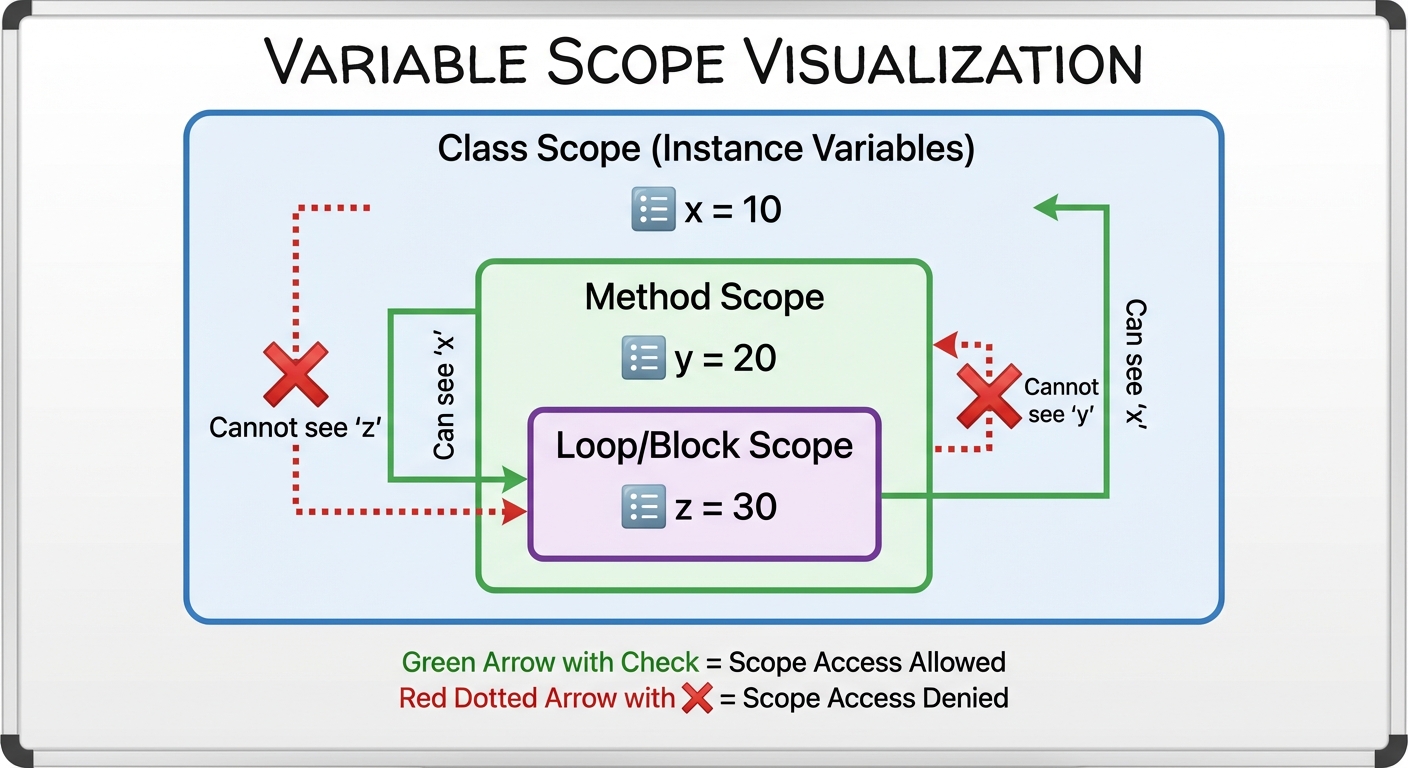
The scope of a variable refers to the region of the code where the variable is accessible.
- Instance Scope: Variables declared in the class (fields). Accessible by all methods in the class. Alive as long as the object is alive.
- Local Scope: Variables declared inside a method (including parameters). Only accessible inside that method. Destroyed when the method finishes execution.
The this Keyword
this is a reference to the current object. It is commonly used to resolve naming conflicts (Shadowing).
Variable Shadowing: When a local parameter has the exact same name as an instance variable, the local variable "shadows" the instance variable.
Example of Shadowing & Resolution:
public class Student {
    private String name;

    // Parameter 'name' shadows instance variable 'name'
    public void setName(String name) {
        // name = name;  <-- WRONG: this assigns the parameter to itself

        this.name = name; // CORRECT: assigns parameter to current object's field
    }
}
6. Method Decomposition & Documentation
Preconditions and Postconditions
These are often found in Java inputs (Javadoc comments) on the AP exam.
- Precondition: A condition that must be true before the method is called for it to work correctly. (e.g.,
/* Precondition: y > 0 */for a division method). - Postcondition: What determines the state of the object or the return value after the method has finished.
The toString Method
All classes inherit from the generic Object class. It is standard practice to override the toString() method to provide a readable string representation of your object.
public String toString() {
    return "Student Name: " + name + " | GPA: " + gpa;
}
If you print an object without an overridden toString (e.g., System.out.println(myStudent)), Java prints the memory address hash code, which is rarely useful.
7. Static vs. Instance Variables
While predominantly covered in later units, distinct static behavior is introduced in class creation.
| Type | Keyword | Behavior |
|---|---|---|
| Instance Variable | (none) | Each object has its own copy. Changing one does not affect others. |
| Static Variable | static | Belongs to the class. All objects share a single copy. |
Example: private static int studentCount; would act as a global counter shared by all Student objects to track how many have been created.
Common Mistakes & Pitfalls
The "VoidConstructor" Error:
- Mistake: Writing
public void Student() { ... }. - Why it's wrong: Adding
voidmakes it a regular method, not a constructor. It will not be called when you usenew Student().
- Mistake: Writing
Public Fields:
- Mistake:
public String name; - Why it's wrong: Violates encapsulation. Other classes can modify data without validation. Always make fields
private.
- Mistake:
Shadowing Logic Errors:
- Mistake: Writing
name = namein a setter where the parameter matches the field name. - Fix: Use
this.name = nameor interpret different names for parameters (e.g.,String newName).
- Mistake: Writing
Uninitialized Variables:
- Mistake: Trying to use a local variable inside a method without initializing it.
- Correction: Local variables do not get default values like instance variables do. You must assign them a value ($x = 0$) before use.
Return Type Mismatch:
- Mistake: Declaring a method
public int getGPA()but returning adouble. - Fix: Ensure the header type matches the data type of the returned variable.
- Mistake: Declaring a method
Mnemonic: P.I.E.
For remembering the essentials of Object-Oriented design:
- P - Polymorphism (covered in later units)
- I - Inheritance (reuse of code)
- E - Encapsulation (keep fields private, methods public)
For Class Structure:
- IV (Instance Variables)
- C (Constructors)
- M (Methods)