AP CSP Big Idea 4 Study Guide: Computer Systems, Networks, the Internet, and Security
Computer Systems, Networks, and the Internet: The Big Picture
A computer system is more than just a single device. It’s a collection of hardware and software components that work together to take input, process it, store it, and produce output. In AP CSP, you care about systems because modern computing rarely happens on one isolated machine. Your phone talks to servers, your laptop prints over Wi‑Fi, and apps rely on cloud services. Understanding “system thinking” helps you explain how computing scales from one device to billions.
A network is a group of interconnected computing devices that can send data to each other. The moment you connect devices, you get powerful benefits such as resource sharing (printers, files, services, databases), communication (messaging, video calls, email), and distributed problem-solving (many machines working on one task).
The Internet is the largest example of a network: a global network of networks. The word Internet comes from “interconnection of computer networks.” A key idea for AP CSP is that the Internet is not “one company’s network” and it is not “one central computer.” Instead, it’s a decentralized collection of networks that agree to communicate using shared rules. Even though people experience it as “wireless” or “in the cloud,” the Internet is very hardware-driven, relying on physical infrastructure like wires, fiber-optic cables, radio transmission, routers, and servers.
Network types you’ll see in questions
Networks are often described by size and purpose:
- LAN (Local Area Network): a smaller network such as a home, school, or office network.
- WAN (Wide Area Network): a network covering a larger geographic area; the Internet is essentially the largest WAN.
You’ll also see ways of describing how devices connect:
- Wired connections (like Ethernet) typically offer stable, high-speed links.
- Wireless connections (like Wi‑Fi and cellular) trade some reliability for mobility and convenience.
Why “systems” matter (not just “networks”)
Big Idea 4 emphasizes that computing systems are built from layers of components. A “simple” action like loading a webpage involves your device hardware (CPU, memory, network card), your operating system (network settings, drivers), applications (browser), local network infrastructure (routers, Wi‑Fi access points), and Internet services (DNS, web servers).
A common misconception is that the Internet is synonymous with “Wi‑Fi.” Wi‑Fi is just one local wireless method of connecting to a network; the Internet is the global network-of-networks that your local network connects to.
Example: What’s actually happening when you watch a video?
When you stream a video:
- Your device requests chunks of video data from a server.
- Those chunks travel across many networks owned by different organizations.
- Your device buffers some data so playback can continue even if packets arrive unevenly.
That “many networks, many owners” point is essential: the Internet works because of shared standards and routing, not because there’s one controlling network.
Exam Focus
- Typical question patterns:
- Identify whether a scenario describes the Internet, a LAN, or a WAN.
- Explain why the Internet is called a “network of networks.”
- Describe how a user action (loading a page, sending a message) involves multiple system components.
- Common mistakes:
- Treating the Internet as a single centralized network or a single route between devices.
- Confusing Wi‑Fi (local access method) with the Internet (global interconnection).
- Assuming data always travels directly from sender to receiver in one hop.
How Data Moves: Bits, Packets, and Addresses
Computers store and transmit data as bits (0s and 1s). Sending data over a network means moving bits through physical media (copper wire, fiber optic cable, radio waves) and through network devices (routers, switches). But the Internet doesn’t usually send one giant “file blob” from start to finish as a single piece. Instead, it uses packets.
A packet is a small chunk of data sent over a network, typically containing:
- payload: the actual data being sent (part of a file, part of a message)
- metadata (often called “header” information): information needed to deliver the packet (like where it’s going and how to reassemble it)
Why packet switching is such a big deal
The Internet largely uses packet switching, which means:
- Data is divided into packets.
- Packets may take different routes to the destination.
- The destination reassembles packets into the original data.
This matters because packet switching makes the Internet more efficient (many users share the same network links), more scalable (growth without dedicated circuits per conversation), and more fault tolerant (rerouting around failures).
A useful analogy is mailing a book by tearing it into numbered postcards. Each postcard can travel independently through the postal system; the receiver sorts them by number to reconstruct the book. If one postcard gets lost, only that piece needs to be resent, not the entire book.
Addresses: how packets know where to go
For packet delivery, networks rely on addressing. In Internet contexts, a key address is an IP address, which identifies a device (or network interface) on the Internet.
Important idea: humans prefer names, but networks deliver using numeric addresses. You might type example.com, but your computer needs an IP address to send packets there (DNS helps map the name to the numeric address).
What can go wrong with packets?
Because packets can take different paths, they can arrive out of order, be duplicated, or go missing. Packet loss happens on real networks (congestion, interference, hardware failure). Higher-level protocols and applications handle these problems by retransmitting missing data or designing around occasional loss (for example, a video call may skip a moment rather than freeze to resend everything).
Example: Sending a photo
Imagine sending a 5 MB photo over a network that uses packets around a few thousand bytes each. The photo is split into many packets. Each packet includes destination IP, source IP, and information to help reassemble the photo. The receiver collects packets, checks what’s missing, and either requests resends (depending on protocol) or tries to continue if the application tolerates gaps.
Exam Focus
- Typical question patterns:
- Explain why the Internet uses packets and how packet switching differs from sending data as one continuous stream.
- Predict outcomes when packets arrive out of order or some are lost.
- Identify what information must be included with transmitted data to make delivery possible.
- Common mistakes:
- Thinking packets always take the same route or arrive in order.
- Assuming packet switching guarantees no loss.
- Confusing “packets” with “protocols” (packets are the chunks; protocols are the rules).
Protocols and Layering: The Rules That Make the Internet Work
A protocol is a set of rules that specify how data is formatted, transmitted, and received. Protocols matter because networks connect devices made by different companies, running different operating systems, written in different programming languages. Without shared rules, communication would be unreliable or impossible.
A core AP CSP idea is that the Internet works due to open standards: publicly available specifications that anyone can implement. This openness supports innovation (you can build a new app without asking permission from a single network owner) and interoperability (devices from different vendors can still communicate).
Why layering helps
Network communication is complex, so it’s organized into layers. Each layer solves a specific category of problems, provides services to the layer above, and relies on the layer below. The big idea is that you can change one layer (like swapping Wi‑Fi for Ethernet) without rewriting everything about how web pages work, as long as the layers still provide the same services.
Key Internet protocols you should understand
IP (Internet Protocol)
IP is responsible for addressing and routing packets across networks. It helps get packets from a source IP address to a destination IP address, possibly through many intermediate routers. IP is “best effort” and does not guarantee reliable delivery.
TCP (Transmission Control Protocol)
TCP is a protocol that defines how computers send packets of data to each other in a way that provides reliable, ordered delivery between programs. Conceptually, TCP keeps track of packets sent, detects missing packets, retransmits as needed, and reorders packets so the application receives data in the correct sequence.
UDP (User Datagram Protocol)
UDP is a transport protocol that allows applications to send messages with less overhead by not checking for missing packets in the same way TCP does, which can save time that would otherwise be spent retransmitting. The AP CSP takeaway is the tradeoff: UDP can reduce delay, but reliability support is reduced, which can matter for real-time audio/video or games.
HTTP and HTTPS
HTTP (HyperText Transfer Protocol) is used for requesting and transferring web resources (web pages, images, etc.). HTTPS is HTTP used with encryption (commonly via TLS) to protect data in transit.
A common misconception is that HTTPS “makes a website safe.” HTTPS mainly protects data as it travels (confidentiality and integrity in transit). It does not guarantee that the website itself is trustworthy or that it won’t misuse your data.
DNS (Domain Name System)
DNS translates human-readable domain names (like collegeboard.org) into IP addresses. DNS exists because names are easier for humans to remember, but routers deliver packets using numeric IP addresses.
Example: Loading a webpage (conceptual chain)
When you load https://example.com/page:
- Your device uses DNS to find the IP address for
example.com. - Your browser connects to that IP using IP routing.
- A transport protocol (often TCP) helps manage reliable data transfer.
- HTTP/HTTPS defines the request for
/pageand the response content.
What goes wrong if protocols aren’t followed?
Protocols are agreements. If one side doesn’t follow the agreement (wrong formatting, missing fields, unexpected message order), the other side may reject the message, misinterpret data, or fail to respond. This is why standardization matters and why even small implementation errors can cause communication failures.
Exam Focus
- Typical question patterns:
- Match a protocol to its function (e.g., DNS maps names to IPs; IP routes packets).
- Explain why layering/protocols enable interoperability.
- Reason about what happens if a protocol step fails (DNS failure, unreliable transport).
- Common mistakes:
- Thinking a single protocol (like HTTP) is responsible for routing across the Internet.
- Assuming IP guarantees reliability or ordering.
- Treating HTTPS as a complete guarantee of website trustworthiness.
Routing, Fault Tolerance, and Real-World Failures
To send packets beyond your local network, the Internet relies on routers. A router is a network device along a path that forwards packets toward their destinations by sending the information along to the next “stop” (next hop). Routing is the process of finding a path from sender to receiver, but it’s best understood as many routers making step-by-step forwarding decisions rather than one computer planning the entire trip end-to-end.
Routing as a step-by-step forwarding process
In practice, packet routing works like this:
- Your device sends a packet to a default router (often your home router).
- That router looks at the destination IP address and chooses where to forward it next.
- Each router repeats this process until the packet reaches the destination network.
Because conditions can change, packets from the same message can take different routes and arrive at different times.
Why multiple paths exist
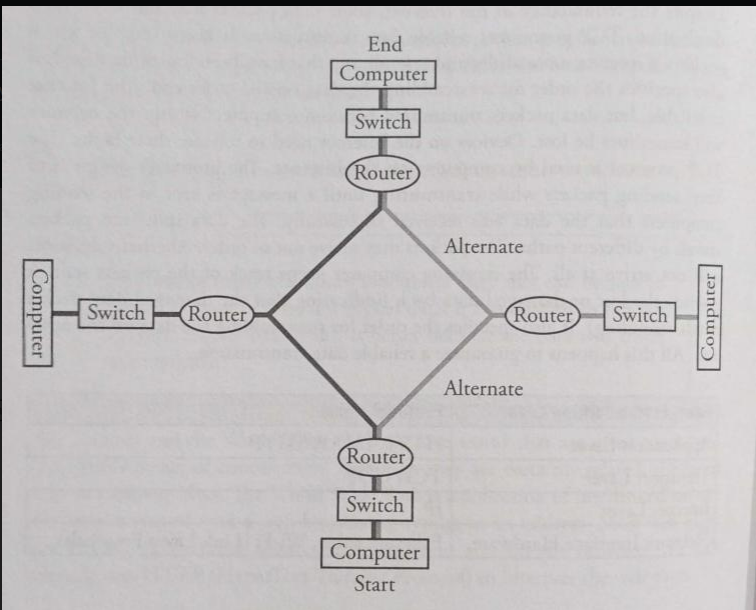
The Internet is highly interconnected, with many different physical links and possible routes between locations. This redundancy is intentional: it helps handle equipment failures, manage congestion, and balance load.
Fault tolerance: the Internet’s ability to keep working
A system is fault tolerant if it can continue operating even when some of its components fail. Packet switching plus redundant paths makes this possible: if one route is unavailable, packets can often be rerouted.
Fault tolerance does not mean “nothing ever fails.” It means failures don’t necessarily cause total system collapse, though performance may degrade.
Common causes of failure you may need to reason about
When AP CSP talks about networks continuing to function under stress, it helps to name realistic failure sources:
- Hardware failure: when a hardware device (computer, printer, router, switch, cable) stops working properly due to physical issues. Causes can include electrical wiring issues or incorrect installation/configuration.
- Operational failures: breakdowns in the operation of a business, machine, or process. These can include unexpected downtime or incorrect results due to faulty programming or misconfiguration.
- Weather and disasters: the Internet has cables and wires spanning the world. Natural disasters can destroy hardware and bring network activity to a halt locally or regionally. A solar flare is intense radiation released from the sun and is sometimes discussed as a risk to infrastructure.
- Cyberattacks: malicious attempts to damage or disrupt systems, networks, and data. These can involve malware (including viruses and ransomware) to steal data or enable denial-of-service attacks.
Some cyberattack methods you might see named include phishing campaigns, social engineering attacks, website defacement, distributed denial of service (DDoS) attacks, SQL injection exploits, and man-in-the-middle (MITM) attack vectors.
Example: What happens if a major cable is cut?
Suppose a fiber link between two cities is damaged.
- Some routes that used that link become unavailable.
- Routing systems can direct packets through alternative links.
- Users may experience higher latency (longer routes) or reduced throughput (more congestion), but the Internet may still function.
A common misconception is that redundancy automatically means “no slowdown.” Redundancy prevents total failure, but performance can degrade during failures.
Exam Focus
- Typical question patterns:
- Explain how routers and redundancy contribute to fault tolerance.
- Predict effects of a failed link (rerouting, possible latency increase).
- Identify plausible sources of failure (hardware, operational, disasters, cyberattacks) and connect them to symptoms.
- Common mistakes:
- Thinking the Internet has a single central router controlling all traffic.
- Assuming all packets between two devices must follow the same path.
- Confusing fault tolerance (keeps working) with perfect performance (always fast).
Bandwidth, Latency, Throughput, and Reliability: Measuring Network Performance
When you use a network, you experience performance: how fast things load, how smooth video calls feel, how long downloads take. AP CSP expects you to reason about performance using a few key concepts.
Bandwidth
Bandwidth is the maximum amount of data that can be transferred through a channel or network connection in a given amount of time. It’s measured in bits per second, and you can think of it as the size of the “pipe.” High bandwidth helps with large downloads and high-quality streaming, but bandwidth is a capacity, not a guarantee.
Latency
Latency is the time it takes for data to travel from source to destination (delay). Even with high bandwidth, high latency can make real-time interactions (gaming, video calls) feel sluggish.
Analogy: bandwidth is the width of a highway; latency is how long it takes a car to get from one city to another.
Throughput
Throughput is the actual rate at which data is successfully delivered over a network. Throughput is affected by available bandwidth, congestion, packet loss and retransmissions, and protocol overhead. This is why paying for “100 Mbps Internet” does not mean you always download at that rate.
Reliability and packet loss
Reliability describes how consistently data arrives correctly. Packet loss reduces reliability and can trigger retransmissions (reducing throughput). Some applications handle loss differently:
- A file download prioritizes correctness, so missing packets must be resent.
- A live video call may prioritize timeliness, so it may skip some missing data rather than pause.
Congestion: why networks slow down
Congestion happens when more data is being sent over a network link than the link can carry efficiently. Congestion can increase latency (packets wait in line), increase packet loss (routers drop packets when buffers fill), and reduce throughput.
Example: Why does a video buffer even on “fast Wi‑Fi”?
Buffering can still happen even with high bandwidth if the path to the server has a congested segment, Wi‑Fi interference causes packet loss and retransmissions, or the server is limiting speed/under heavy load. End-to-end performance depends on the weakest or most congested link along the route, not just your local connection.
Exam Focus
- Typical question patterns:
- Compare bandwidth vs latency using scenarios (streaming vs video chat).
- Reason about why throughput is lower than advertised bandwidth.
- Predict how congestion affects latency and packet loss.
- Common mistakes:
- Using bandwidth and throughput interchangeably.
- Assuming high bandwidth implies low latency.
- Forgetting that retransmissions can reduce effective throughput.
Physical Transmission: How Bits Travel Through Real Media
Behind every “wireless” or “online” experience is a physical method for transmitting bits. Bits are represented as physical signals.
Wired transmission
In wired networks, bits can be carried by electrical signals over copper (like Ethernet cables) or light pulses over fiber optic cable. Fiber is often used for long-distance, high-capacity links because it supports very high bandwidth and is less susceptible to some kinds of interference.
Wireless transmission
Wireless networks transmit bits using radio waves (Wi‑Fi and cellular). Wireless is convenient, but signals can be blocked or weakened by walls and distance, interference can cause errors, and shared airwaves can increase congestion.
A common misconception is that wireless is “not physical.” It is physical: the medium is electromagnetic waves traveling through space.
Encoding and errors
Systems encode 0s and 1s into signals (voltage levels, frequency changes, light pulses). Real-world channels introduce noise, so errors can happen. Networks combat this with mechanisms such as detecting errors (so corrupted packets can be dropped) and retransmitting missing/corrupted packets (depending on protocol).
Example: Why moving farther from a Wi‑Fi router can slow you down
As distance increases, signal strength decreases and interference becomes more significant. That can lead to more bit errors, more dropped packets, and more retransmissions, reducing actual throughput.
Exam Focus
- Typical question patterns:
- Identify that bits must be transmitted via physical signals (wired or wireless).
- Explain why wireless connections may be less reliable than wired ones.
- Connect interference/noise to packet loss and retransmissions.
- Common mistakes:
- Treating “wireless” as meaning “no physical medium involved.”
- Assuming transmission errors are rare enough to ignore.
- Believing performance is determined only by software, not physical constraints.
DNS and Naming: How Human-Friendly Names Become Network Routes
Humans prefer names; networks prefer numeric addresses. The Domain Name System (DNS) bridges this gap by mapping domain names to IP addresses.
What DNS does
When you type a domain name into a browser, your computer needs the corresponding IP address to send packets. DNS provides that translation.
- Input: domain name (like
apstudents.collegeboard.org) - Output: an IP address (a numeric address)
Why DNS is designed as a distributed system
DNS is not one giant central database. It is distributed, meaning many servers share responsibility for different parts of the naming system. This supports scalability (too large for one server), fault tolerance (other servers can answer if one fails), and faster responses (nearby answers and caching).
Caching: why DNS can be fast (and sometimes confusing)
DNS responses are often cached, meaning your device or a local resolver stores results temporarily. Caching improves performance and reduces load, but it can cause delays in how quickly updates spread when a domain’s IP address changes.
Example: What happens if DNS fails?
If DNS isn’t working, you might still have an Internet connection (Wi‑Fi connected), but be unable to load websites by name. Sometimes, entering an IP address directly can still work (though many modern services rely on names for other reasons too). This distinction helps diagnose that “Internet is down” might actually be “DNS is down.”
Exam Focus
- Typical question patterns:
- Explain DNS’s role in mapping domain names to IP addresses.
- Reason about why DNS is distributed (scalability and fault tolerance).
- Predict effects of DNS failure or caching.
- Common mistakes:
- Thinking DNS routes packets (routers route using IP; DNS only helps find the destination IP).
- Assuming DNS is a single central server.
- Ignoring caching when reasoning about updates and failures.
Internet Services and Applications: Clients, Servers, and Requests
Many Internet applications use a client-server model. A client is a device/program that requests a service, and a server is a device/program that provides a service. A lot of online activity can be described as: client sends a request, server processes it, server sends back a response.
The Web as a client-server system
When your browser loads a webpage, your browser (client) requests resources (HTML, images, scripts) and a web server responds with the requested data. The rules for these requests and responses are defined by protocols like HTTP/HTTPS.
Stateless vs stateful thinking (conceptual)
Many web interactions are stateless at the protocol level: each request can be treated as independent. But applications often add “state” using techniques like login sessions or cookies. The key idea is that “the network request” and “the app’s behavior” are not the same thing: the application may store context across multiple requests.
Example: Why websites use multiple requests
A single page load might involve dozens of requests: one for the main HTML, several for images, several for CSS styling, and several for JavaScript. This is why small performance changes (latency, packet loss) can add up across many requests.
Exam Focus
- Typical question patterns:
- Identify clients vs servers in a scenario.
- Explain how a browser retrieves multiple resources to display one page.
- Connect latency to page load time (many small requests).
- Common mistakes:
- Thinking the “server” is a single machine (services can be distributed across many machines).
- Assuming one webpage equals one request.
- Confusing the Internet (infrastructure) with the Web (an application/service running on it).
Cybersecurity Foundations: Threats, Encryption, and Safe Communication
Sending data over networks introduces security and privacy risks. When data travels through many intermediate networks and devices, you have to assume it could be observed, altered, or disrupted unless protections are used.
Common goals: confidentiality, integrity, availability
A helpful way to frame security is to think about what you want to protect:
- Confidentiality: keeping data secret from unauthorized parties.
- Integrity: ensuring data is not altered in transit without detection.
- Availability: ensuring systems and data remain accessible to authorized users.
Encryption: making data unreadable to eavesdroppers
Encryption transforms readable data (plaintext) into unreadable ciphertext using an algorithm and a key. Intercepting encrypted data should not reveal the content without the key. Encryption matters because data can pass through many routers and networks you don’t control, and wireless traffic can be easier to intercept if not protected.
A very common misconception is that encryption “hides the fact that you are communicating.” Encryption protects content, but observers may still learn metadata (for example, that your device contacted a particular server, and when).
HTTPS (TLS) in plain language
HTTPS encrypts communication between your browser and the web server, helping prevent eavesdropping (confidentiality) and tampering (integrity). It does not stop all tracking, nor does it guarantee that the website is honest.
Authentication: proving who you are (or who a server is)
Authentication verifies identity. Examples include logging in with a password or multifactor authentication, and your browser conceptually authenticating a server using digital certificates (proof that the server is associated with a domain). Authentication reduces impersonation risk, but is only as strong as its implementation and user behavior.
Malware, phishing, and social engineering
Not all attacks are purely technical:
- Malware is malicious software designed to harm systems, steal data, or gain unauthorized access. Examples include viruses and ransomware.
- Phishing tricks users into revealing sensitive information by pretending to be a trusted entity.
- Social engineering manipulates people to bypass security (phishing is one form).
A key insight: the “weakest link” is often human behavior, not encryption algorithms.
Denial-of-service concepts (including DDoS)
A denial-of-service (DoS) attack attempts to disrupt access to a service, often by overwhelming a server or network so legitimate users can’t be served. A distributed denial-of-service (DDoS) attack does this from many machines at once.
Example: Why public Wi‑Fi can be risky
On public Wi‑Fi, attackers might attempt to intercept unencrypted traffic or create fake networks with names similar to legitimate ones. Using HTTPS reduces risk for web traffic, but it doesn’t eliminate all threats (like malicious downloads or phishing pages).
Exam Focus
- Typical question patterns:
- Explain what encryption protects (data content in transit) and what it may not protect (metadata, device compromise).
- Identify examples of phishing/social engineering vs technical attacks.
- Reason about how HTTPS improves confidentiality and integrity.
- Common mistakes:
- Believing encryption automatically makes communication anonymous.
- Thinking HTTPS means a site is “safe” in every sense.
- Assuming cybersecurity is only about code, not about user decisions and authentication practices.
Scalability, Parallelism, Distributed Computing, and Redundancy: How Modern Systems Scale
Big Idea 4 connects networks to how computing is done at scale. Many services rely on combining multiple machines, multiple processors, and backup components.
Scalability
Scalability is the ability for a system, network, or process to handle a growing amount of work in an efficient manner. It can also mean having the capacity to increase services and products quickly with minimal interruption and cost, which is especially important when developing applications expected to handle large amounts of traffic or data.
Parallel computing
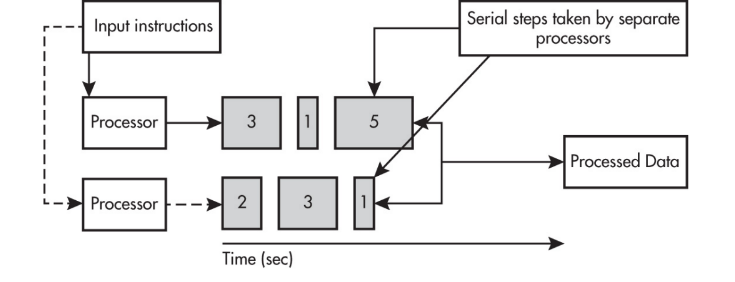
Parallel computing is when multiple processors (or multiple computers) work on different parts of a task at the same time. Parallel computing often contains both:
- a sequential portion that must happen in order
- a parallel portion where independent tasks happen simultaneously
A crucial performance idea is that a parallel computing solution takes as long as the longest of the tasks done in parallel. More generally, a parallel computing solution takes as long as its sequential tasks plus the longest of its parallel tasks, because the parallel section can’t finish until the slowest parallel subtask finishes.
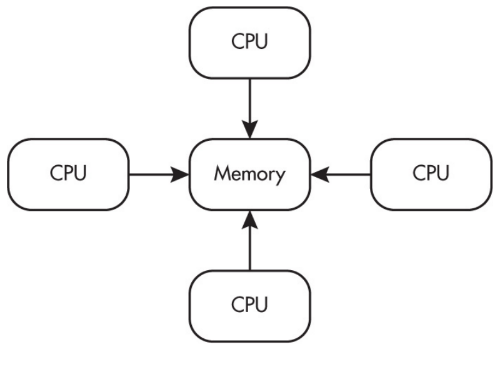
Parallel computing is used for real-world simulations and modeling. In many parallel systems, multiple processors operate independently but share the same memory resources (a common model within one computer).
Distributed computing
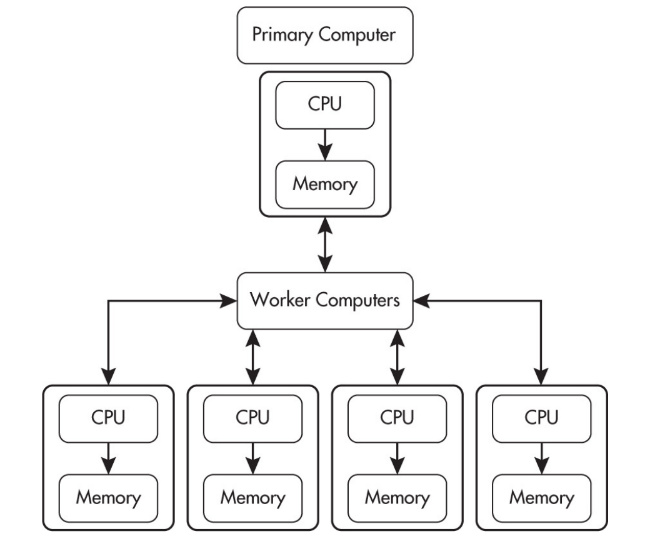
Distributed computing means computation and data storage are spread across multiple machines connected over a network. One major reason to distribute work is that it can allow problems to be solved that could not be solved on a single computer because of processing time or storage needs.
A helpful comparison (commonly tested conceptually):
- Parallel computing often means one computer with multiple processors working at the same time.
- Distributed computing uses multiple computing devices to process tasks.
Distributed systems can improve:
- scalability: handle more users by adding more machines
- fault tolerance: if one machine fails, others may keep the service running
- performance: work can be shared
A misconception is that “distributed” always means “faster.” Distributed systems add overhead: coordinating machines, sending messages, handling partial failures, and keeping data consistent. Sometimes distribution is chosen for reliability or capacity rather than raw speed.
Redundancy
Redundancy means having extra components available in case something fails: extra servers, extra network links, backups, replicated data. Redundancy supports fault tolerance, but it introduces design questions such as keeping copies consistent, handling disagreement between copies, and failover speed.
Cloud computing (conceptual)
Cloud computing refers to delivering computing services (servers, storage, databases, software) over a network, often the Internet. Under the hood it relies on distributed systems, virtualization, and massive data centers. Organizations can scale resources up/down without buying physical hardware, deploy services globally, and improve reliability with geographic redundancy.
Example: Why a big website doesn’t run on one server
If a major site used one server, it would be a single point of failure and could be overwhelmed by traffic. Large services use many servers and load balancing so users are spread across machines and failures are less likely to take the whole service down.
Exam Focus
- Typical question patterns:
- Explain benefits of scalability and distributed computing (handling growth, redundancy, fault tolerance).
- Compare parallel vs distributed computing using scenarios (one machine/many processors vs many devices).
- Reason about why parallel speedups are limited by the longest parallel task and any sequential portion.
- Common mistakes:
- Assuming distributed systems are always faster than single-machine solutions.
- Confusing parallel computing (simultaneous work) with redundancy (backup copies).
- Ignoring coordination/consistency overhead in distributed designs.
Reasoning About Network Scenarios: Putting the Concepts Together
AP CSP questions often test whether you can apply these ideas to real scenarios rather than recite definitions. A reliable approach is to trace what must happen, what could fail, and what tradeoffs are being made.
A structured way to analyze a scenario
When you’re given a network situation (a slow app, a failed connection, a security concern), break it down:
- What is being sent? (bits, packets)
- How does it find the destination? (DNS to get IP; routing via routers)
- What rules manage the communication? (protocols: IP, TCP/UDP, HTTP/HTTPS)
- What could affect performance? (latency, bandwidth, congestion, packet loss)
- What could affect security/privacy? (encryption, authentication, phishing, MITM risk)
- How does the system handle failures? (redundancy, rerouting, retries; and recognizing causes like hardware/operational/disaster/cyberattack)
Example 1: “The Internet works, but websites won’t load.”
A common reasoning path:
- If you can connect to Wi‑Fi, your local link might be fine.
- If nothing loads by name, DNS could be failing.
- If some apps work but others don’t, it may depend on cached DNS records or different services.
This pushes you to separate: local connection, naming (DNS), and routing.
Example 2: “A file download is slow, but video streaming is okay.”
Possible explanations:
- Streaming apps buffer and adapt quality; they can tolerate variability.
- File downloads often aim for perfect delivery; packet loss can trigger retransmissions that reduce throughput.
- Congestion or latency can affect many small transfers differently than continuous streaming.
Example 3: “Why does packet switching increase fault tolerance?”
A strong explanation mentions:
- data is split into independent packets
- routers can forward packets along alternate paths
- if one path fails, not all communication stops
Also include the realistic tradeoff: packets may arrive out of order or with delay.
Exam Focus
- Typical question patterns:
- Multi-step explanations (DNS + routing + protocols) for how a request reaches a server.
- Compare two designs using tradeoffs (TCP vs UDP reliability vs speed; centralized vs distributed).
- Reason about failure modes (link failure, DNS outage, congestion, cyberattacks) and likely symptoms.
- Common mistakes:
- Giving one-word answers (“DNS”) without explaining the chain of events.
- Assuming performance issues have a single cause rather than multiple interacting factors.
- Mixing up roles: DNS finds IPs; routers route; TCP may ensure reliability; HTTPS encrypts content in transit.