Mastering One-Dimensional Arrays in Java
Ethical and Social Implications of Data
Before diving into the syntax of coding arrays, it is crucial to understand the impact of the data structures we build. In AP Computer Science A, the concept of Data Collections is not just about storage—it is about representation.
Bias in Data Sets
Algorithms are often viewed as objective, but they process data collected by humans. If the input data (the dataset) is biased, the output of the array-processing algorithm will also be biased.
- Selection Bias: Developing an algorithm to predict credit scores using an array of data collected only from a specific demographic can lead to discriminatory lending practices.
- Incomplete Data: If an array stores user inputs but fails to account for certain accent characters or naming conventions, the software may exclude specific cultural groups.
Privacy and PII
When managing large arrays of user data, you are often handling Personally Identifiable Information (PII). Efficient traversing algorithms allow programs to aggregate and correlate data rapidly, potentially reducing user anonymity. As a developer, you must consider ensuring that data stored in arrays is secured and anonymized when possible.
Introduction to Using Data Sets
In previous units, you likely used individual variables to store data (e.g., int score1; int score2;). However, real-world applications require processing vast amounts of related data—thousands of student grades, daily temperature readings, or pixels in an image.
A Data Set is a collection of related values. In Java, the simplest way to handle a data set is an Array.
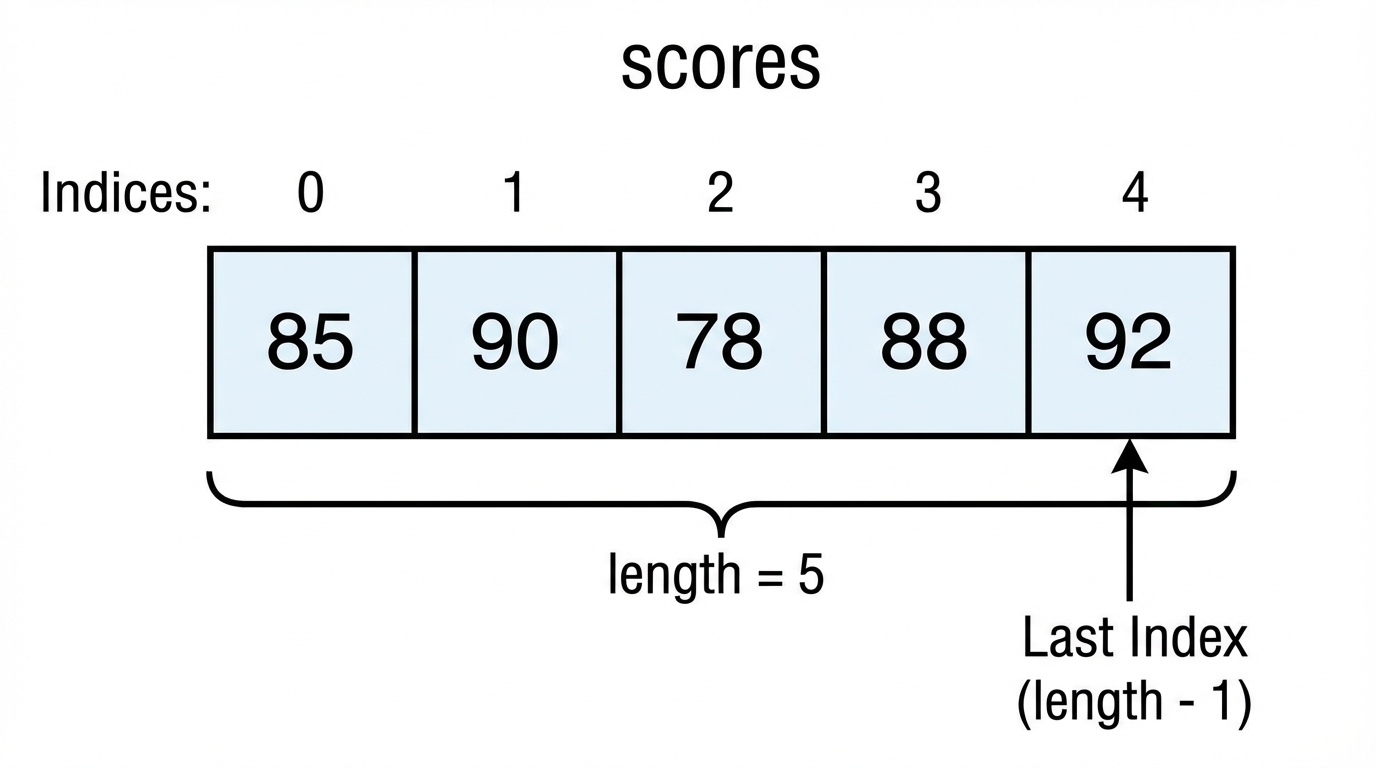
Concept: Think of an array as a row of lockers.
- The entire row has one name.
- Each locker has a unique number (index).
- Every locker must contain the same type of item (e.g., only integers).
Array Creation and Access
An Array is a fixed-size data structure used to store multiple values of the same type under a single variable name.
Declaring and Constructing Arrays
There are two main ways to create an array in Java:
Using the
newkeyword (Default Values):
Use this when you know the size but not the specific values yet. Elements are initialized to their default (0 forint,nullfor objects,falseforboolean).// Syntax: type[] name = new type[size]; int[] highScores = new int[5]; // Creates an array of size 5 filled with 0sUsing an Initializer List:
Use this when you know the values immediately.// Syntax: type[] name = {value1, value2, ...}; String[] names = {"Alice", "Bob", "Charlie"};
Accessing Elements
Array indices are zero-based. The first element is at index 0, and the last element is at index length - 1.
- Access:
arrayName[index] - Modify:
arrayName[index] = newValue; - Size:
arrayName.length(Note:lengthis a public final field, not a method, so there are no parentheses()).
int[] nums = {10, 20, 30};
System.out.println(nums[0]); // Prints 10
nums[1] = 50;                // Changes 20 to 50
// nums[3] = 99;             // ERROR: ArrayIndexOutOfBoundsException
Traversing Arrays
Traversing means visiting each element in the array, usually to perform an operation (print, sum, search). There are two standard approaches in Java.
1. Standard for Loop
Use this when you need the index (e.g., to modify elements or access multiple indices simultaneously).
int[] values = {5, 10, 15, 20};

for (int i = 0; i < values.length; i++) {
    values[i] = values[i] * 2; // Can modify the array
    System.out.print(values[i] + " ");
}
// Output: 10 20 30 40
2. Enhanced for-each Loop
Use this when you only need to read the values. It is cleaner but less flexible. You cannot use this to modify the array or find the index of an element.
double[] prices = {2.50, 3.00, 4.50};

for (double p : prices) {
    System.out.println(p); // 'p' is a temporary copy of the element
}
| Feature | Standard for Loop | Enhanced for Loop |
|---|---|---|
| Access Index | Yes | No |
| Modify Array | Yes | No |
| Partial Traversal | Yes (can start/stop anywhere) | No (must do all) |
| Syntax Complexity | Higher | Lower |
Developing Algorithms Using Arrays
The AP Computer Science A exam frequently checks your ability to implement standard algorithms.
Accumulator Algorithm (Sum/Average)
To verify or calculate statistics, traverse the array and add values to a variable defined outside the loop.
int[] data = {2, 4, 6, 8};
int sum = 0;

for (int num : data) {
    sum += num;
}
double average = (double) sum / data.length;
Finding Minimum or Maximum
Initialize a max variable to the first element (or min), then compare every subsequent element against it.
int[] arr = {5, 9, 1, 3};
int maxVal = arr[0]; // Assume first is max

for (int i = 1; i < arr.length; i++) {
    if (arr[i] > maxVal) {
        maxVal = arr[i];
    }
}
Linear Search
Linear search checks elements one by one until the target is found or the end of the array is reached.
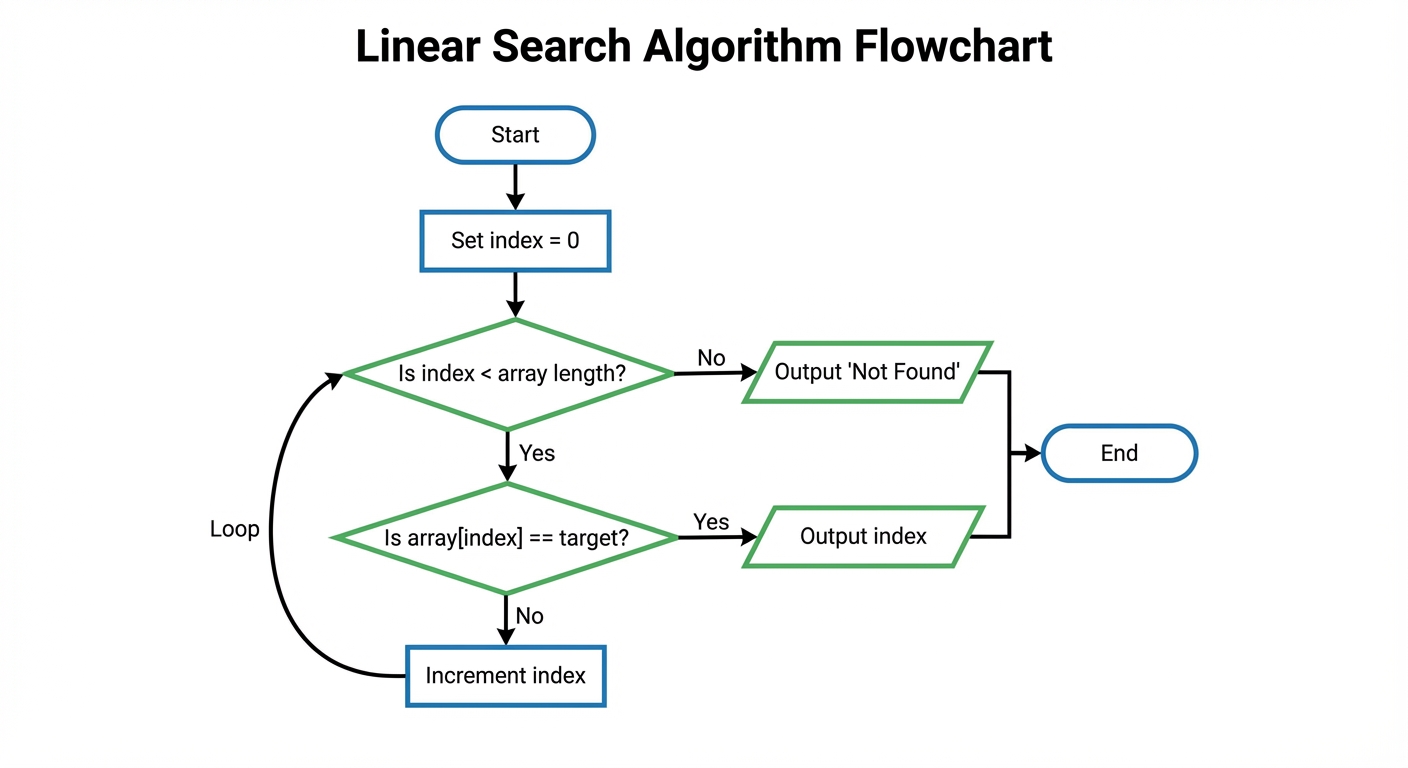
public int findIndex(int[] arr, int target) {
    for (int i = 0; i < arr.length; i++) {
        if (arr[i] == target) {
            return i; // Found it!
        }
    }
    return -1; // Target not in array
}
Using Text Files
While Arrays store data in memory (RAM), real-world applications often need to read datasets stored permanently on a disk (Text Files). In AP CSA, you often use the Scanner class to read file input into an array.
Note: On the AP Exam, file reading boilerplate code is often provided, but you must understand the logic.
Reading Data Flow
- Open File: Create a
Fileobject and aScanner. - Read Header: Often, the first line of a file tells you how many items are in the set (the array size).
- Fill Array: Loop through the file tokens and assign them to array indices.
import java.util.Scanner;
import java.io.File;
import java.io.FileNotFoundException;

// Conceptual Example
public void readNumbers() throws FileNotFoundException {
    Scanner fileIn = new Scanner(new File("data.txt"));

    // Assume first integer in file is the count of numbers
    int size = fileIn.nextInt();
    int[] numbers = new int[size];

    for (int i = 0; i < size; i++) {
        if (fileIn.hasNextInt()) {
            numbers[i] = fileIn.nextInt();
        }
    }
}
Common Mistakes & Pitfalls
Off-by-One Errors:
- Mistake: Looping with
i <= arr.length. - Correction: Always use
i < arr.length. The last valid index islength - 1.arr[length]causes an exception.
- Mistake: Looping with
Confusing Length Syntax:
- Mistake: Writing
arr.length(). - Correction: Arrays use the field
length(no parentheses). Strings use the methodlength(). - Mnemonic: Arrays are difficult; they don't give you a method, just a field!
- Mistake: Writing
Modifying in For-Each:
- Mistake: Trying to utilize an enhanced loop to update array values.
- Correction:
for (int x : arr) { x = 0; }only changes the local variablex, not the actual slot inarr. Use a standardforloop if you need to write data.
Uninitialized Arrays:
- Mistake: Accessing an array reference that is
null. - Correction: Always ensure
arr = new type[size]is executed before accessingarr[0].
- Mistake: Accessing an array reference that is