Foundations of Java: Variables and Primitive Types
Introduction to Java Programming
Why Programming? Why Java?
At its core, programming is the art of problem-solving. It involves analyzing a complex issue, breaking it down into manageable components, and providing instructions that a computer can execute to solve that problem.
The Java Ecosystem
Java is one of the most widely used languages in the world, particularly in corporate environments and education. For AP Computer Science A students, Java is the medium, but Object-Oriented Programming (OOP) is the message.
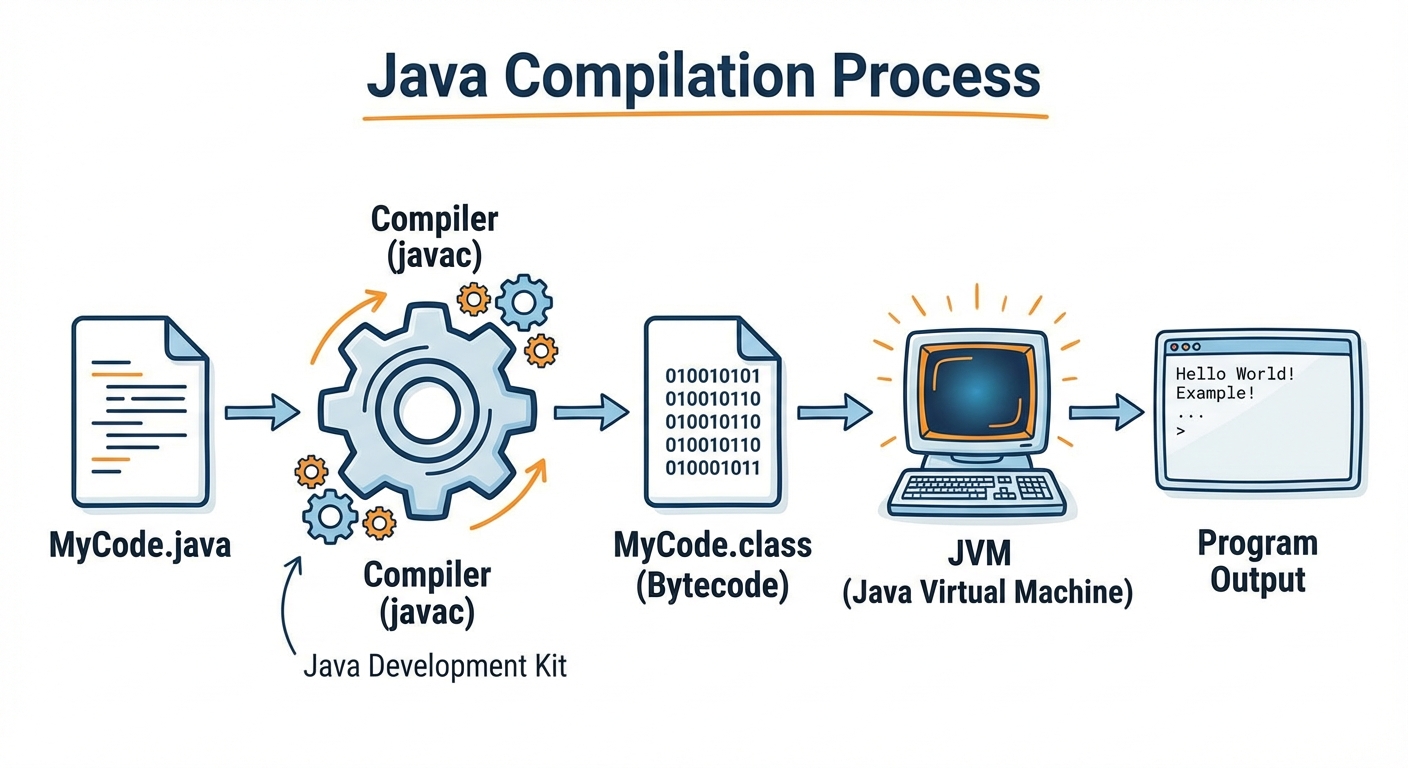
- Platform Independence: Java boasts the motto "Write Once, Run Anywhere." Code written in Java is compiled into bytecode, which is then interpreted by the Java Virtual Machine (JVM). This means the same code can run on Windows, Mac, or Linux without modification.
- Strongly Typed: Java requires you to explicitly declare what type of data (number, text, true/false) a variable will hold. This helps catch errors early.
The Anatomy of main
Every executable Java application requires a main method as the entry point. You will memorize this signature quickly:
public class HelloWorld {
    public static void main(String[] args) {
        System.out.println("Hello, World!");
    }
}
Variables and Primitive Data Types
A variable is a named storage location in the computer's memory that holds a data value. Think of a variable as a labeled box; the type of box determines what you can put inside it.
Comparison of Types
While Java has eight primitive types, the AP Computer Science A exam focuses almost exclusively on three:
| Type | Description | Size | Example | Range Definition |
|---|---|---|---|---|
int | Integer (whole numbers) | 32-bit | 42, -7 | $-2^{31}$ to $2^{31}-1$ |
double | Decimal numbers (floating point) | 64-bit | 3.14, -0.05 | $\approx \pm 1.8 \times 10^{308}$ |
boolean | Logical truth values | 1-bit* | true, false | N/A |
(Note: Actual memory usage for boolean is JVM dependent, but it represents 1 bit of information.)
Declaration and Initialization
To use a variable, you must declare its type and name. You initialize it by assigning it a value.
int totalScore;         // Declaration
totalScore = 95;        // Initialization

double average = 88.5;  // Declaration & Initialization combined
boolean isPassing = true;
Key Rule: Java is "case-sensitive." totalScore and TotalScore are different variables. By convention, variables use camelCase (start lowercase, subsequent words capitalized).

Expressions and Assignment Statements
An expression is a combination of variables, literals, and operators that evaluates to a single value. An assignment statement stores the result of an expression into a variable.
The Assignment Operator (=)
In math, $=$ suggests equality. In Java, = is an action. It means "calculate the value on the right, and store it in the variable on the left."
Arithmetic Operators
+(Addition):5 + 2evaluates to7-(Subtraction):5 - 2evaluates to3*(Multiplication):5 * 2evaluates to10/(Division): CRITICAL CONCEPT%(Modulus/Remainder):5 % 2evaluates to1
Special Case: Integer Division
When you divide two integers in Java, the result is truncated (the decimal part is thrown away, not rounded).
int a = 5;
int b = 2;
// Mathematical result is 2.5
// Java int result is 2
System.out.println(a / b);
If at least one operand is a double, standard decimal division occurs:
System.out.println(5.0 / 2); // Prints 2.5
System.out.println(5 / 2.0); // Prints 2.5
The Modulo Operator (%)
Modulo returns the remainder of division. It is incredibly useful for:
- Even/Odd checks: If
x % 2 == 0, the number is even. - Time calculations:
minutes % 60gives remaining minutes after converting to hours. - Extracting digits:
123 % 10evaluates to3(the last digit).
Compound Assignment Operators
Programmers love efficiency. Compound operators perform an operation and reassignment in one step.
| Operator | Example | Equivalent To |
|---|---|---|
+= | x += 5; | x = x + 5; |
-= | y -= 2; | y = y - 2; |
*= | z *= 3; | z = z * 3; |
/= | w /= 4; | w = w / 4; |
%= | m %= 2; | m = m % 2; |
Increment and Decrement
These are unary operators (they work on a single operand).
x++incrementsxby 1.x--decrementsxby 1.
Note: On the AP exam, avoid using ++ inside complex expressions (like int y = x++ + 5). Just use them on their own line to increment variables.
Casting and Ranges of Variables
Variables define the range of values allowed. Because computers have finite memory, these ranges are limited.
Integer Limits
The int type is stored in 32 bits using Two's Complement notation.
- Minimum value:
Integer.MIN_VALUE($-2^{31}$ or approx -2.14 billion) - Maximum value:
Integer.MAX_VALUE($2^{31}-1$ or approx +2.14 billion)
Integer Overflow: If you add 1 to Integer.MAX_VALUE, the computer runs out of bits and wraps around to Integer.MIN_VALUE. This is a Logic Error.
Casting (Type Conversion)
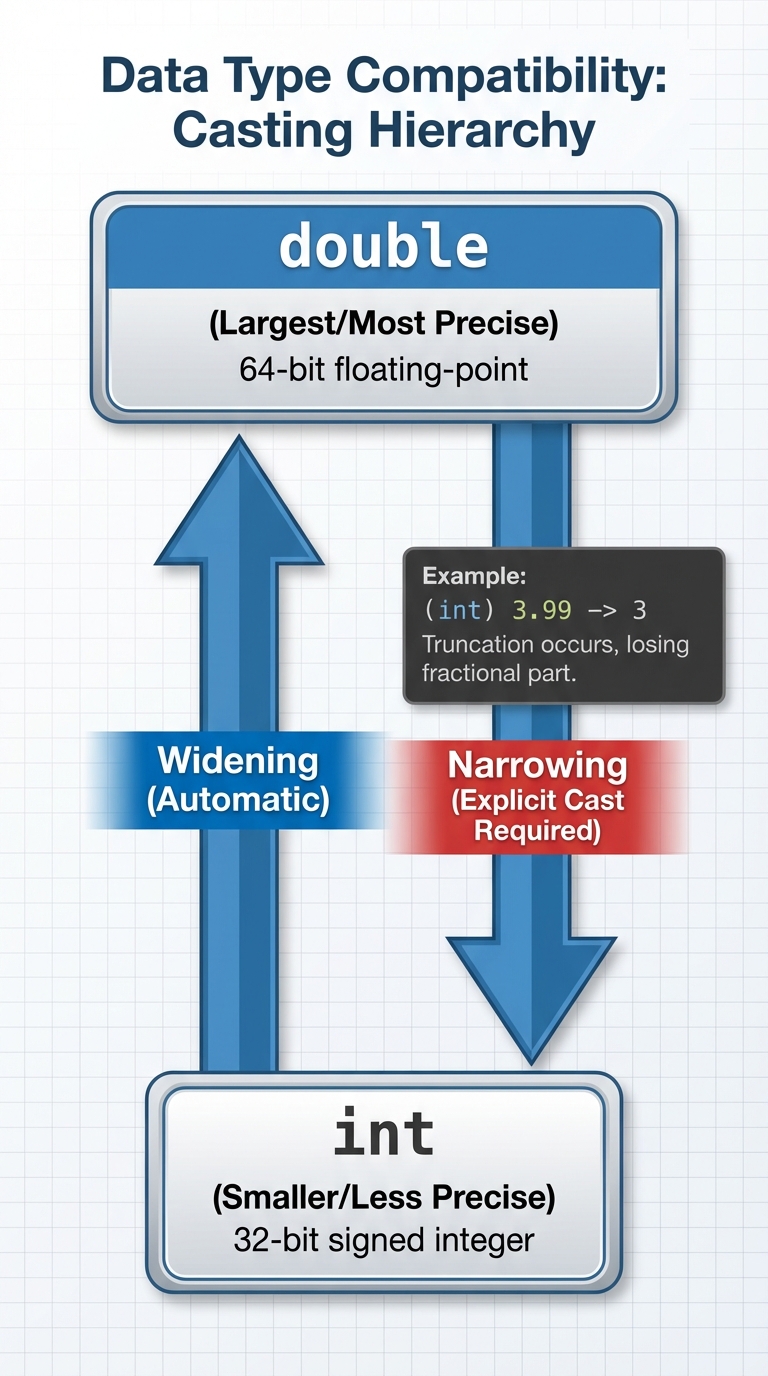
Sometimes you need to treat an int as a double or vice versa. This is called casting.
1. Widening Conversion (Implicit)
When moving from a smaller/less precise type to a larger one, Java does it automatically.
int num = 10;
double decimalNum = num; // Automatically becomes 10.0
2. Narrowing Conversion (Explicit)
When moving from a double to an int, you risk losing data (the decimal). Java forces you to "sign off" on this by using a cast operator (type).
double pi = 3.14159;
int p = (int) pi; // Explicitly casts to int. p becomes 3.
Important: Casting a double to an int does not round; it truncates.
Rounding with Casting
To round a positive double x to the nearest integer, add 0.5 and cast to int.
- If $x = 4.1$: $4.1 + 0.5 = 4.6 \rightarrow (int) 4.6 \rightarrow 4$
- If $x = 4.9$: $4.9 + 0.5 = 5.4 \rightarrow (int) 5.4 \rightarrow 5$
Common Mistakes & Pitfalls
Integer Division Trap:
- Mistake:
double result = 1 / 4; - Result:
0.0. - Why: Both 1 and 4 are integers. The division happens first ($1/4 = 0$), and then the result is promoted to a double ($0.0$).
- Fix:
double result = 1.0 / 4;
- Mistake:
Assignment vs. Equality:
- Mistake:
if (x = 5) ... - Why:
=assigns value.==compares value.
- Mistake:
Uninitialized Variables:
- Mistake: Declaring
int count;and trying to printcountbefore setting it to 0. - Result: Compiler error (Java acts to prevent this).
- Mistake: Declaring
Casting Order of Operations:
- Mistake:
(int) 5.5 + 4.5 - Result: Evaluation is
((int) 5.5) + 4.5$\rightarrow$5 + 4.5$\rightarrow$9.5. - Fix: If you wanted the whole sum as an int, use parentheses:
(int) (5.5 + 4.5).
- Mistake: