Mastering Java Built-In Classes: Methods, Libraries, and Documentation
Understanding APIs and Libraries
Before diving into specific classes, it is crucial to understand where these tools come from. Java is not just a language syntax; it comes with a massive set of pre-written code known as the Java Class Library.
Application Programming Interface (API)
An API (Application Programming Interface) allows you to interface with existing code. In Java, this serves as a blueprint or manual for how to use the pre-built classes and methods provided by the language.
- Libraries: Collections of related classes. For example, the
java.utillibrary contains helpful utilities likeScanner. - Packages: Libraries are organized into packages.
- Essential Note: The package
java.langis capable of being used without an explicit import statement. This is why you can useString,System, andMathclasses immediately in your code.
- Essential Note: The package
Documentation With Comments
Writing code is only half the battle; documenting it for humans is the other half. Comments are ignored by the compiler but are vital for code maintenance.
Types of Comments
Single-Line Comments:
- Start with
//. - Used for short explanations inside methods.
int count = 0; // Initialize counter- Start with
Multi-Line (Block) Comments:
- Enclosed between
/*and*/. - Used to temporarily disable chunks of code or write longer descriptions.
/* This is a block comment. It spans multiple lines. */- Enclosed between
Javadoc Comments:
- Enclosed between
/**and*/. - Used to generate external HTML documentation (the API).
- Typically placed above class definitions and method headers.
- Uses tags like
@param(to describe parameters) and@return(to describe the return value).
/** * Calculates the area of a circle. * @param radius The radius of the circle * @return The calculated area as a double */ public double calculateArea(double radius) { ... }- Enclosed between
The String Class
A String is a sequence of characters. Unlike int or double, which are primitive types, String is a Reference Type (an object). However, it is so fundamental to Java that it behaves slightly differently from other objects.
Creating Strings
There are two main ways to create a String:
- String Literal (Recommended):
java String s1 = "Hello"; - New Keyword:
java
String s2 = new String("Hello");
Immutability: Strings in Java are immutable. This means once a String object is created, it cannot be changed. When you "modify" a string (like concatenation), Java actually creates a completely new String object in memory and updates the reference.
Indices and Length
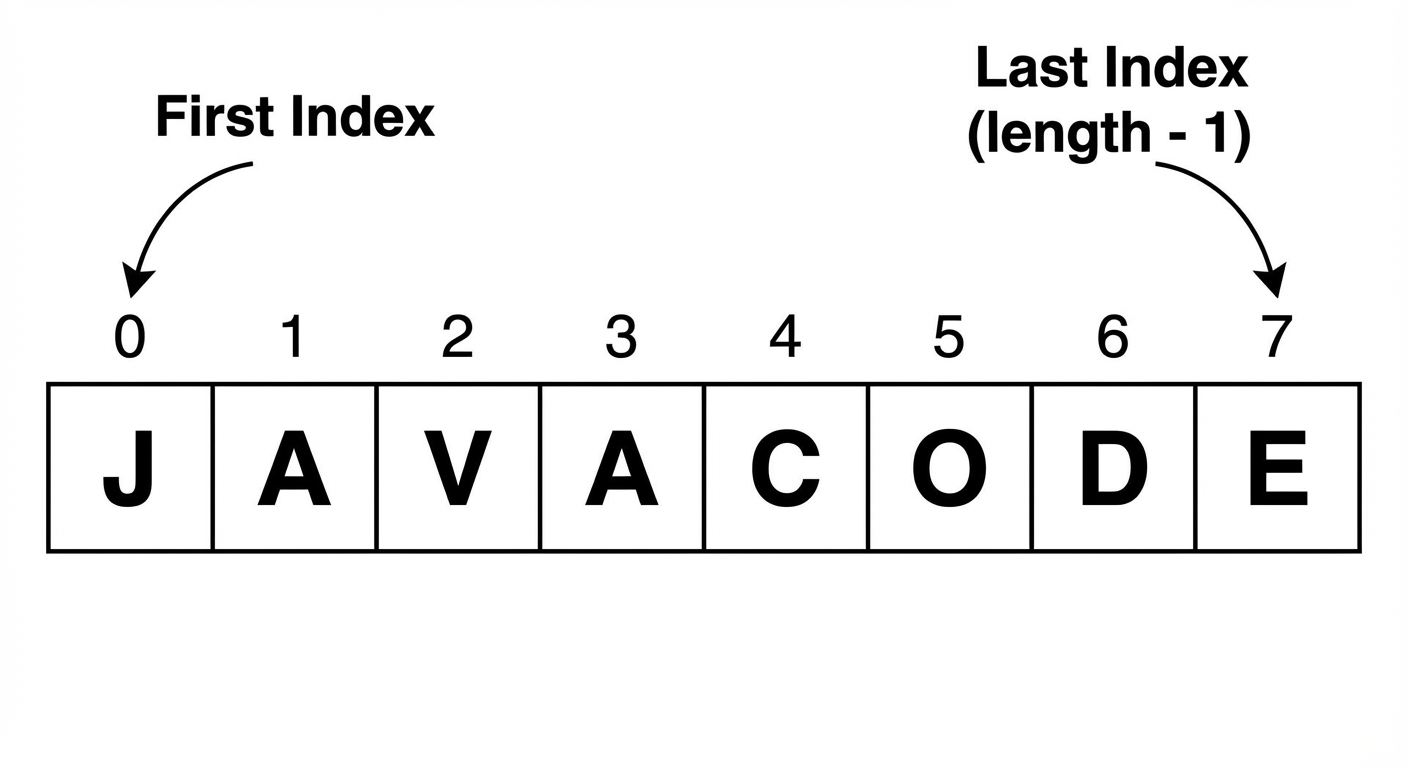
Strings are zero-indexed. The first character is at index 0, and the last character is at index length() - 1.
Essential String Methods
The AP Computer Science A exam specifically tests the following methods. You must memorize their signatures and return types.
| Method Signature | Description | Returns |
|---|---|---|
int length() | Returns the number of characters in the string. | int |
String substring(int from) | Returns the characters from index from to the end. | String |
String substring(int from, int to) | Returns characters starting at from up to (but excluding) to. | String |
int indexOf(String str) | Returns the index of the first occurrence of str. Returns -1 if not found. | int |
boolean equals(String other) | Checks if two strings have the exact same characters. | boolean |
int compareTo(String other) | Compares strings lexicographically (dictionary order). | int |
Method Breakdown and Examples
1. Concatenation
Joining strings using the + operator or +=. If you add a primitive (like a number) to a String, the primitive is converted to a String automatically.
String a = "AP";
String b = "CS";
String c = a + " " + b + " A"; // "AP CS A"
2. Substring Nuances
- Rule: The length of the string returned by
substring(a, b)is alwaysb - a. - Mistake Warning:
substring(a, b)does not include the character at indexb.
String text = "Computer";
// Indices: C(0) o(1) m(2) p(3) u(4) t(5) e(6) r(7)

System.out.println(text.substring(3));    // "puter"
System.out.println(text.substring(0, 3)); // "Com" (indices 0, 1, 2)
3. Comparison Details
equals(): Always use this for content comparison. Do not use==.compareTo(): used for sorting.- Returns 0: Strings are identical.
- Returns Negative: The calling string comes before the parameter alphabetically.
- Returns Positive: The calling string comes after the parameter alphabetically.
String s1 = "Apple";
String s2 = "Banana";
System.out.println(s1.compareTo(s2)); // Negative number (A is before B)
Escape Sequences
Special characters preceded by a backslash \:
\": Prints a double quote.\\: Prints a backslash.\n: New line.
Using the Math Class
The Math class provides basic numeric operations.
Static Methods
All methods in the Math class are static. This means you do not create an object of type Math (e.g., new Math() is invalid). Instead, you call the methods directly on the class name.
Syntax: Math.methodName(parameters)
Key Math Methods (AP CSA Subset)
| Method | Description | Return Type |
|---|---|---|
Math.abs(x) | Returns the absolute value of x. Overloaded for int and double. | int or double |
Math.pow(base, exp) | Returns base raised to the power of exp. | double |
Math.sqrt(x) | Returns the square root of x. | double |
Math.random() | Returns a random number $r$ where $0.0 \le r < 1.0$. | double |
Generating Random Integers
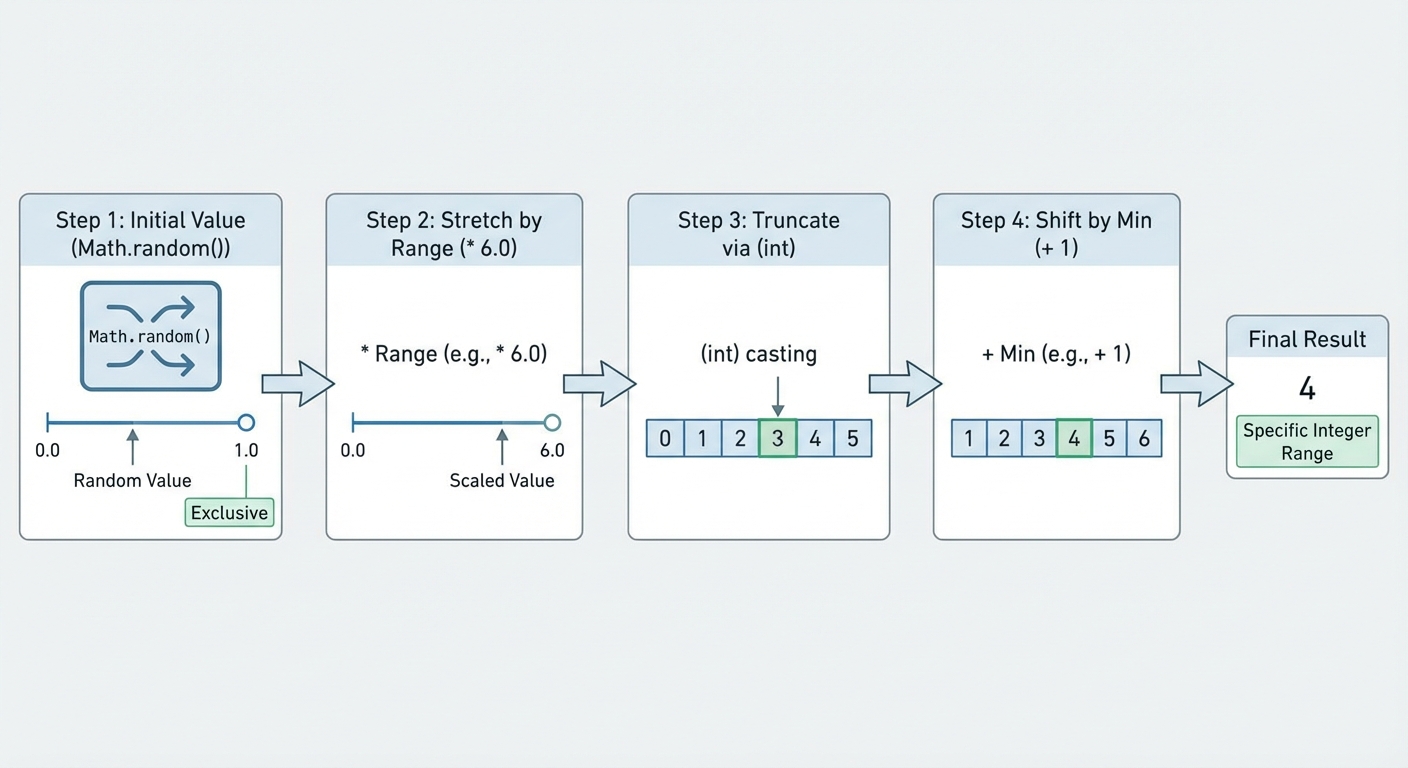
Since Math.random() returns a double between 0.0 (inclusive) and 1.0 (exclusive), we often need to manipulate it to get random integers (like rolling a die).
Formula:
Where:
- range = (max - min) + 1
- min = the starting number
Example: Rolling a Die (1-6)
- Min = 1, Max = 6.
- Range = (6 - 1) + 1 = 7… Wait! Range is typically Max - Min + 1.
- Correction: Range size is 6. (1, 2, 3, 4, 5, 6 is 6 numbers).
- Calculation:
(6 - 1) + 1 = 6.
- Multiply:
Math.random() * 6$\rightarrow$ [0.0, 5.999…] - Cast to int:
(int)(...)$\rightarrow$ {0, 1, 2, 3, 4, 5} - Add Min:
+ 1$\rightarrow$ {1, 2, 3, 4, 5, 6}
int dieRoll = (int)(Math.random() * 6) + 1;
Common Mistakes & Pitfalls
1. Comparing Strings with ==
- Wrong:
if (s1 == "Hello")checks ifs1refers to the same memory address as the literal. - Right:
if (s1.equals("Hello"))checks the actual characters inside.
2. String Index Out of Bounds
Accessing an index that doesn't exist throws a StringIndexOutOfBoundsException.
- Remember: The last valid index is
length() - 1. str.substring(0, str.length())is valid (returns the whole string).str.substring(0, str.length() + 1)will crash.
3. Math.random() Parentheses Errors
Casting happens before multiplication due to order of operations.
- Wrong:
(int)Math.random() * 10. This casts the random decimal (0.something) to integer 0 immediately, then multiplies 0 * 10. Result is always 0. - Right:
(int)(Math.random() * 10). Parentheses ensure multiplication happens before casting.
4. Integer Division in Math Functions
- Be aware that while
Math.powreturns a double, if you pass integers, it still returns a double (e.g.,8.0). If you try to store that in anintvariable without casting, you will get a compilation error.java int x = Math.pow(2, 3); // ERROR: Type mismatch: cannot convert from double to int int x = (int)Math.pow(2, 3); // Correct