Mastering 2D Arrays in Java
2D Arrays in AP Computer Science A
Structure and Creation of 2D Arrays
In Java, a 2D Array is essentially an "array of arrays." While we often visualize them as grids or tables with rows and columns, strictly speaking, they are one-dimensional arrays where each element is a reference to another one-dimensional array.
Declaring and Initializing
There are two primary ways to create a 2D array:
1. Using the new keyword (Standard Declaration)
You must specify the number of rows and columns. The dimensions are enclosed in brackets.
// Syntax: type[][] name = new type[rows][cols];
int[][] matrix = new int[3][4];
- This creates a grid with 3 rows and 4 columns.
- Elements are initialized to default values (
0forint,0.0fordouble,nullfor objects,falseforboolean).
2. Using an Initializer List
If you know the values beforehand, you can populate the array immediately.
int[][] scores = {
    {90, 85, 78},  // Row 0
    {88, 92, 100}  // Row 1
};
Dimensions and Layout
It is crucial to understand how Java handles dimensions:
arr.length: Returns the number of rows (the length of the outer array).arr[0].length: Returns the number of columns (the length of the inner array at index 0).
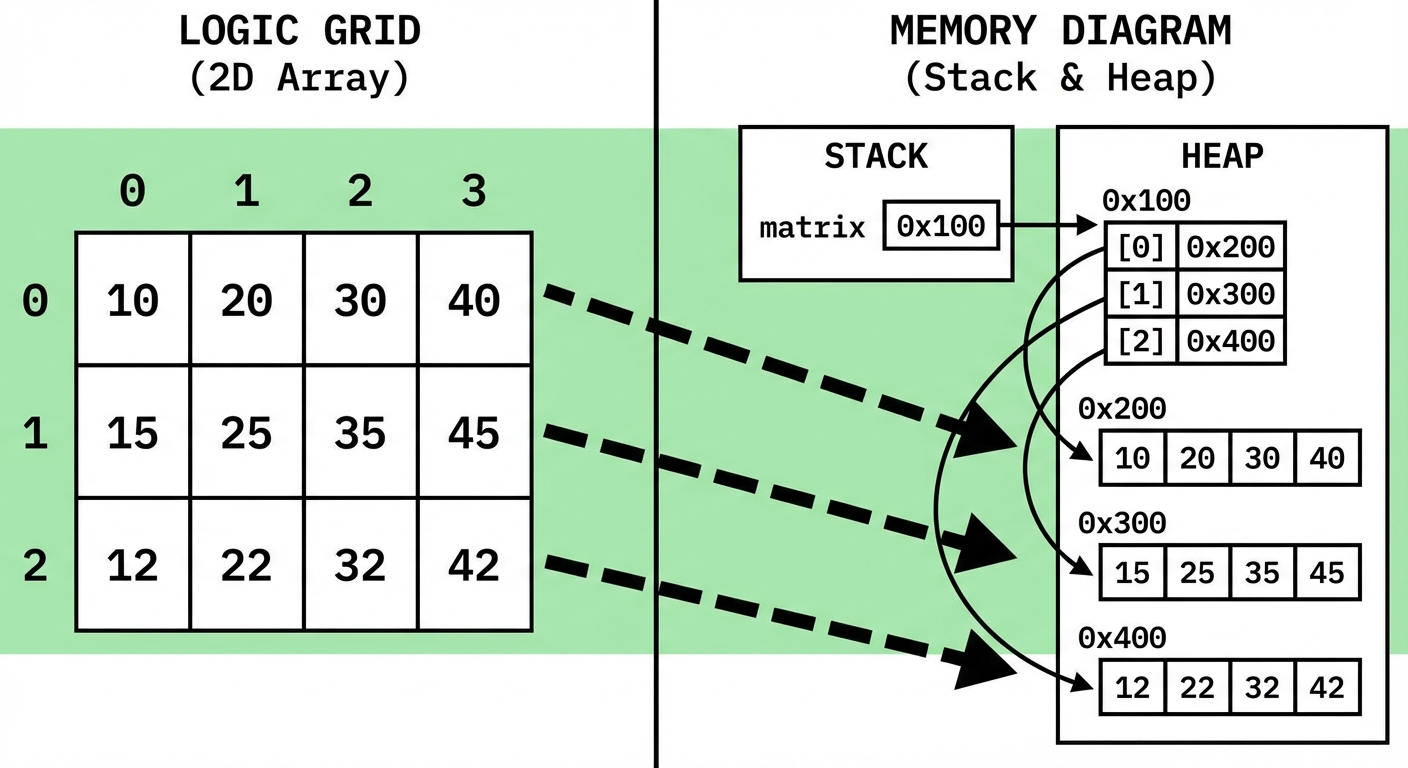
Accessing and Modifying Elements
Elements are accessed using row-major indices: arrayName[row][col].
- Row Index: Shifts vertical position (Top to Bottom), 0-indexed.
- Column Index: Shifts horizontal position (Left to Right), 0-indexed.
Memory Aid: Remember "RC" (like RC Cola). You specify the Row first, then the Column.
String[][] board = new String[3][3];
board[0][0] = "X";      // Top-left corner
board[1][2] = "O";      // Middle row, far right column
String move = board[1][2]; // Retrieving value
Traversing 2D Arrays
To process all elements in a 2D array, we typically use nested loops. The order of the loops determines the direction of the traversal.
1. Row-Major Traversal (Standard)
This is the most common traversal. It processes the grid row by row (left to right, then down to the next row).
- Outer Loop: Iterates through rows (
r). - Inner Loop: Iterates through columns (
c).
// "matrix" is a 2D integer array
for (int r = 0; r < matrix.length; r++) {
    for (int c = 0; c < matrix[0].length; c++) {
        System.out.print(matrix[r][c] + " ");
    }
    System.out.println(); // New line after each row
}
2. Column-Major Traversal
This processes the grid column by column (top to bottom, then move right to the next column). This is useful when calculating column averages or checking for vertical patterns (like in Connect 4).
- Outer Loop: Iterates through columns (
c). - Inner Loop: Iterates through rows (
r).
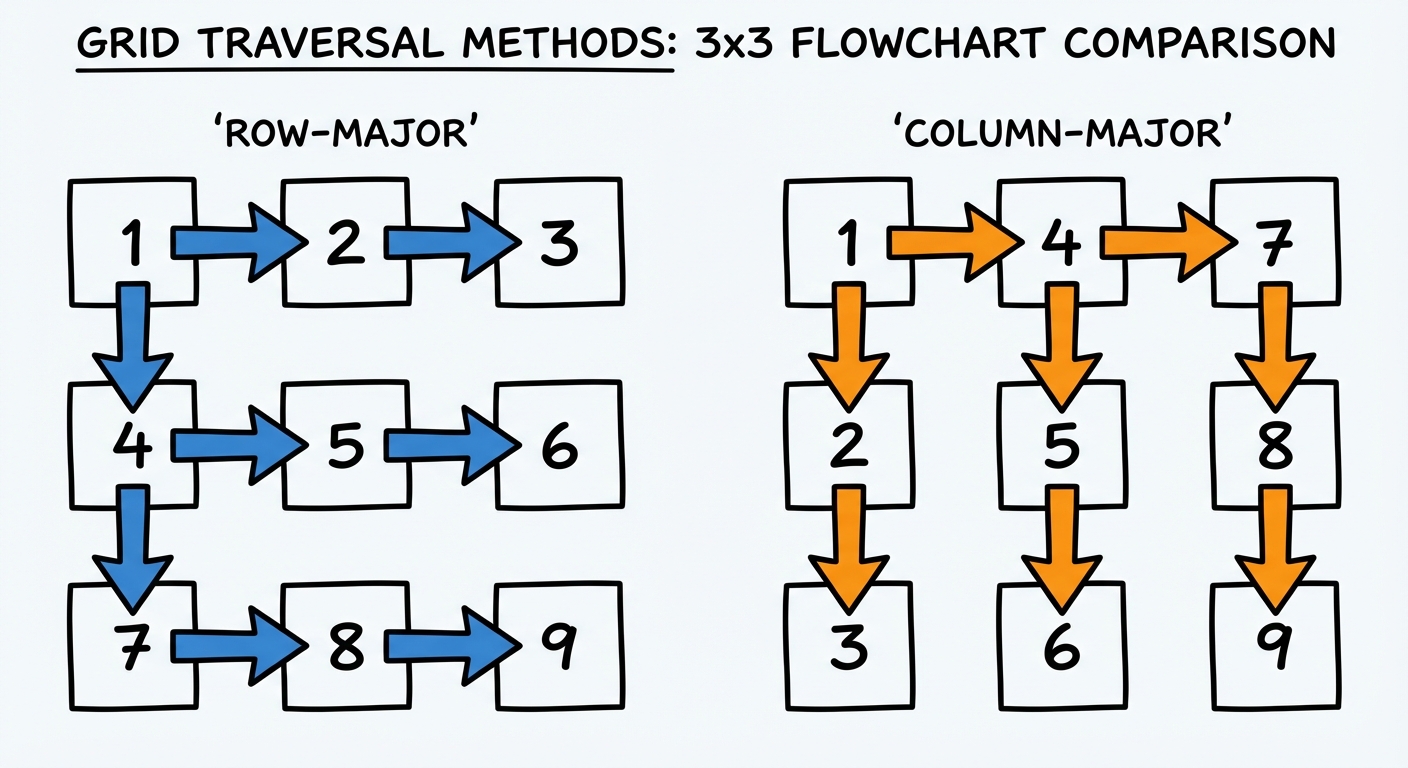
Note the Limit Changes:
// Bounds are swapped in the loops!
for (int c = 0; c < matrix[0].length; c++) {     // Loop through Cols first
    for (int r = 0; r < matrix.length; r++) {    // Loop through Rows second
        System.out.print(matrix[r][c] + " ");
    }
    System.out.println(); // New line after each logical column
}
3. Enhanced For-Loop (For-Each)
The enhanced for-loop is useful for read-only operations where you do not need index positions.
for (int[] row : matrix) {     // 1. Get each row (which is an int[])
    for (int num : row) {      // 2. Iterate through integers in that row
        System.out.print(num + " ");
    }
}
- Limitation: You cannot modify the structure (replace elements) using the enhanced for-loop variable
num, nor can you easily perform column-major traversal this way.
Implementing 2D Array Algorithms
On the AP Exam, you will frequently be asked to apply standard 1D array algorithms to a 2D context.
Linear Search
Finding a specific value in the grid.
public boolean contains(int[][] grid, int target) {
    for (int r = 0; r < grid.length; r++) {
        for (int c = 0; c < grid[0].length; c++) {
            if (grid[r][c] == target) {
                return true; // Found match
            }
        }
    }
    return false; // Traversals complete, validation failed
}
Accessing Neighbors
A common question type involves checking the neighbors of a cell (e.g., Image Processing, Minesweeper, Game of Life). You must be careful not to trigger an ArrayIndexOutOfBoundsException.
Validating Index Boundaries:
Before accessing grid[r-1][c] (the neighbor above), ensure r > 0.
// Only checks the neighbor ABOVE if it exists
if (r > 0 && grid[r-1][c] == someValue) {
    // do logic
}
Traversing Rectangular Areas
Sometimes you only need to process a subset of the array.
// Sum only the top-left 2x2 section
int sum = 0;
for (int r = 0; r < 2; r++) {
    for (int c = 0; c < 2; c++) {
        sum += matrix[r][c];
    }
}
Common Mistakes & Pitfalls
Confusing
lengthcalls:arr.lengthis the number of Rows.arr[0].lengthis the number of Columns.- Mistake: using
arr.lengthfor the inner loop limit.
Swapping [r] and [c]:
arr[row][col]is correct.- Mistake: Writing
arr[x][y]where x is the horizontal coordinate. In 2D arrays, the first index is vertical position ($y$), the second is horizontal position ($x$).
Out of Bounds on Neighbors:
- Trying to access
arr[r+1][c]whenris at the last row (arr.length - 1). - Fix: Always check boundary conditions (
if(r + 1 < arr.length)) before accessing.
- Trying to access
Mutating with For-Each Loops:
- Mistake:
for(int x : row) { x = 0; }. This does not verify the zero inside the actual array; it only changes the local variablex. - Fix: Use standard
forloops with indices for write operations.
- Mistake: