Java Fundamentals: Objects, Methods, and Data Types
Anatomy of Class Structure and Objects
Java is an Object-Oriented Programming (OOP) language. This means the code describes entities (objects) that interact with one another. To understand this unit, you must distinguish between the design of a thing and the thing itself.
Classes vs. Objects
Think of a logical hierarchy:
- Class: The template, blueprint, or cookie cutter. It defines the state (data) and behavior (methods) that objects will have. It is not an object itself; it is the definition of an object.
- Object (Instance): A specific realization of the class. It takes up space in memory. Using the cookie cutter analogy, the Object is the actual cookie.

Declaring and Initializing Objects
To create an object in Java, we typically use the new keyword. The general syntax is:
ClassName variableName = new ClassName(parameters);
Breakdown:
ClassName variableName: Declares a reference variable of a specific type.=: Assignment operator.new: Allocates memory in the heap for a new object.ClassName(parameters): Calls the Constructor to initialize the object.
Example:
Scanner input = new Scanner(System.in);
Rectangle rect = new Rectangle(5, 10);
Primitive Types vs. Reference Types
In AP Computer Science A, understanding how data is stored in memory is critical for predicting code behavior.
Primitive Data Types
Java has 8 primitive types, but the AP exam specifies three you must know inside and out:
int: Integers (whole numbers). e.g.,42,-7,0.- Note: Supports standard arithmetic but integer division (e.g.,
5 / 2) results in truncation (result:2).
- Note: Supports standard arithmetic but integer division (e.g.,
double: Floating-point numbers (decimals). e.g.,3.14,-0.005,5.0.- Note: Stored with limited precision (floating point errors can occur).
boolean: Logical values. Onlytrueorfalse.
Reference Data Types
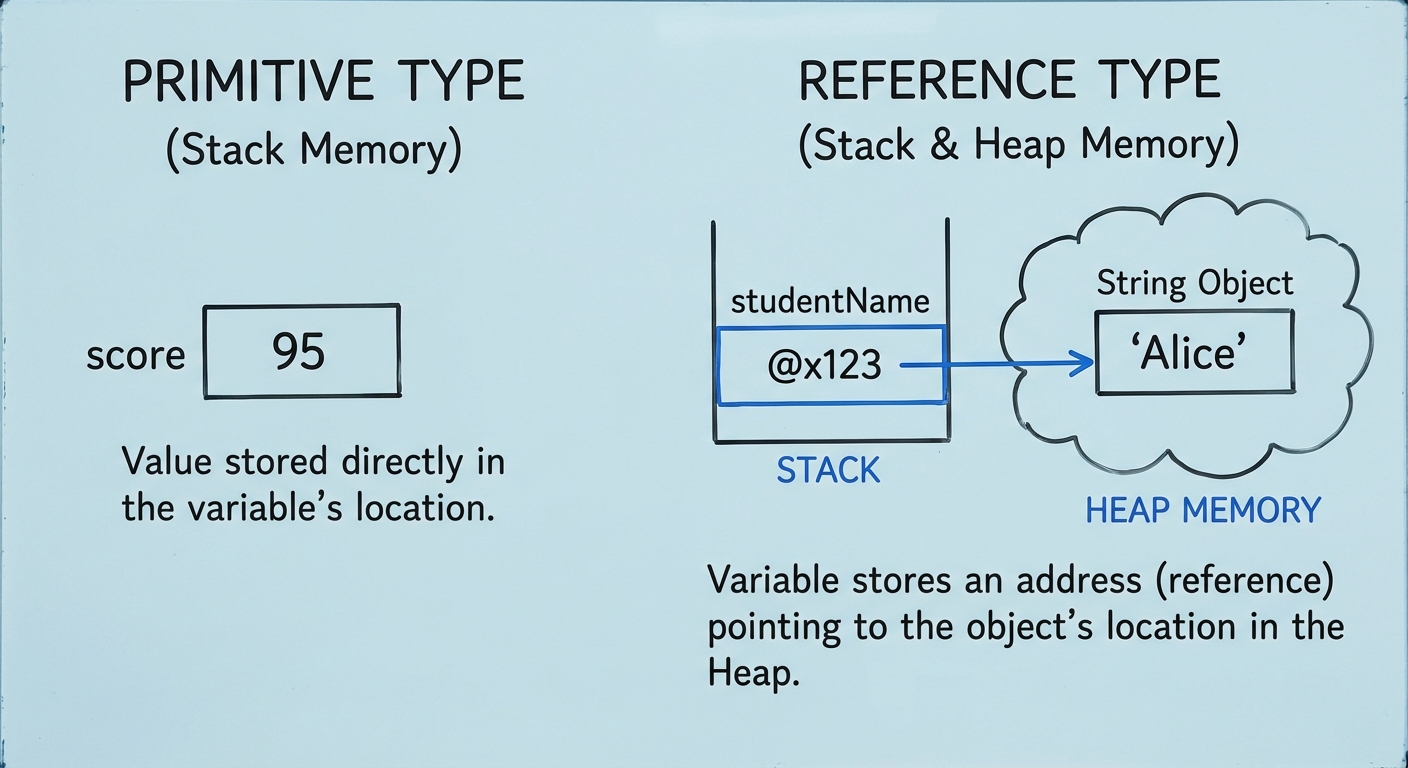
Reference types refer to objects (like String, Scanner, Random, or custom classes).
The Critical Difference:
- Primitives store the actual value in the variable's memory slot.
- References store the memory address (or pointer) where the object acts lives.
Wrapper Classes
Sometimes we need to treat a primitive like an object (e.g., storing an int in an ArrayList). Java provides Wrapper Classes for this purpose.
| Primitive | Wrapper Class | Description |
|---|---|---|
int | Integer | Contains the int value plus methods like Integer.MIN_VALUE and Integer.MAX_VALUE. |
double | Double | Contains the double value plus methods. |
Autoboxing and Unboxing:
Java automatically converts between primitives and their wrappers.
- Autoboxing: Primitive $\rightarrow$ Wrapper (
Integer x = 5;) - Unboxing: Wrapper $\rightarrow$ Primitive (
int y = x;)
Calling Methods
Objects have behaviors defined by methods.
Method Signatures and Return Types
When looking at documentation or a method header, you will see:public returnType methodName(parameterType parameter)
- Void Methods: Do not return a value. They perform an action (like printing to the console).
java System.out.println("Hello"); // Returns nothing, just prints. - Return Methods: Calculate and send back a value. This value must be used (stored, printed, or part of an equation).
java
double x = Math.sqrt(25.0); // Returns 5.0, which is stored in variable x.
Method Overloading
A class can have multiple methods with the same name, provided their parameter lists are different (different types, number of parameters, or order). This is called overloading.
The String Class
Strings are sequences of characters. While they feel like primitives, String is a reference type.
String Objects and Immutability
Strings are immutable. Once created, a String object cannot be changed. Methods that seem to change a String (like toUpperCase()) actually create and return a new String object.
String Concatenation
The + operator concatenates strings. If you add a String and a primitive (like an int), the primitive is converted to a String.
String s = "Score: " + 10; // Result: "Score: 10"
Essential String Methods
You must memorize these methods for the AP exam:
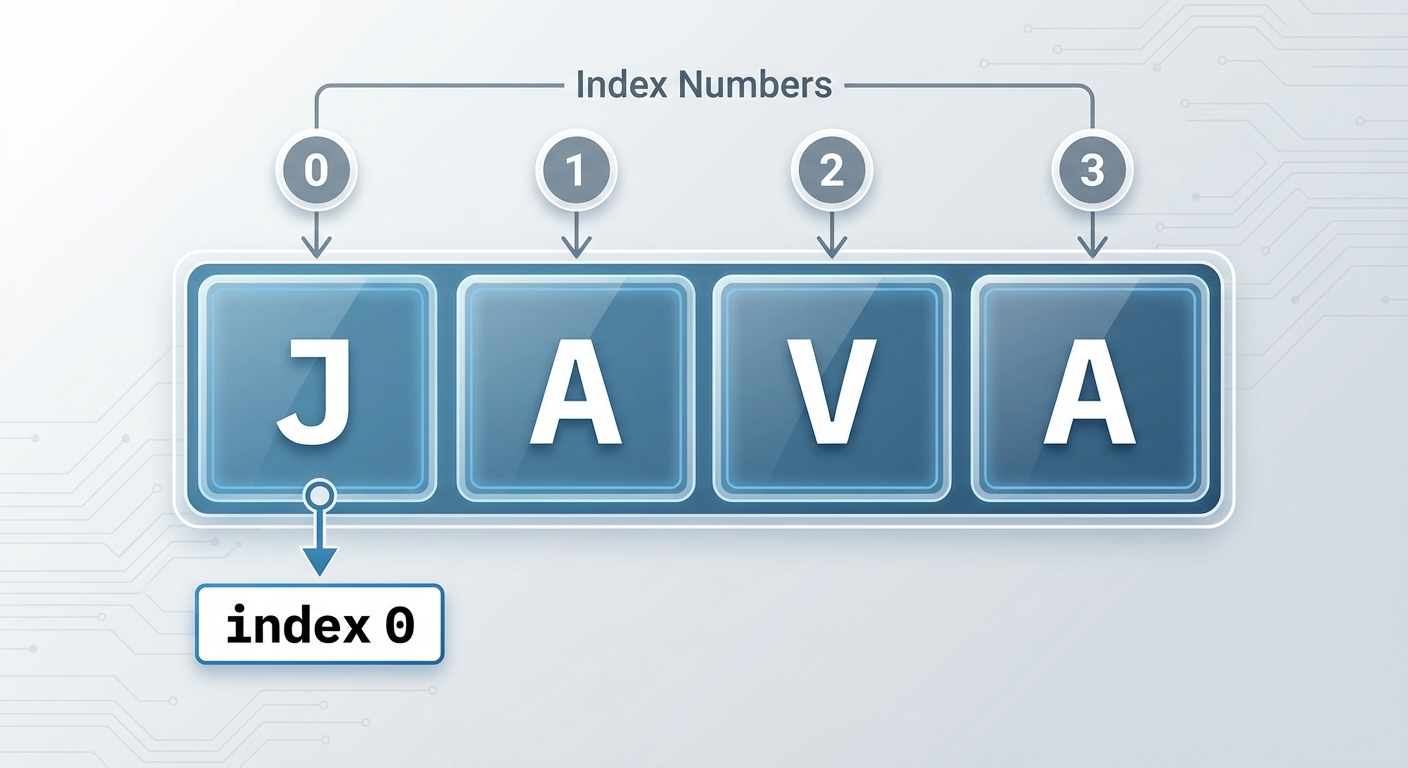
length(): Returns anintrepresenting the number of characters.substring(int from, int to): Returns the string starting at indexfromup to (but not including) indexto.substring(int from): Returns the string from indexfromto the end.indexOf(String str): Returns theintindex of the first occurrence ofstr. Returns-1if not found.equals(Object other): Returnstrueif the characters are exactly the same. NEVER use==to compare Strings.compareTo(String other): Returns anint. Negative if the calling string comes first alphabetically, 0 if equal, positive if it comes after.
The Math Class
The Math class contains static methods. You do not create an object of type Math (no new Math()). You call methods using the class name.
Key Math Methods
- : Returns the absolute value (works for
intanddouble). - : Returns base to the power of exponent. Always returns a
double. - : Returns the square root. Always returns a
double. - : Returns a random
doublesuch that $0.0 \le x < 1.0$.
Generating Random Integers
A very common exam question requires generating a random integer within a specific range.
The Formula:
- Range: (Max - Min + 1)
- Min: The starting number
Example: Generate a random integer between 5 and 10 (inclusive).
- Min = 5
- Max = 10
- Range = $10 - 5 + 1 = 6$
int rand = (int)(Math.random() * 6) + 5;
Common Mistakes & Pitfalls
Integer Division: Ignoring that
int / inttruncates decimals.- Wrong:
double x = 1 / 2;(Result is 0.0) - Right:
double x = 1.0 / 2;(Result is 0.5)
- Wrong:
String Comparison: Using
==instead of.equals().==compares memory addresses (do these references point to the same object?)..equals()compares the actual text content.
String Index Out of Bounds: Trying to access
str.substring(0, str.length() + 1). Valid indices are $0$ to $length-1$.Uninitialized Variables: Trying to use a variable before assigning it a value results in a compilation error. Trying to use a reference variable that is
nullresults in a runtimeNullPointerException.Math.random() Casting: You must cast the result of the multiplication, not the
Math.random()call itself.- Wrong:
(int)Math.random() * 10(Always 0, because random (0.x) casts to 0 first). - Right:
(int)(Math.random() * 10).
- Wrong: