AP Computer Science A: Logic & Control Structures
Unit 2: Selection and Iteration — Boolean Expressions and Conditionals
Algorithms with Selection and Repetition
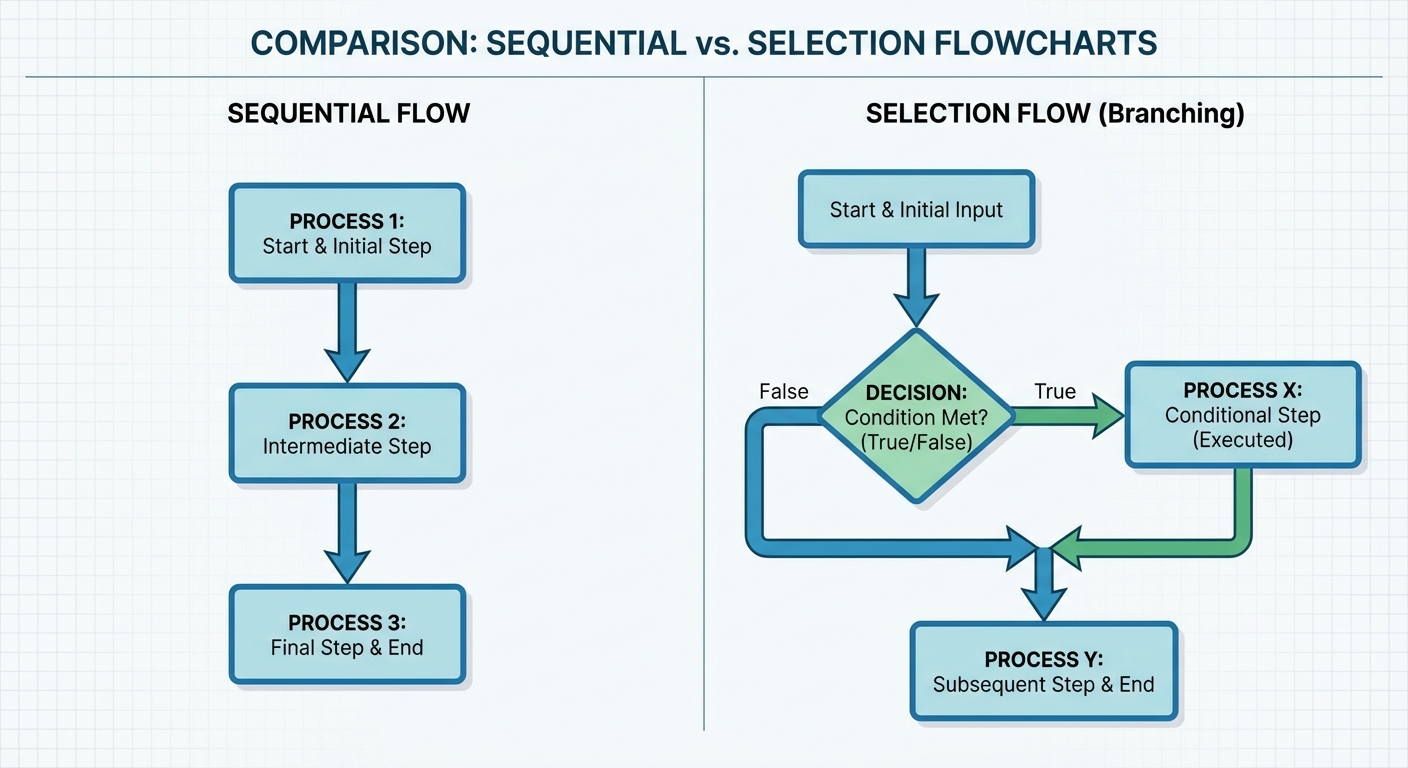
Before writing Java code, it is essential to understand the underlying logic of algorithms. An algorithm is a finite sequence of well-defined instructions to solve a specific problem. In computer science, algorithms utilize three primary control structures:
- Sequencing: Executing instructions one after another in order.
- Selection (Conditionals): Deciding which part of an algorithm to run based on a boolean condition (e.g., "If it is raining, take an umbrella").
- Iteration (Repetition): Repeating a section of code multiple times (e.g., loops).
While this note focuses on Selection, understanding how it differs from flow-through sequencing is vital for AP CSA.
Boolean Expressions
A Boolean Expression is a code snippet that evaluates to either true or false. These are the foundation of decision-making in Java.
Relational Operators
In Java, you compare primitive values (like int and double) using Relational Operators. The result of these operations is always a boolean.
| Operator | Meaning | Example (int x = 5;) | Result |
|---|---|---|---|
== | Equal to | x == 5 | true |
!= | Not equal to | x != 3 | true |
< | Less than | x < 5 | false |
> | Greater than | x > 1 | true |
<= | Less than or equal to | x <= 5 | true |
>= | Greater than or equal to | x >= 10 | false |
Assigning Boolean Variables
You can also store the result of an expression in a boolean variable:
int age = 17;
boolean canVote = (age >= 18); // Evaluates to false
If Statements and Control Flow
Control Flow refers to the order in which individual statements, instructions, or function calls are executed. The if statement allows the program to deviate from the standard top-to-bottom sequential flow.
Single-Way Selection
The simplest conditional is the one-way if statement. The code block inside is executed only if the boolean expression evaluates to true. If it is false, the code is skipped entirely.
Syntax:
if (booleanExpression) {
    // Code to execute if true
}
Example:
double gpa = 3.8;
if (gpa > 3.5) {
    System.out.println("Honor Roll");
}
// Control flow continues here regardless of the GPA
If-Else Statements
Two-Way Selection
Often, you need to execute one block of code if a condition is true, and a different block if it is false. This is handled by the If-Else statement.
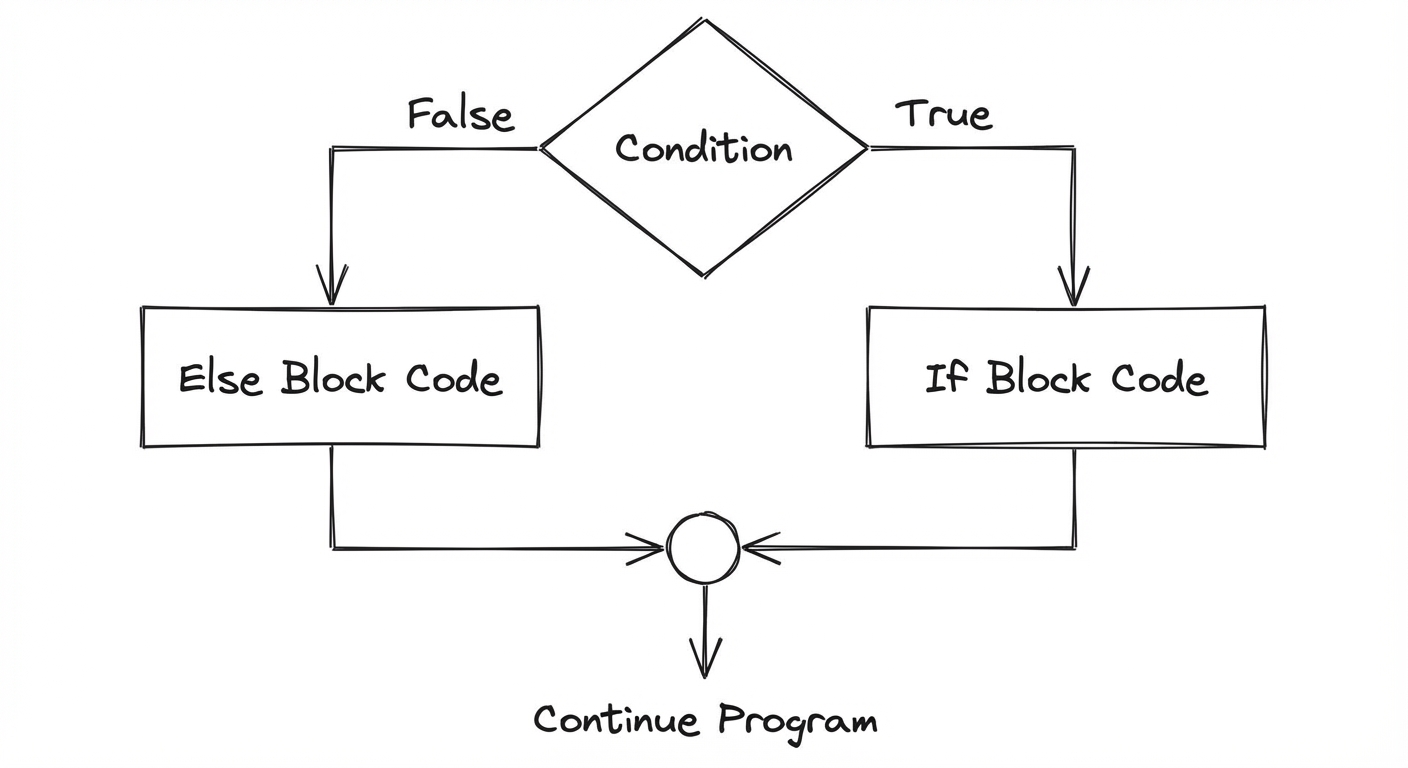
int score = 75;

if (score >= 60) {
    System.out.println("Pass");
} else {
    System.out.println("Fail");
}
Multi-Way Selection (Else-If)
When there are more than two possible paths, you can chain conditions using else if. The computer evaluates the conditions from top to bottom. It executes the code block for the first true condition it finds and ignores the rest.
int temp = 85;

if (temp > 90) {
    System.out.println("Hot");
} else if (temp > 70) {
    System.out.println("Warm"); // This executes
} else if (temp > 50) {
    System.out.println("Cool"); // Skipped, even though 85 > 50
} else {
    System.out.println("Cold"); // Catch-all for anything <= 50
}
Compound Boolean Expressions
To check multiple conditions simultaneously, we combine boolean expressions using Logical Operators.
Logical Operators
!(NOT): Inverses the boolean value.&&(AND): True only if BOTH operands are true.||(OR): True if AT LEAST ONE operand is true.
Truth Tables:
| P | Q | P && Q | P || Q |
|---|---|---|---|
| T | T | T | T |
| T | F | F | T |
| F | T | F | T |
| F | F | F | F |
Short-Circuit Evaluation
Java uses Short-Circuit Evaluation to optimize performance and prevent errors.
- AND (
&&): If the left operand isfalse, the entire expression must be false. Java does not evaluate the right operand. - OR (
||): If the left operand istrue, the entire expression must be true. Java does not evaluate the right operand.
Practical Application:
This is often used to prevent runtime errors, such as dividing by zero or accessing null objects.
int count = 0;
int total = 100;

// If count is 0, (count != 0) is false.
// Java stops immediately, avoiding the division by zero error.
if (count != 0 && (total / count) > 5) {
    System.out.println("Average is greater than 5");
}
Equivalent Boolean Expressions
Sometimes, boolean logic can be written in multiple ways. In the AP exam, you are often asked to simplify complex expressions or identify equivalent ones used in different algorithms structure.
De Morgan's Laws
Named after logician Augustus De Morgan, these laws provide a set of rules for distributing the NOT operator (!) across parentheses. This is a frequent topic on the AP CSA Multiple Choice section.
The Rules:
- In Java:
!(A && B)is equivalent to!A || !B
- In Java:
- In Java:
!(A || B)is equivalent to!A && !B
- In Java:
How to memorize:
"Break the line, change the sign."
When you distribute the ! into the parentheses, the && flips to ||, and || flips to &&.
Example: Simplifying Logic
Imagine a rollercoaster requirement: You typically cannot ride if you are "too short" or "too young".
boolean tooShort = height < 48;
boolean tooYoung = age < 10;

// You CAN ride if strictly NEITHER is true
if (!tooShort && !tooYoung) {
    System.out.println("Enjoy the ride!");
}

// Using De Morgan's Law, this is equivalent to:
// NOT (tooShort OR tooYoung)
if (!(tooShort || tooYoung)) {
    System.out.println("Enjoy the ride!");
}
Comparing Objects (Special Note)
A critical concept in boolean expressions is comparing objects (like String) vs. primitives.
==: Compares references (memory addresses). Are these pointing to the exact same object in memory?.equals(): Compares content. Do these objects behave the same/contain the same data?
Correct String Comparison:
String s1 = new String("Hello");
String s2 = new String("Hello");

if (s1 == s2) { ... }       // FALSE (different memory locations)
if (s1.equals(s2)) { ... }  // TRUE (same characters)
Common Mistakes & Pitfalls
Confusing
=and==:- Wrong:
if (x = 5)(This attempts assignment inside a condition). - Right:
if (x == 5).
- Wrong:
The Semicolon Trap:
- Placing a semicolon immediately after the
ifcondition terminates the statement logic immediately. - Example:
if (x > 5); { x++; }causesx++to run always, because theifcontrolled an empty statement.
- Placing a semicolon immediately after the
Comparing Strings with
==:- Always use
.equals()for Strings unless you specifically need to check memory identity.
- Always use
Missing Braces:
- If you omit
{}after anif, only the first following line is considered part of the conditional conditional block. The second line will always execute. - Best Practice: Always use
{}even for one-liners.
- If you omit
Boundary Errors:
- Confusing
<with<=often leads to "Off-By-One" errors.
- Confusing
Negating Ranges incorrectly:
- The negation of
x > 5isx <= 5(note the inclusion of equals), notx < 5.
- The negation of