Comprehensive Guide to Data Collections in Java
Introduction to Data Collections
In Java, Data Collections allow us to store and manipulate groups of related data under a single variable name, rather than creating separate variables for every single value (e.g., score1, score2, score3). This unit focuses on the two primary linear collections tested in AP Computer Science A: 1D Arrays and ArrayLists.
Mastering these structures involves understanding how they are created, how they effectively manage memory, and how to iterate (loop) through them to process data.
One-Dimensional (1D) Arrays
An array is a fixed-size data structure that holds multiple values of the same type. Once an array is created, its size (length) cannot be changed.
Declaration and Initialization
There are two main ways to set up an array:
Using
new(Default Values):
You declare the type, variable name, and allocate memory for a specific number of slots.// Syntax: type[] name = new type[size]; int[] scores = new int[5];When created this way, Java fills the array with default values:
int/double$\rightarrow$0or0.0boolean$\rightarrow$false- Objects (like
String) $\rightarrow$null
Initializer List (Known Values):
If you know the values immediately, you can declare and fill the array in one step.java String[] fruits = {"Apple", "Banana", "Cherry"};
Accessing Elements
Arrays use zero-based indexing. The first element is at index 0, and the last element is at index length - 1.
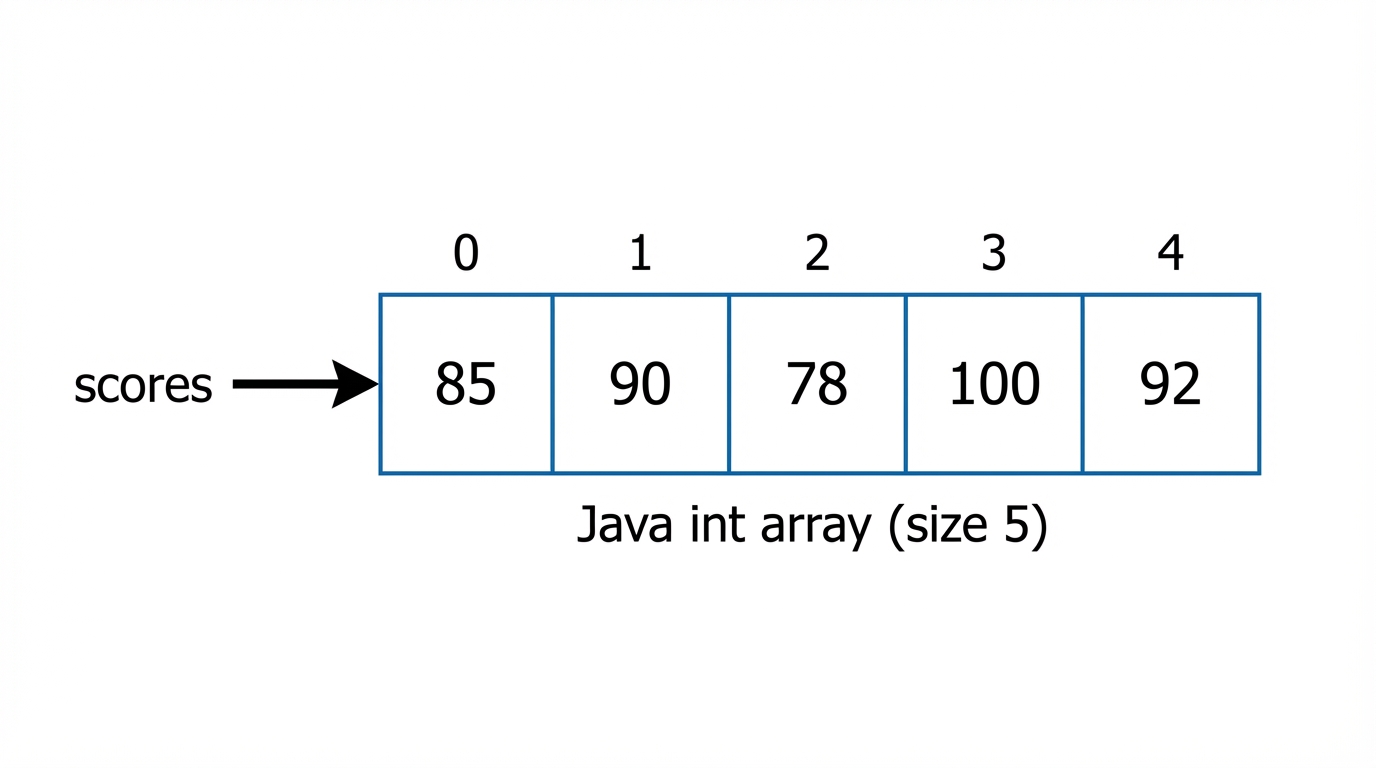
- Accessing:
int x = scores[2];(Gets value at index 2) - Modifying:
scores[2] = 95;(Changes value at index 2) - Length:
scores.length(Property, not a method—no parentheses!)
Traversing Arrays
To process data in an array, we use loops. There are two primary methods commonly tested.
1. The Standard for Loop
Use this when you need the index (e.g., to modify the array, swap elements, or access parallel arrays).
int[] nums = {10, 20, 30, 40};

for (int i = 0; i < nums.length; i++) {
    // We essentially say: "Visit the box at index i"
    nums[i] = nums[i] + 5; // Adds 5 to every element
}
2. The Enhanced for-each Loop
Use this for simpler traversals where you only need to read values. Warning: You cannot modify the array's structure or the values of primitive types using this loop.
// Syntax: for (DataType tempVar : arrayName)
for (int n : nums) {
    System.out.println(n); // Prints the value
    n = 0; // LOCAL change only. Does NOT change the actual array.
}
Summary: Standard vs. Enhanced Loop
| Feature | Standard for(int i...) | Enhanced for(Type x : arr) |
|---|---|---|
| Access to Index | Yes ($i$) | No |
| Modify Elements | Yes (arr[i] = val) | No (for primitives) |
| Code Verbosity | High | Low (Cleaner syntax) |
| Risk | IndexOutOfBoundsException | Safe from bounds errors |
Standard Array Algorithms
The AP exam frequently tests specific algorithms. You should memorize the logic for these.
1. Accumulator (Sum/Average)
Create a variable outside the loop to keep a running total.
double sum = 0;
for (double val : prices) {
    sum += val;
}
double average = sum / prices.length;
2. Finding Minimum/Maximum
Initialize the min/max variable to the first element of the array, then compare every subsequent element.
int max = nums[0]; // Assume first is max
for (int i = 1; i < nums.length; i++) {
    if (nums[i] > max) {
        max = nums[i];
    }
}
Pitfall: Do not initialize max to 0. If all numbers in the array are negative (e.g., -5, -10), your result will be 0, which is incorrect.
The ArrayList Class
While arrays are static (fixed size), an ArrayList is dynamic. It creates a resizable list that handles its own memory management.
Key Comparisons
- Type: Part of
java.util. You mustimport java.util.ArrayList;. - Storage: Can ONLY store Objects (References). It cannot store primitives (
int,double) directly.
Wrapper Classes & Autoboxing
To store primitives in an ArrayList, Java uses Wrapper Classes (Integer, Double). Java performs autoboxing (converting primitive $\rightarrow$ object) and unboxing (object $\rightarrow$ primitive) automatically.
ArrayList<Integer> list = new ArrayList<Integer>();
list.add(5); // Autoboxing: 5 becomes Integer(5)
int x = list.get(0); // Unboxing: Integer(5) becomes 5
Essential ArrayList Methods
You are responsible for the following methods on the AP exam. Assume list is ArrayList<E>.
| Method | Description | Return Type |
|---|---|---|
size() | Returns the number of elements in the list. | int |
add(E obj) | Appends obj to the end of the list. Always returns true. | boolean |
add(int index, E obj) | Inserts obj at index. Shifts existing elements to the right. | void |
get(int index) | Returns the element at index. | E |
set(int index, E obj) | Replaces the element at index with obj. Returns the old value. | E |
remove(int index) | Removes element at index. Shifts subsequent elements to the left. Returns the removed element. | E |
Visualizing Insertion and Deletion
When you use add(index, obj) or remove(index), the indices of other elements change. This is computationally more expensive than arrays.

Traversing ArrayLists
Warning regarding removal: When removing elements inside a loop, using a standard increasing for loop causes you to skip elements because the indices shift left.
Correct approach for removal: Traverse backwards.
// Removes all even numbers safely
for (int i = list.size() - 1; i >= 0; i--) {
    if (list.get(i) % 2 == 0) {
        list.remove(i);
    }
}
Common Mistakes & Pitfalls
Length vs. Size vs. Length()
arr.length(Arrays: no parentheses)list.size()(ArrayLists: method call)str.length()(Strings: method call)- Mnemonic: Arrays are the "primitive" cousins, they don't get parentheses.
ArrayIndexOutOfBoundsException
- Occurs when accessing
arr[arr.length]. Remember the last valid index is alwayslength - 1.
- Occurs when accessing
Concurrent Modification Error
- You cannot add or remove from a collection while traversing it with an enhanced for-each loop. You must use a standard
forloop (preferably backwards for removal).
- You cannot add or remove from a collection while traversing it with an enhanced for-each loop. You must use a standard
setvsaddlist.set(2, "A")REPLACES the item at index 2. Size remains the same.list.add(2, "A")INSERTS item at index 2. Size increases by 1.- Note: You cannot
setan index that doesn't exist yet.
Comparing Objects
- Never use
==to compare contents of objects stored in arrays or lists (like Strings). Use.equals().
- Never use
Printing Collections
System.out.println(myArray)prints a memory hash code (e.g.,[I@15db9742). UseArrays.toString(myArray)to see values.System.out.println(myList)prints the nice format[A, B, C]automatically becauseArrayListhas atoString()method.