Unit 3 Mastery: Class Creation Essentials
Constructors: Building the Object
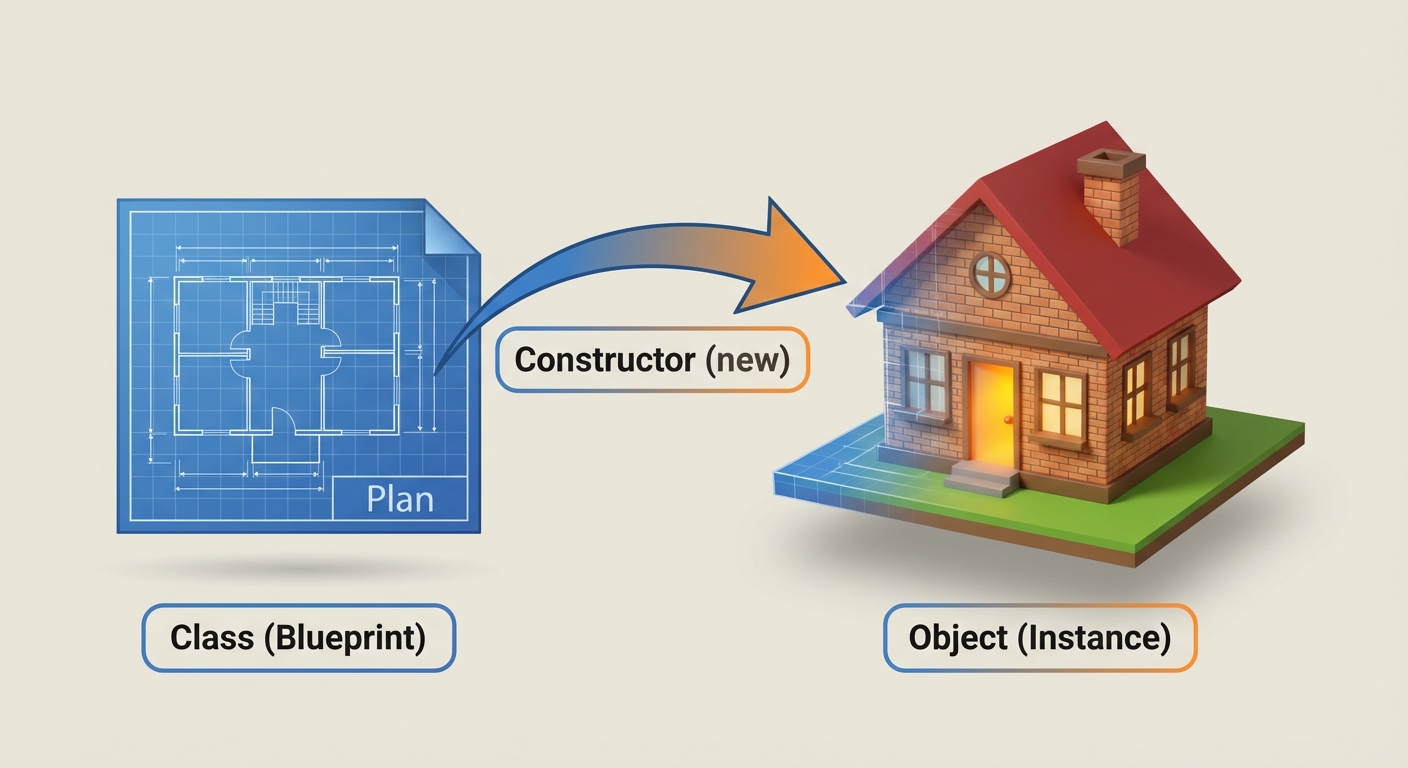
At the heart of Object-Oriented Programming (OOP) is the constructor. While a class is merely a blueprint or template, the constructor is the specific block of code used to instantiate (create) an actual object from that blueprint.
Definition and Purpose
A constructor is a special block of code that allows the programmer to set the initial state of an object. Its primary purpose is to initialize the instance variables (attributes) of the newly created object.
Key rules for constructors:
- Name Match: The name of the constructor MUST be identical to the name of the class.
- No Return Type: Constructors do not have a return type, not even
void. - Automatic Call: They are called automatically when the
newkeyword is used.
Types of Constructors
1. No-Argument Constructor
A constructor that takes no parameters. It usually sets the instance variables to default values.
public class Student {
    private String name;
    private double gpa;

    // No-argument constructor
    public Student() {
        name = "Unknown";
        gpa = 0.0;
    }
}
2. Parameterized Constructor
A constructor that accepts parameters to set the instance variables to specific values provided by the client (the code using the class).
// Parameterized constructor
public Student(String initName, double initGpa) {
    name = initName;
    gpa = initGpa;
}
Constructor Overloading
Overloading occurs when a class has more than one constructor. They must have the same name (the class name) but different parameter lists (number, type, or order of parameters).
This provides flexibility to the programmer, allowing objects to be created in different ways.
The Default Constructor Trap
If you do not write any constructor in your class, Java provides a default no-argument constructor hidden in the background that sets variables to null/0. However, once you write any constructor (even a parameterized one), the default one disappears. If you still need a no-argument constructor, you must explicitly write it.
Writing Methods: Defining Behavior
Methods define what an object can do. They are modular blocks of code that perform specific tasks.
The Method Header
The method header defines how other code interacts with the method. It consists of the access specifier, return type, method name, and parameter list.
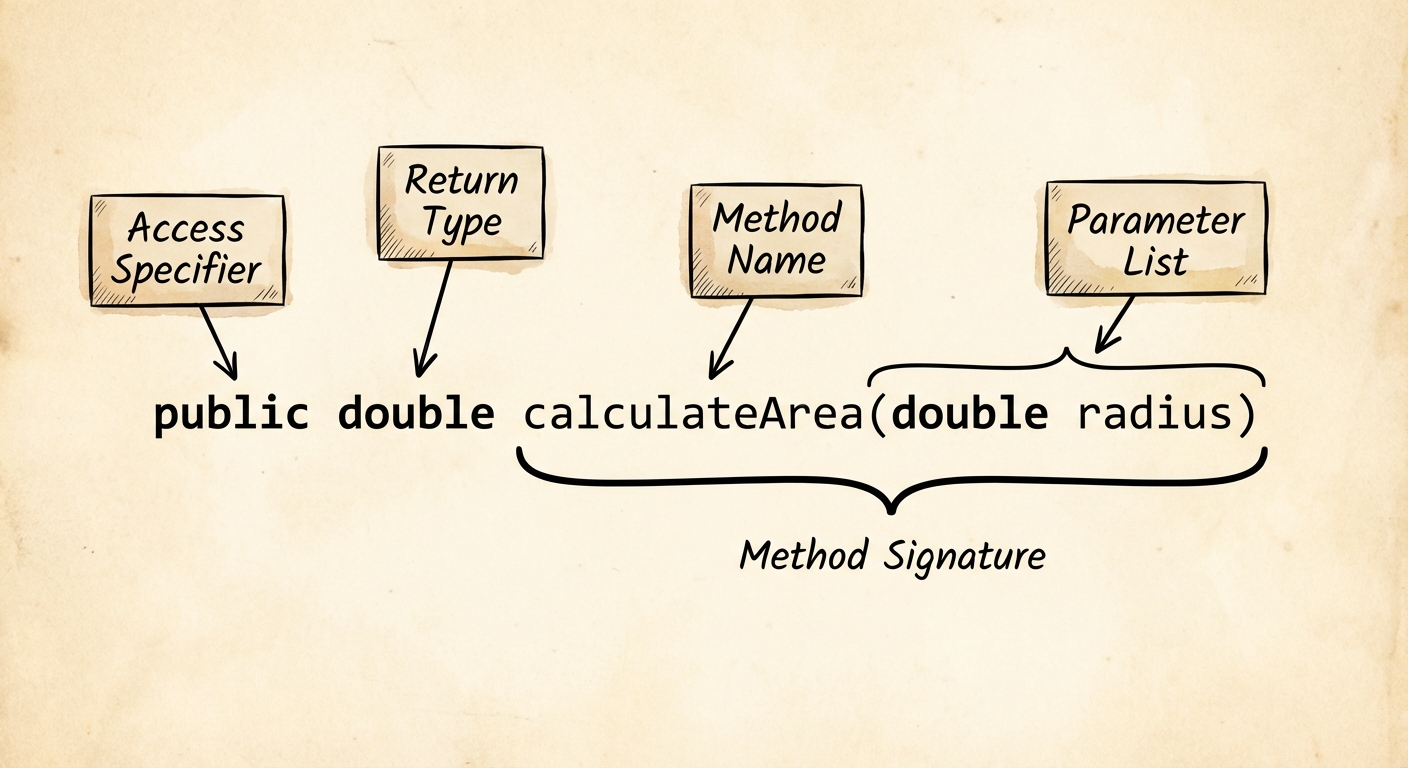
1. Access Specifier
Usually public for methods intended to be used by other classes, or private for helper methods used internally.
2. Return Type
Indicates the type of data the method sends back to the code that called it.
- Primitive types:
int,double,boolean, etc. - Reference types:
String,Student,int[], etc. void: Used if the method performs an action but does not return a value.
3. Method Name
Follows camelCase convention (e.g., calculateAverage). It should be a verb or verb phrase describing the action.
4. Parameter List
The variables listed inside the parentheses are called formal parameters. They act as local variables within the method, receiving values passed from the method call.
Method Signatures
The signature of a method consists ONLY of:
- The method name
- The parameter list (types and order)
Note: The return type and variable names are NOT part of the signature.
The return Statement
If a method has a return type other than void, it must execute a return statement returning a value compatible with that type. The return keyword immediately halts the execution of the method.
public int add(int a, int b) {
    int sum = a + b;
    return sum; // Returns the integer value back to the caller
}
Accessor Methods (Getters)
In the AP Computer Science A curriculum, encapsulation is a core concept. We keep instance variables private to protect data, but we provide public methods to allow controlled access to that data. These are called Accessor Methods (often called "getters").
characteristics of an Accessor
- Visibility: usually
public. - Return Type: Matches the type of the instance variable it acts upon.
- Naming Convention: Usually starts with
getfollowed by the variable name (e.g.,getScore). Boolean accessors often start withisorhas(e.g.,isFinished). - Parameters: Usually takes no parameters.
Code Example: Putting It All Together
Here is a complete class showing a constructor, a void method, and an accessor method.
public class LightBulb {
    // 1. Instance Variables (Private)
    private boolean isOn;
    private int wattage;

    // 2. Constructor
    public LightBulb(int initWattage) {
        wattage = initWattage;
        isOn = false; // Default state
    }

    // 3. Method (void - Action)
    public void turnOn() {
        isOn = true;
        System.out.println("The light is now on.");
    }

    // 4. Method (Accessor - Getter)
    public boolean isTurnedOn() {
        return isOn;
    }

    // 5. Method (Accessor - Getter)
    public int getWattage() {
        return wattage;
    }
}
Pass-by-Value
When you pass parameters to a constructor or method in Java, you are passing by value.
- Primitives: A copy of the actual number is passed. Changing the parameter inside the method does NOT change the original variable.
- Objects: A copy of the reference (address) is passed. The method can modify the object 's internal state, but it cannot make the original reference point to a totally new object.
Comparison: Constructors vs. Methods
| Feature | Constructor | Method |
|---|---|---|
| Return Type | None (not even void) | Required (void or a type) |
| Name | Must match Class Name | Any valid identifier (camelCase) |
| Calling | Called via new operator | Called via dot operator . |
| Purpose | Initialize object state | Define object behavior |
Common Mistakes & Pitfalls
The "void" Constructor: A very common error is adding
voidto a constructor declaration.- Wrong:
public void Student() { ... }(This makes it a standard method, not a constructor!) - Right:
public Student() { ... }
- Wrong:
Shadowing Variables: Naming a parameter the exact same name as an instance variable without using
this.public void setScore(int score) { score = score; // This only updates the local parameter, not the instance variable! } // Fix: use separate names (e.g., newScore) or use this.score = score;Unreachable Code: Placing statements after a
returnstatement. Java will throw a compiler error because that code can never be executed.Header vs. Call Confusion: Including type declarations when calling a method.
- Wrong:
myObject.add(int 5, int 10); - Right:
myObject.add(5, 10);
- Wrong:
Forgetting Initialization: Declaring an instance variable but failing to set its value in the constructor. For objects (like Strings), this leaves them as
null, leading toNullPointerExceptionlater.