Mastering Control Flow in Java
Boolean Expressions and Logic
At the heart of selection (making decisions) and iteration (repeating tasks) lies the Boolean expression. These are statements that evaluate to either true or false.
Relational Operators
Relational operators compare two values. In the AP Java subset, these are applied strictly to primitive numbers (int, double), and the result is always a boolean.
| Operator | Meaning | Example (x = 5, y = 10) | Result |
|---|---|---|---|
== | Equal to | x == y | false |
!= | Not equal to | x != y | true |
< | Less than | x < y | true |
<= | Less than or equal to | x <= 5 | true |
> | Greater than | y > x | true |
>= | Greater than or equal to | y >= 20 | false |
Logical Operators
To combine multiple boolean conditions, we use logical operators. The order of operations is crucial: NOT (!) has the highest precedence, followed by AND (&&), and finally OR (||).
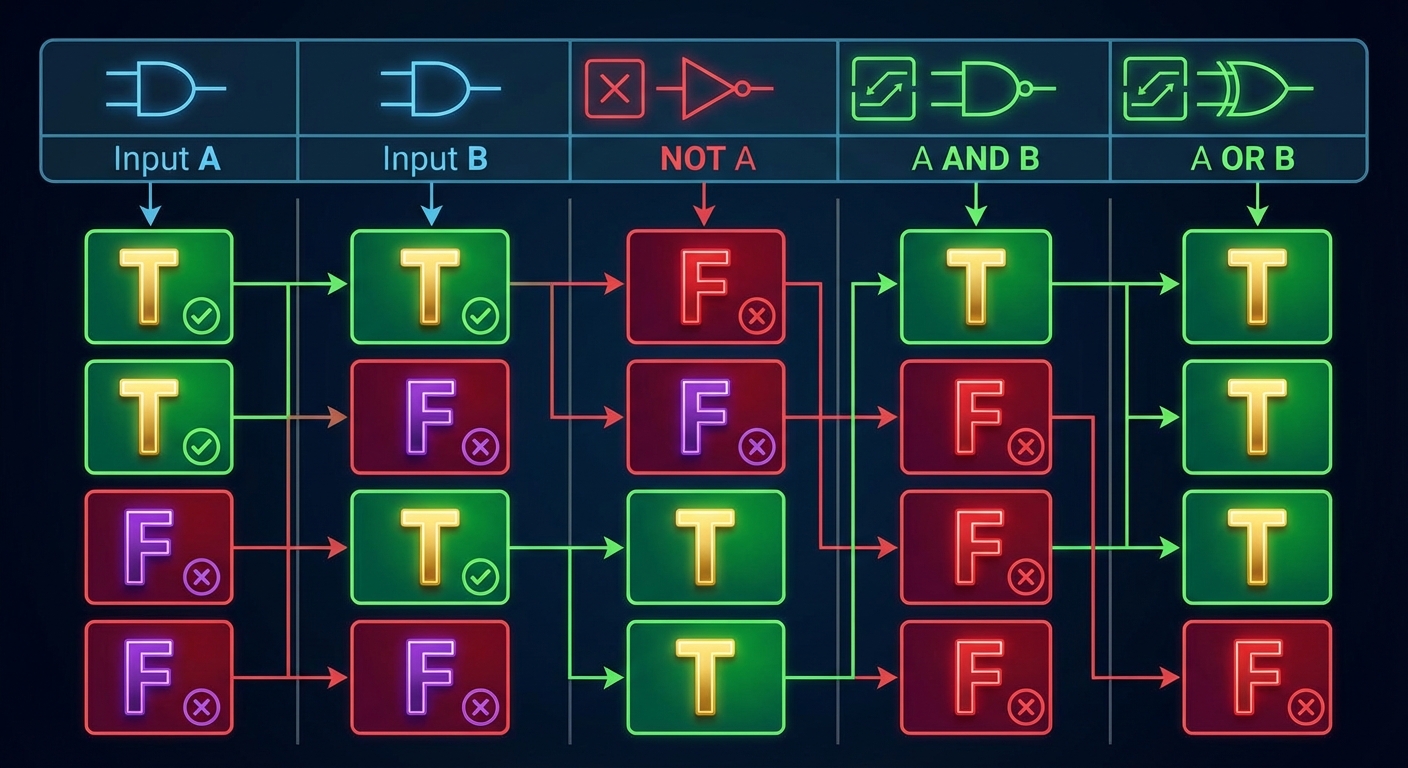
- NOT (
!): Inverts the boolean value.!true$\rightarrow$false
- AND (
&&): True only if both operands are true. - OR (
||): True if at least one operand is true.
Short-Circuit Evaluation
Java uses short-circuit evaluation for efficiency and error prevention.
- AND (
&&): If the left operand isfalse, the result is automaticallyfalse. Java does not evaluate the right side. - OR (
||): If the left operand istrue, the result is automaticallytrue. Java does not evaluate the right side.
Application: This is often used to prevent arithmetic errors, such as division by zero:
int count = 0;
int total = 100;

// If count is 0, the first part is false.
// The division (total / count) is NEVER executed, preventing a crash.
if (count != 0 && total / count > 5) {
    System.out.println("Average is greater than 5");
}
De Morgan’s Laws
One of the most frequently tested concepts on the AP exam involves simplifying negated complex boolean expressions. You must know how to distribute the NOT operator.
The Rules:
!(A && B)is equivalent to!A || !B!(A || B)is equivalent to!A && !B
Study Tip/Mnemonic: "Break the bar, change the sign." (If you draw a bar over the expression to represent NOT, break it over the operators and flip the AND to OR).
Example:
- Determine if a number
xis not inside the range [10, 20]. - Logic:
! (x >= 10 && x <= 20) - Applied De Morgan's:
x < 10 || x > 20
Selection Statements (Conditionals)
Selection allows a program to execute code segments conditionally. This dictates the "flow" of the program.
The if and if-else Statements
The single-way selection (if) executes code only if the condition is true. Two-way selection (if-else) provides an alternative path.
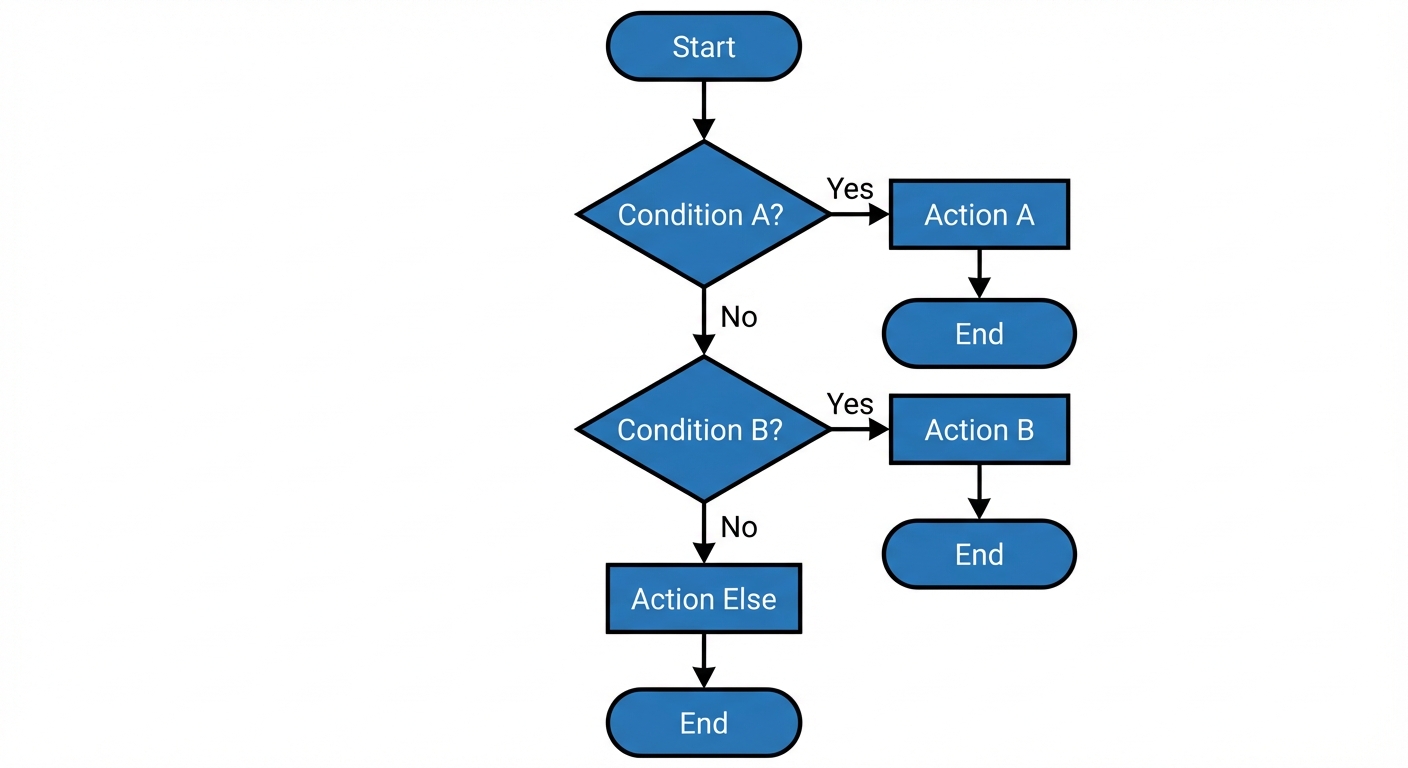
int score = 85;

if (score >= 90) {
    System.out.println("A");
} else if (score >= 80) {
    System.out.println("B"); // This executes
} else {
    System.out.println("C or lower");
}
Block Scope and Braces
While Java allows you to omit curly braces {} if the block contains only one line of code, always use braces on the AP exam (and in real life). This prevents the "dangling else" error where an else accidentally attaches to the wrong if.
Comparing Objects vs. Primitives
This is a critical distinction in Unit 2 logic.
- Primitives (
int,double): Use==to compare values. - Objects (specifically
String):==compares memory citations (references), not content. You must use the.equals()method.
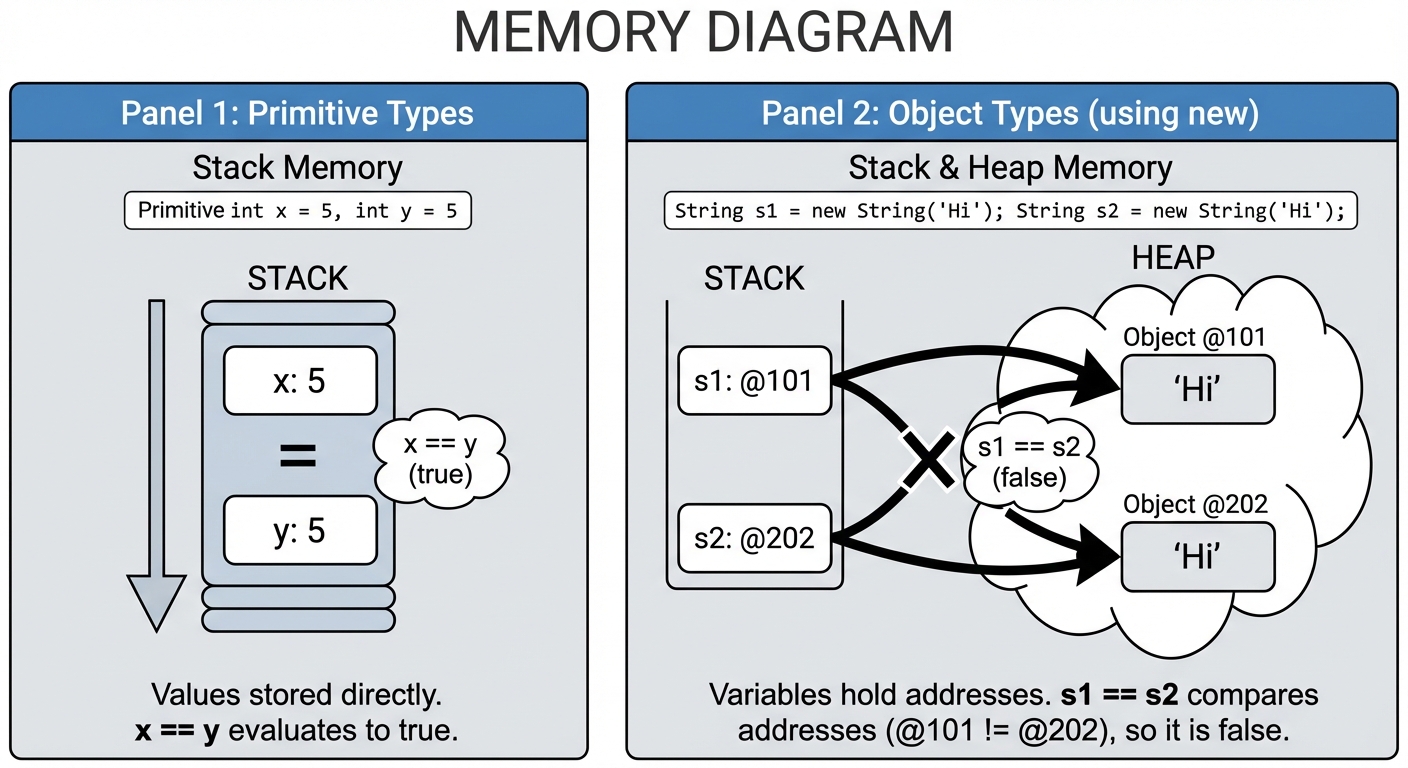
The Pitfall:
String s1 = new String("Hello");
String s2 = new String("Hello");

if (s1 == s2) { ... }       // FALSE (Different memory addresses)
if (s1.equals(s2)) { ... }  // TRUE (Same logic inside the object)
Iteration (Loops)
Iteration allows code to repeat. The AP Java subset focuses on while loops, for loops, and enhanced for-each loops (typically covered with Arrays). We will focus on the standard while and for here.
The while Loop
A while loop is used when the number of iterations is not known in advance. It continues as long as the boolean condition remains true.
Syntax:
while (boolean expression) {
    // statements
}
Key Characteristics:
- It is a pre-test loop (the condition is checked before the loop runs).
- If the condition is initially
false, the loop body executes zero times. - You are responsible for manually updating the variable to avoid an infinite loop.
Example: Digit extraction algorithm
(Very common on AP FRQs)
int n = 729;
while (n > 0) {
    int digit = n % 10; // Get the last digit (9, then 2, then 7)
    System.out.print(digit);
    n /= 10;            // Remove the last digit (72, then 7, then 0)
}
// Output: 927
The for Loop
The for loop is concise and typically used for definite iteration (when you know how many times you want to loop).
Syntax:
for (initialization; condition; update) {
    // statements
}
Execution Order:
- Initialization (Runs once at the start).
- Condition Check (If false, loop ends instantly).
- Body execution.
- Update (Increment/Decrement).
- Repeat step 2.
Example:
// Print even numbers from 0 to 10
for (int i = 0; i <= 10; i += 2) {
    System.out.print(i + " ");
}
Nested Loops
A loop inside another loop. For every one iteration of the outer loop, the inner loop runs to completion.
Complexity Note: Nested loops often imply $O(n^2)$ complexity. If the outer loop runs $n$ times and the inner loop runs $n$ times, the body executes $n \times n$ times.
Example: Printing a Triangle pattern
for (int r = 1; r <= 5; r++) {
    for (int c = 1; c <= r; c++) {
        System.out.print("*");
    }
    System.out.println();
}
/* Output:
*
**
***
****
*****
*/
Mathematical Analysis of Loops
On the AP exam, you will often find multiple-choice questions asking "How many times does this loop execute?"
Standard Range Formula
For a loop: for (int i = A; i < B; i++)
- Number of iterations = $B - A$
For a loop: for (int i = A; i <= B; i++)
- Number of iterations = $(B - A) + 1$
Tracing Tables
When facing complex loops involving changing variables, do not do it in your head. Draw a trace table.
| Iteration | Variable i | Variable k | Condition i < 4? | Output |
|---|---|---|---|---|
| Init | 0 | 5 | true | - |
| 1 | 1 | 7 | true | 7 |
| 2 | 2 | 9 | true | 9 |
| 3 | 3 | 11 | true | 11 |
| 4 | 4 | 13 | false (stop) | - |
Common Mistakes & Pitfalls
Confusing
=and==- Wrong:
if (x = 5)(This is an assignment, and in Java, it usually causes a compile error unlessxis boolean). - Right:
if (x == 5).
- Wrong:
String Comparisons
- Never use
if (string1 == "A"). Always useif (string1.equals("A")).
- Never use
The Semicolon of Death
- Mistake:
for (int i=0; i<5; i++); - Result: The semicolon immediate terminates the loop statement. The block following it runs only once after the loop is finished counting. The code inside the loop technically does nothing.
- Mistake:
Off-by-One Errors (OBOE)
- Confusing
<with<=usually results in a loop running one time too many or too few. Always check your boundary conditions (the first and the last value).
- Confusing
Infinite Loops
- Forgetting to increment the counter in a
whileloop, or decrementing instead of incrementing causes the condition to remain true forever. Example:for(int i=0; i>0; i++)(Wait, this one never runs!) vsfor(int i=0; i>=0; i++)(This runs forever).
- Forgetting to increment the counter in a
Arithmetic Exception in Short-Circuiting
- Checking
if (x / y > 5 && y != 0)is wrong. Ifyis 0, the division happens before the check. - Flip it:
if (y != 0 && x / y > 5)guarantees safety.
- Checking