AP Computer Science A: Iteration and Loop Structures
While Loops
Iteration, or looping, allows a program to execute a block of code repeatedly based on a specific condition. The while loop is the fundamental structure for repetition in Java, often used when the number of iterations is not known in advance.
Syntax and Structure
A while loop evaluates a boolean expression before every iteration. If the expression evaluates to true, the code block executes. If false, the loop terminates, and program flow continues to the statement following the loop.
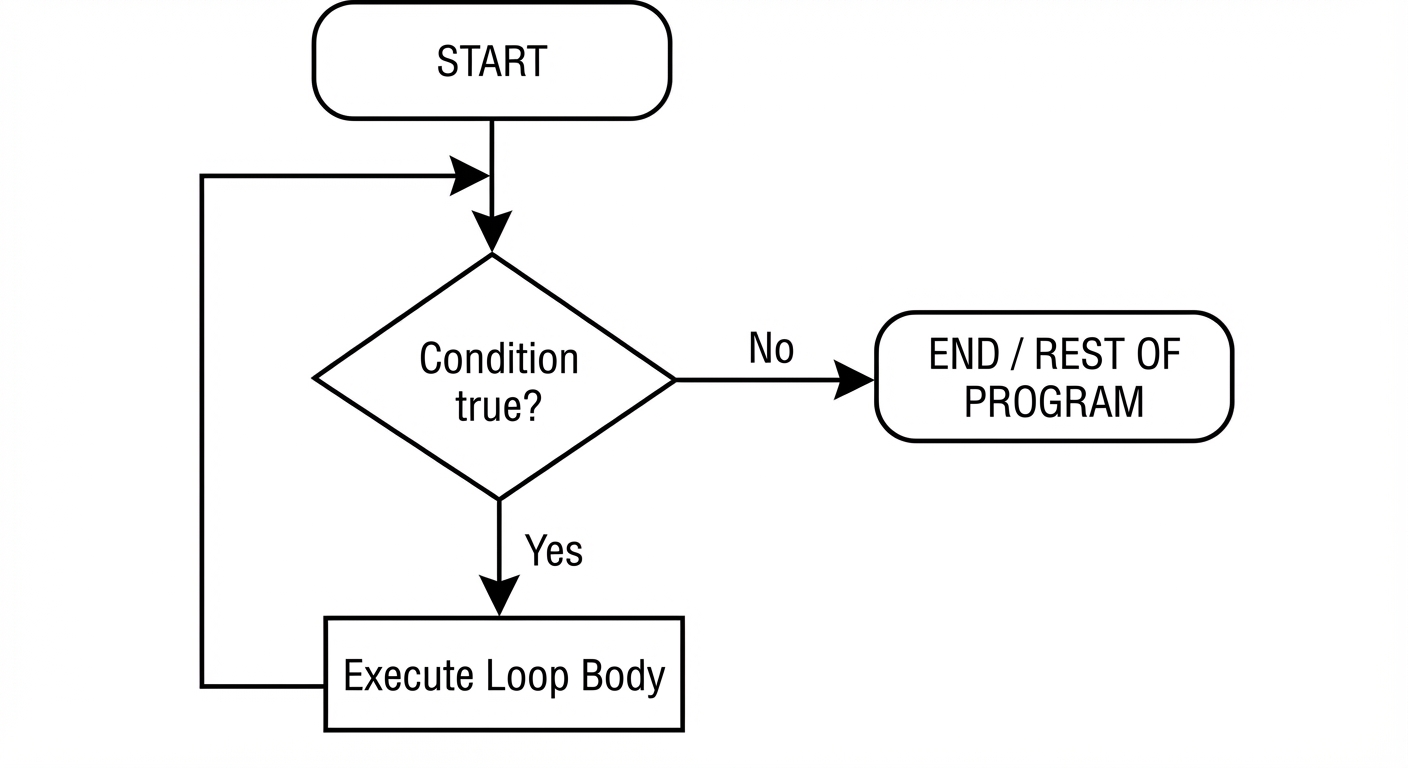
The Three Essential Components:
To prevent logic errors, every loop typically needs:
- Initialization: A variable strictly initialized before the loop starts.
- Boolean Condition: The test that determines if the loop runs.
- Update Step: A statement inside the loop that changes the variable, moving it toward a state where the condition becomes false.
Code Example: The Basic Counter
int count = 0;             // 1. Initialization

while (count < 5) {        // 2. Boolean Condition
    System.out.print(count + " ");
    count++;               // 3. Update Step
}
// Output: 0 1 2 3 4
Key Algorithm: Digit Extraction
A frequent pattern in AP CSA exams is using a while loop to process digits of an integer from right to left using the modulus (%) and division (/) operators.
int number = 294;
int sum = 0;

while (number > 0) {
    int digit = number % 10; // Get the last digit (4, then 9, then 2)
    sum += digit;
    number /= 10;            // Remove the last digit (294 -> 29 -> 2 -> 0)
}
// Result: sum is 15
For Loops
The for loop is a condensed version of the while loop. It is structurally designed for cases where you know exactly how many times you want to repeat a block of code (definite iteration).
Anatomy of a For Loop
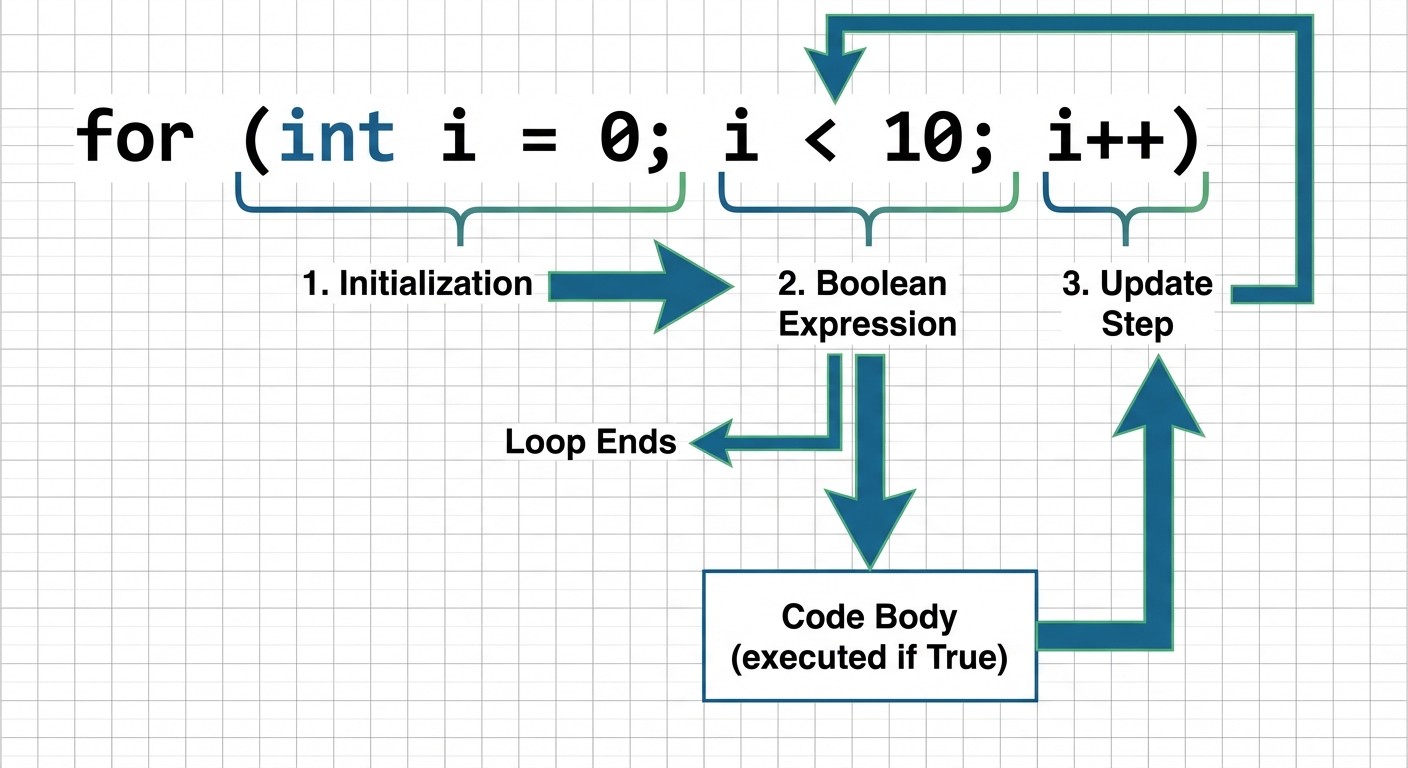
The header of a for loop contains three parts separated by semicolons:
- Initialization: Executes only once when the loop begins.
- Boolean Expression: Checked before every iteration. If true, the body runs.
- Update: Executes after the body runs, just before the condition is checked again.
Scope of Loop Variables
A common point of confusion is variable scope. If the control variable (usually i) is declared inside the for loop header, it cannot be accessed outside the loop.
for (int i = 0; i < 3; i++) {
    System.out.println("Looping: " + i);
}
// System.out.println(i); // ERROR: i cannot be resolved to a variable here
Traversing Strings
for loops are the standard method for iterating through String indices. Remember that valid indices range from 0 to length() - 1.
String str = "AP CSA";
// Note: use i < str.length(), NOT i <= str.length()
for (int i = 0; i < str.length(); i++) {
    if (str.substring(i, i+1).equals("A")) {
        System.out.println("Found 'A' at index " + i);
    }
}
Nested Iteration
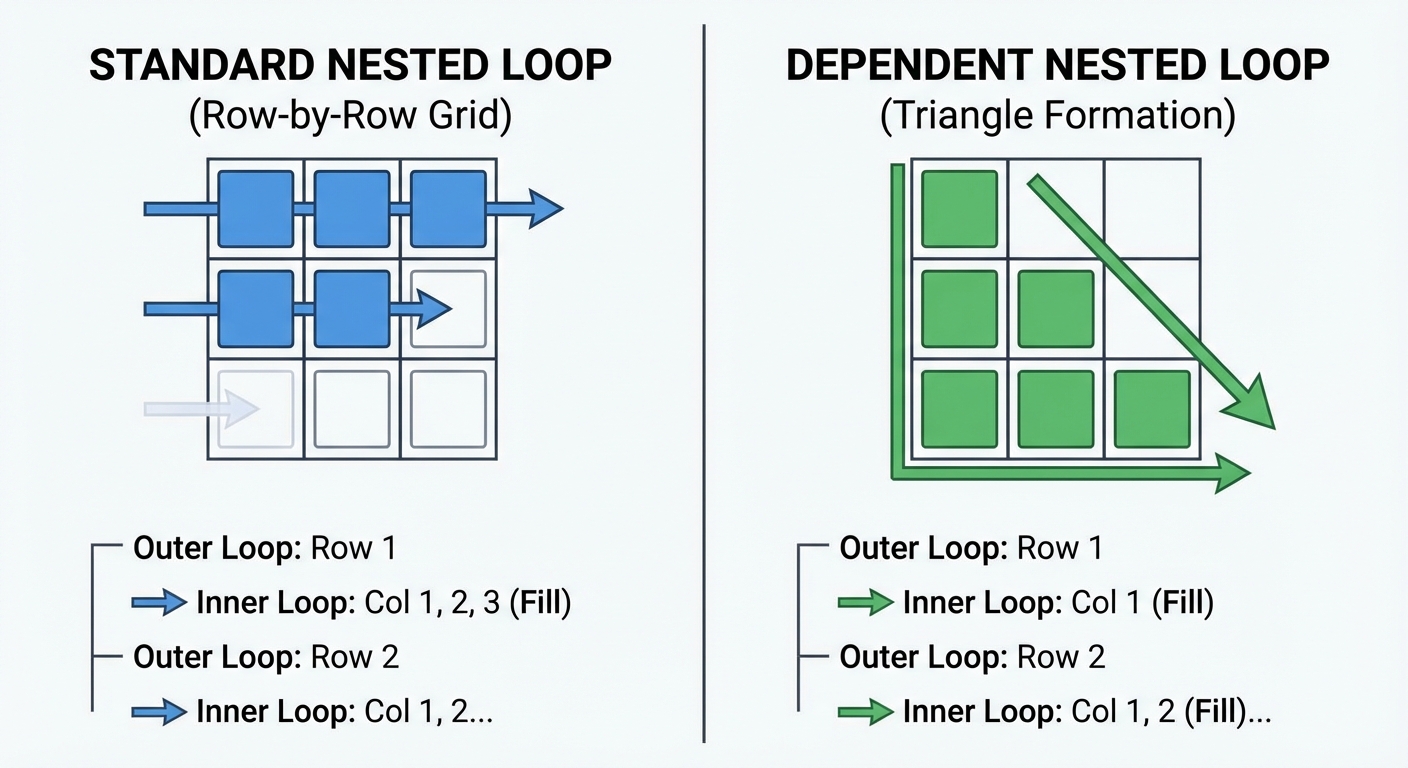
Nested iteration occurs when a loop is placed inside the body of another loop. For every single iteration of the outer loop, the inner loop runs to completion.
Calculating Total Iterations
If the loops are independent (the inner loop's logic doesn't depend on the outer loop's variable), the total number of times the inner body executes is:
Code Example: Coordinate Grid
// Outer loop (rows)
for (int row = 1; row <= 3; row++) {
    // Inner loop (columns)
    for (int col = 1; col <= 4; col++) {
        System.out.print("(" + row + "," + col + ") ");
    }
    System.out.println(); // New line after inner loop finishes
}
Output:
(1,1) (1,2) (1,3) (1,4)
(2,1) (2,2) (2,3) (2,4)
(3,1) (3,2) (3,3) (3,4)
Dependent Loops (Triangular Patterns)
Often, the inner loop's range depends on the outer loop's current variable (i). This is used to create triangles.
for (int i = 1; i <= 3; i++) {
    for (int k = 0; k < i; k++) {
        System.out.print("*");
    }
    System.out.println();
}
Trace:
- When
i = 1,kruns 0 to 0 (1 time) $\rightarrow$ prints* - When
i = 2,kruns 0 to 1 (2 times) $\rightarrow$ prints** - When
i = 3,kruns 0 to 2 (3 times) $\rightarrow$ prints***
Common Mistakes & Pitfalls
1. Infinite Loops
If the condition never becomes false, the loop runs forever (or until the program crashes). This usually happens if you forget the update step.
- Incorrect:
while (x > 0) { System.out.print(x); }(x never changes!) - Correct: Ensure the variable in the condition is modified inside the loop.
2. Off-by-One Errors (OBOE)
Looping one time too many or one time too few. This frequently occurs when confusing < with <= or typically with String lengths.
- Mistake:
for (int i = 0; i <= str.length(); i++)causes aStringIndexOutOfBoundsExceptionbecause the last valid index islength() - 1.
3. The Phantom Semicolon
Placing a semicolon immediately after the loop header creates an empty loop body. The code block you intended to loop runs only once after the loop finishes.
// BAD CODE
for (int i = 0; i < 5; i++); {
    System.out.println("Hi"); // Prints only ONCE, not 5 times
}
4. Modifying Loop Variables Inside the Body
In a for loop, avoid manually changing the control variable (e.g., i++ or i--) inside the loop body if it is already being updated in the loop header. This leads to unpredictable skipping of iterations.