AP CSA Study Guide: Data Collections and Dynamic Arrays
Wrapper Classes: Integer and Double
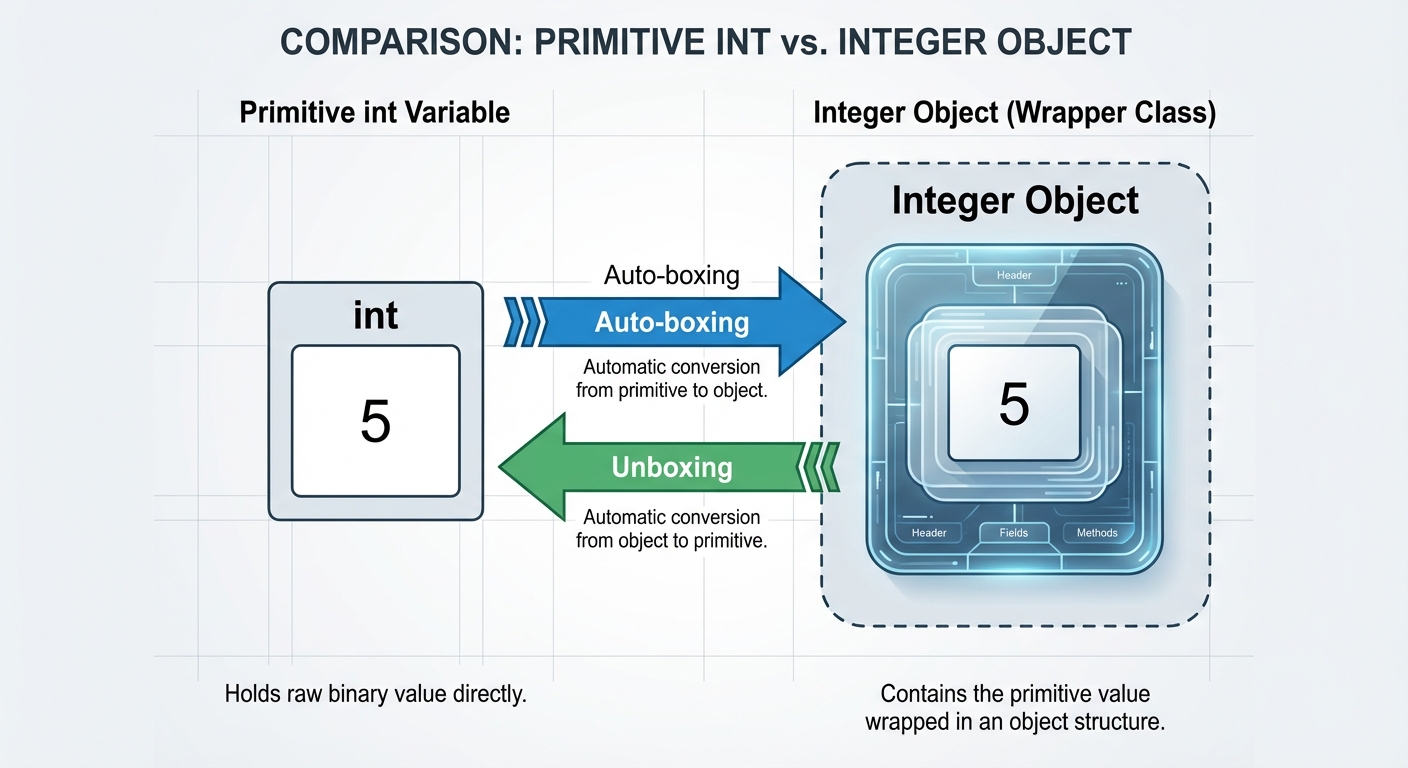
Unlike standard arrays, an ArrayList cannot directly store primitive data types (like int, double, or boolean). They can only store references to objects. To solve this, Java provides Wrapper Classes which "wrap" a primitive value in an object.
Key Concepts
- Integer: The wrapper class for
int. - Double: The wrapper class for
double. - Auto-boxing: The automatic conversion the Java compiler makes between the primitive types and their corresponding object wrapper classes. For example, converting an
intto anInteger. - Unboxing: The reverse process—converting an
Integerto anint.
Code Example
// Using raw wrapper classes (Manual)
Integer myIntObj = new Integer(5); // Deprecated in newer Java, but concept remains
int myInt = myIntObj.intValue();   // Manual unboxing

// Auto-boxing (What you actually write)
ArrayList<Integer> numbers = new ArrayList<>();
numbers.add(7); // Auto-boxing: 7 (int) becomes new Integer(7)

// Unboxing
int num = numbers.get(0); // Unboxing: Integer object becomes primitive int
The ArrayList Class
The ArrayList is a class in the java.util package that represents a resizable array. Unlike standard arrays, where the size is fixed upon creation, an ArrayList grows and shrinks automatically as you add or remove elements.
Declaration and Initialization
To use an ArrayList, you must import it: import java.util.ArrayList;.
Syntax:ArrayList<E> listName = new ArrayList<E>();
<E>: This is a generic type parameter. It specifies the type of elements the list will hold (e.g.,<String>,<Integer>,<Student>).
Essential ArrayList Methods
Below captures the specific methods tested on the AP CSA exam:
| Method Signature | Description | Return Value |
|---|---|---|
int size() | Returns the number of elements in the list. | An integer representing the count. |
boolean add(E obj) | Appends obj to the end of the list. | Always returns true. |
void add(int index, E obj) | Inserts obj at the specified index. Elements at and to the right of index shift right. | void (nothing). |
E get(int index) | Returns the element at the specified position. | The object at that index. |
E set(int index, E obj) | Replaces the element at index with obj. | The OLD element that was replaced. |
E remove(int index) | Removes the element at index. Elements to the right shift left. | The element that was removed. |
Note: Accessing an index less than 0 or greater than/equal to
size()results in an IndexOutOfBoundsException.
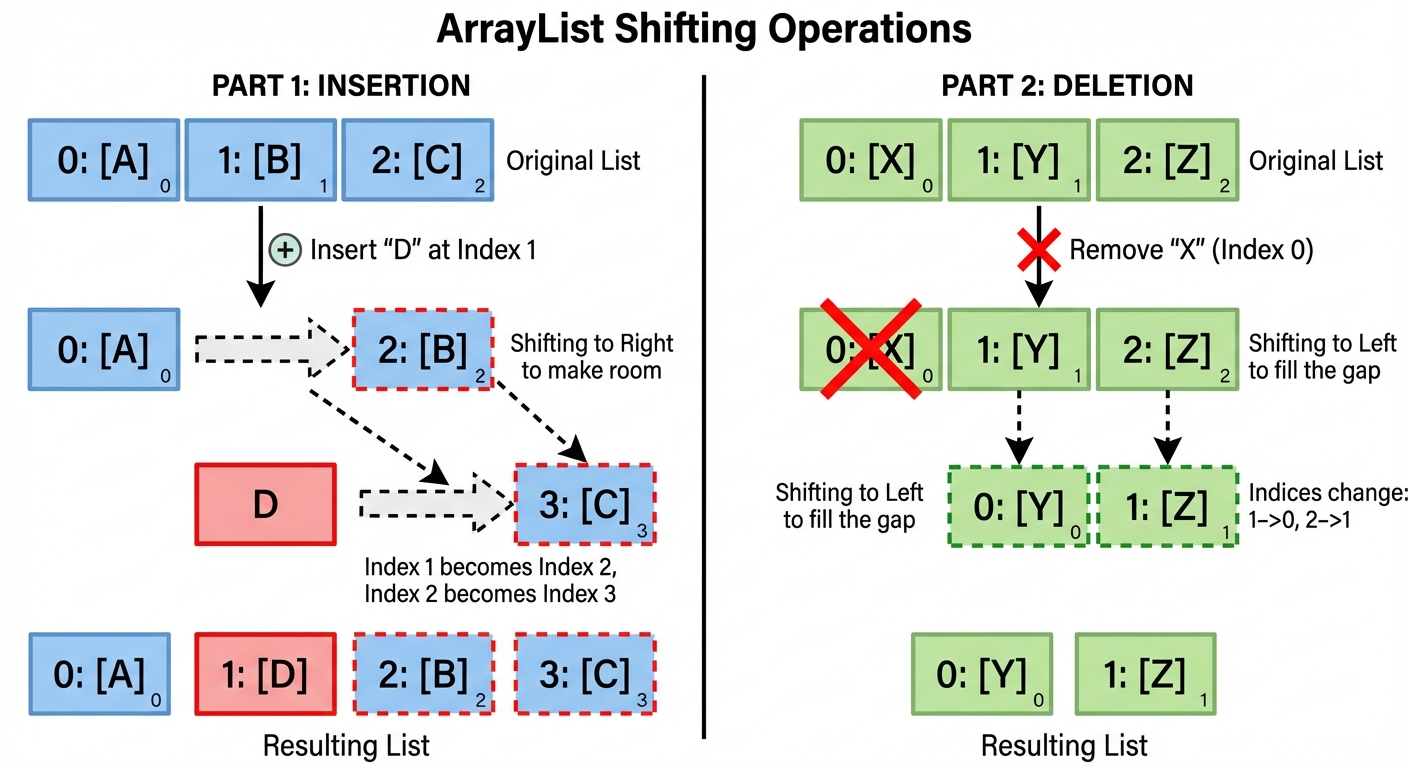
Shifting Explanation
- Insertion (
addwith index): If you have[A, B, C]and calladd(1, D), the list becomes[A, D, B, C]. Indices of B and C increase by 1. - Deletion (
remove): If you have[A, B, C]and callremove(1), the list becomes[A, C]. The index of C decreases by 1.
Traversing ArrayLists
Just like arrays, you need to iterate through ArrayLists to access or modify data. There are two primary ways to do this.
1. Standard for Loop
Use this when you need access to the index (e.g., for replacing elements or complex logic).
ArrayList<String> names = new ArrayList<>();
names.add("Alice");
names.add("Bob");

for (int i = 0; i < names.size(); i++) {
    // Use .get(i) to access elements
    System.out.println(i + ": " + names.get(i));
}
2. Enhanced for Loop (For-Each)
Use this for simple traversal where you do not need the index and do not intend to modify the structure of the list (add/remove).
for (String n : names) {
    System.out.println(n);
}
Restriction: You cannot use an enhanced for-loop to remove elements or replace elements (modify the reference currently held by the loop variable).
Developing Algorithms Using ArrayLists
Linear Search
Finding if an element exists or finding its location.
public int findTarget(ArrayList<Integer> list, int target) {
    for (int i = 0; i < list.size(); i++) {
        // Use .equals() for objects! Auto-unboxing handles == for Integers mostly,
        // but .equals is safer for generic objects.
        if (list.get(i).equals(target)) {
            return i; // Return index
        }
    }
    return -1; // Not found
}
The "Remove Elements" Trap
A common algorithm is removing all elements that meet a certain condition (e.g., remove all failing grades). This is a frequent source of logic errors.
The Problem: When you remove an element at index i, all subsequent elements shift left. If you then increment i, you skip the element that just shifted into the spot i occupied.
Correct Approach 1: Traverse Backwards
This prevents shifting from affecting indices you haven't checked yet.
// Remove all grades less than 60
for (int i = grades.size() - 1; i >= 0; i--) {
    if (grades.get(i) < 60) {
        grades.remove(i);
    }
}
Correct Approach 2: Conditional Increment
Only increment i if you didn't remove an element.
int i = 0;
while (i < grades.size()) {
    if (grades.get(i) < 60) {
        grades.remove(i); // size shrinks, elements shift, do not increment i
    } else {
        i++;
    }
}
Common Mistakes & Pitfalls
- Size vs. Length: Arrays have a
.lengthproperty. ArrayLists use the.size()method. Mixing these up is a syntax error. - The Return Value Paradox: Students often forget that
set(i, obj)andremove(i)return the data that was previously at that index. Exam questions often try to trick you by doing something like:System.out.println(list.set(0, "New"));—this prints the old value, not "New". - Object Comparison: Using
==to compare objects (like Strings or Integers outside of the cached range). Always use.equals()for checking content equality. - ConcurrentModificationException: Trying to add or remove items from a list while iterating over it using an enhanced for-loop will crash your program. Always use a standard for-loop for structural modifications.
- Index Logic: Forgetting that the last valid index is
size() - 1, notsize().