Big Idea 5: Computing Innovations, Ethics, and Cybersecurity
Crowdsourcing: The Power of the Many
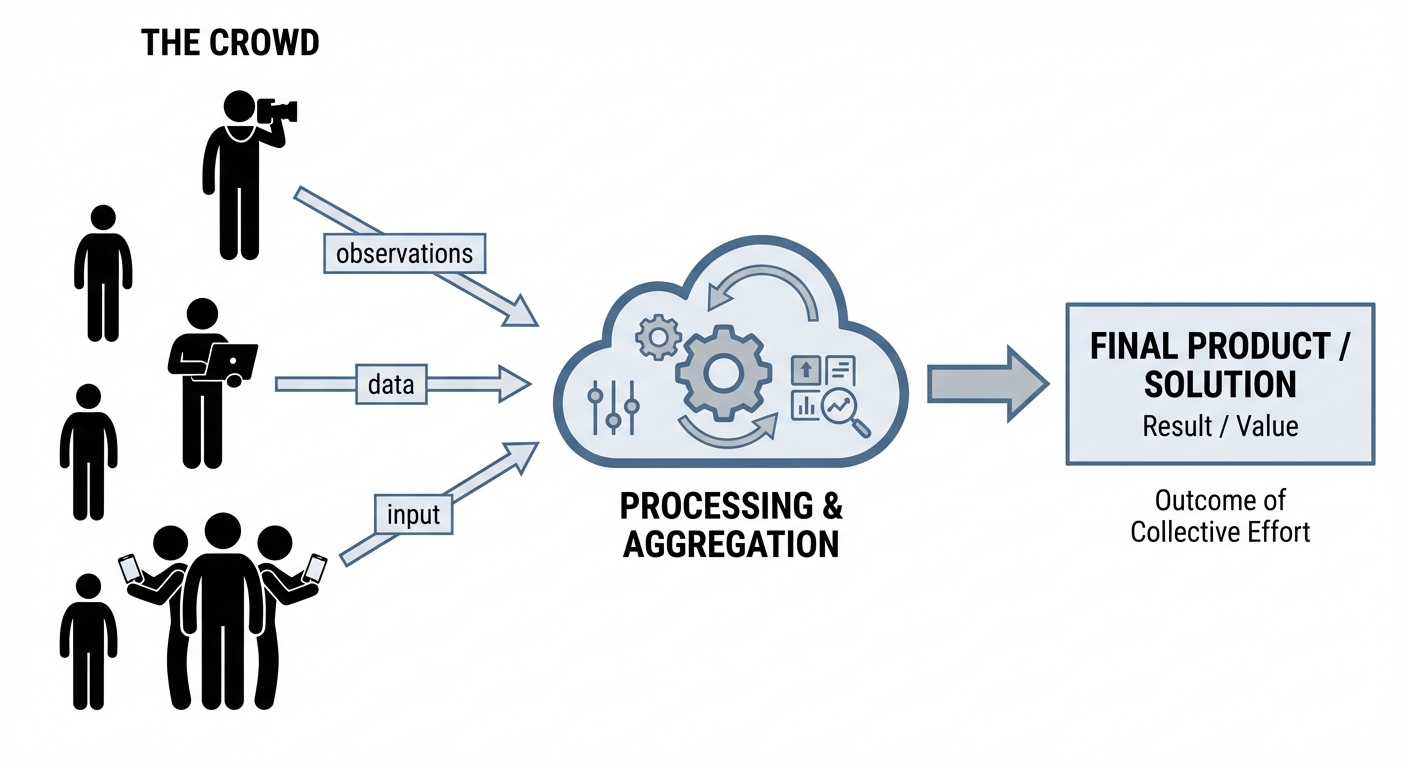
Crowdsourcing is the practice of obtaining input or information for a task or project by enlisting the services of a large number of people, typically via the Internet. Instead of relying on a small team of experts, crowdsourcing leverages the collective intelligence of the general public.
Key Models of Crowdsourcing
- Citizen Science: Scientific research conducted, in whole or in part, by amateur (or non-professional) scientists.
- Example: Apps where users identify local plants or count bird populations to help researchers track migration patterns.
- Participatory Sensing: Users contribute data usually via mobile devices.
- Example: Waze, where drivers passively contribute speed data and actively report accidents to create a real-time traffic map.
- Human Computation: Tasks that are easy for humans but difficult for computers.
- Example: reCAPTCHA, which asks users to identify traffic lights or text in images. This verifies the user is human while simultaneously training AI image recognition models.
Benefits vs. Challenges
| Benefits | Challenges |
|---|---|
| Scale: Access to thousands of contributors allows for massive data collection. | Quality Control: Data can be inaccurate or malicious. |
| Speed: Tasks can be completed much faster than by a single team. | Privacy: Contributors might unknowingly share sensitive location data. |
| Diversity: Brings in different perspectives and solutions. | Bias: Results may skew toward the demographics of those with internet access. |
Legal and Ethical Concerns in Computing
Computing innovations raise complex questions about ownership, privacy, and fairness. Understanding these rules is critical for the AP CSP exam.
Intellectual Property (IP) and Copyright
Intellectual Property refers to creations of the mind, such as code, inventions, and artistic works. By default, most created works are Copyrighted, meaning the creator has exclusive rights to use and distribute them.
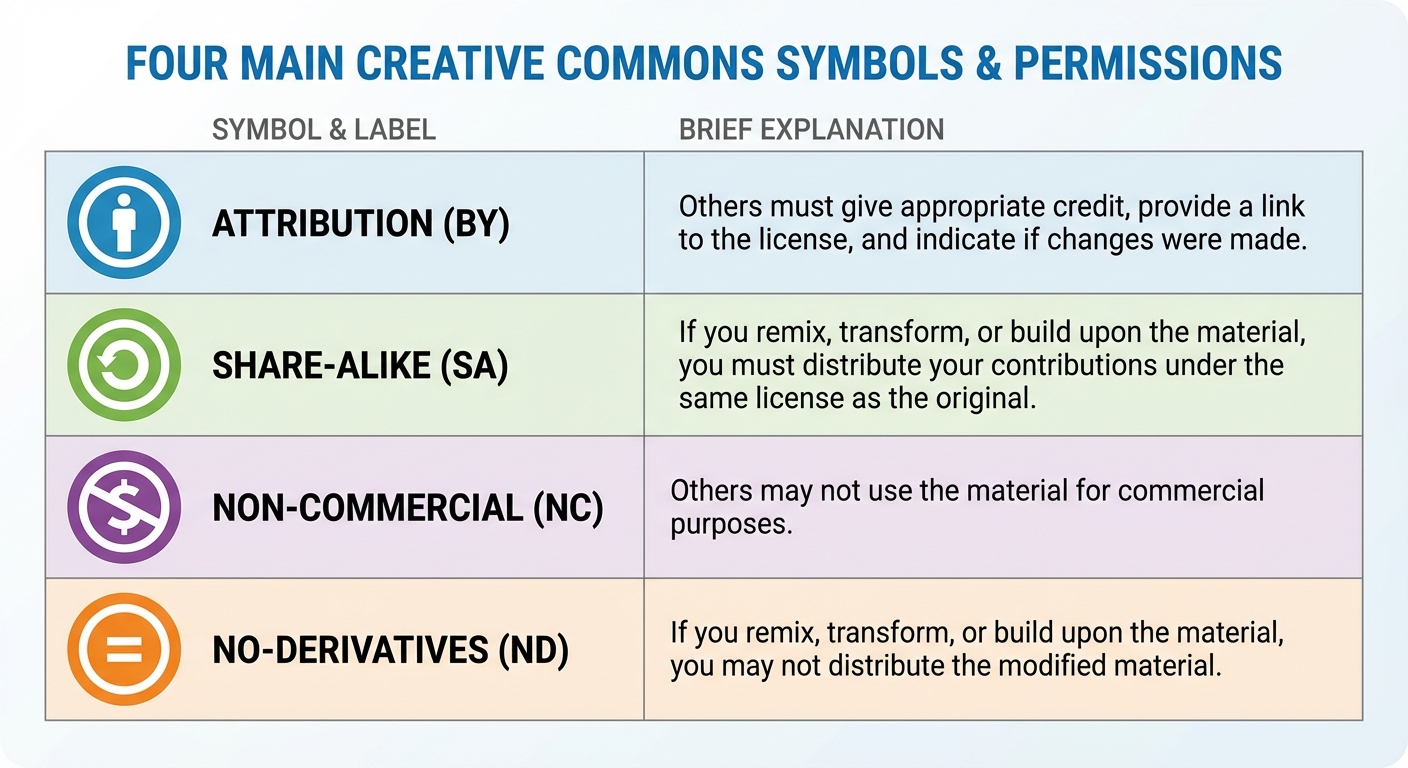
To facilitate sharing, many creators use Creative Commons (CC) licenses. These allow copyright holders to waive certain rights while retaining others.
Common CC License Elements:
- Attribution (BY): Others can use the work as long as they credit the creator.
- Share-Alike (SA): Others can use the work only if they license their new creation under the same terms.
- Non-Commercial (NC): Others can use the work, but not for profit.
- No-Derivatives (ND): Others can share the work but cannot change or remix it.
Open Source vs. Proprietary Software
- Open Source Software: The source code is made freely available for possible modification and redistribution (e.g., Linux, Firefox, Python). It promotes collaboration and transparency.
- Proprietary Software: The source code is kept secret and belongs to a specific company. Users buy a license to use it but cannot modify it (e.g., Microsoft Office, Adobe Photoshop).
Personally Identifiable Information (PII)
PII is any information that can verify the identity of an individual.
- Direct PII: Name, SSN, Passport Number.
- Linkable PII: Zip code, age, gender. (While not unique individually, when combined, they can often identify a specific person).
Risk: Aggregating data from multiple sources (e.g., search history + geolocation + shopping habits) can destroy anonymity, even if the data was "anonymized."
Algorithmic Bias
Algorithmic Bias occurs when a computing system reflects the implicit values of the humans who designed it or the training data used found within it.
- Example: A facial recognition system trained primarily on light-skinned faces may fail to accurately recognize dark-skinned faces.
- Correction: This is rarely intentional malice; it usually results from unrepresentative datasets. The fix requires auditing the data for diversity and testing the algorithm across all demographics.
Safe Computing: Cybersecurity Principles
Cybersecurity is the practice of protecting systems, networks, and programs from digital attacks.
The CIA Triad
Security is often defined by three goals:
- Confidentiality: Only authorized users can see the data.
- Integrity: The data has not been tampered with or corrupted.
- Availability: The system is accessible when needed.
Authentication and Multifactor Authentication (MFA)
Authentication verifies who you are. Multifactor Authentication (MFA) is a method of access control in which a user is granted access only after successfully presenting two or more pieces of evidence from different categories:
- Knowledge (Something you know): Password, PIN.
- Possession (Something you have): Mobile phone, security token, smart card.
- Inherence (Something you are): Fingerprint, FaceID, Retina scan.
Exam Tip: Entering a password and then answering a security question is NOT Multifactor Authentication. Those are both "Knowledge." MFA requires two different categories.
Malware and Social Engineering
- Malware: Malicious software intended to damage or disable computers (Viruses, Worms, Ransomware).
- Phishing: A social engineering attack where emails or messages deceive users into revealing PII or installing malware. These often look like official emails from a bank or school.
- Keylogging: Using software to record every keystroke made by a user to capture passwords.
- Rogue Access Point: A wireless access point that gives unauthorized access to secure networks (e.g., a hacker sets up a hotspot named "Free Coffee Wi-Fi" to intercept traffic).
Encryption
Encryption is the process of encoding information so that only authorized parties can access it.
1. Symmetric Key Encryption
- Uses a single key for both encryption and decryption.
- Pros: Very fast.
- Cons: Key Management. If I send you the key so you can read the message, a hacker intercepts the key and can read everything.
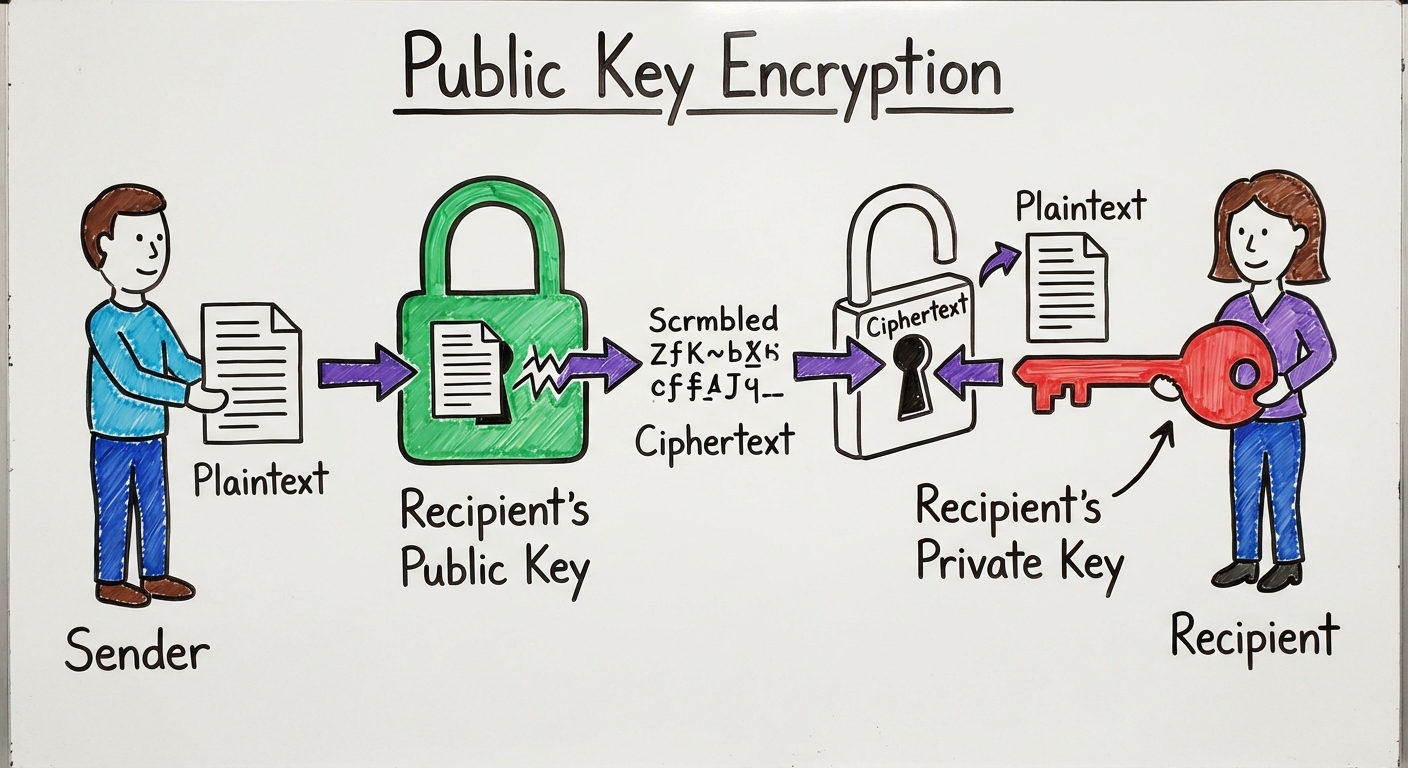
2. Public Key Encryption (Asymmetric)
- Uses a pair of keys:
- Public Key: Shared with everyone. Used to encrypt data.
- Private Key: Kept secret. Used to decrypt data.
- Concept: Alice wants to send a private message to Bob. Alice encrypts the message using Bob's Public Key. Now, only Bob's Private Key can unlock it. Even Alice cannot decrypt it once sent.
- Certificate Authorities (CA): Trusted organizations that verify that a public key belongs to a specific company/website (this is the padlock icon in your browser).
Common Mistakes & Pitfalls
- Confusing PII types: Students often think Zip Codes are not PII. While a Zip Code alone isn't PII, it is linkable PII. If you have Zip Code + Birthday + Gender, you can identify a massive percentage of the population.
- MFA Misunderstanding: Remember the categories. Password + PIN is NOT Multifactor. Password + Text code to phone IS Multifactor.
- Public Key Confusion: A common error is thinking you encrypt with your own private key to send a message. You encrypt with the recipient's Public Key. The private key is only for decrypting messages sent to you.
- Open Source vs. Free: Open Source means the code is visible and editable. Freeware means the software costs $0. These are not the same. You can have paid Open Source software (for support) and free Proprietary software.