AP CSP Unit 1: The Creative Development Process
Collaboration in Computing
Collaboration is not just a soft skill; it is a fundamental requirement of modern computer science. In the AP CSP curriculum (Topic 1.1), collaboration is defined as a driving force that helps create complex systems, reduce bias, and solve problems more effectively.
Why Collaborate?
Effective collaboration accomplishes several key goals:
- Diverse Perspectives: Different life experiences lead to different ways of thinking. Bringing diverse perspectives to a project helps avoid outcome bias (creating software that only works for a specific group of people).
- Efficiency: Large problems can be broken down into sub-problems, allowing teams to work in parallel.
- Error Detection: It is easier to spot errors in someone else's code than in your own.
Collaborative Models
A common specific model tested in AP CSP is Pair Programming.
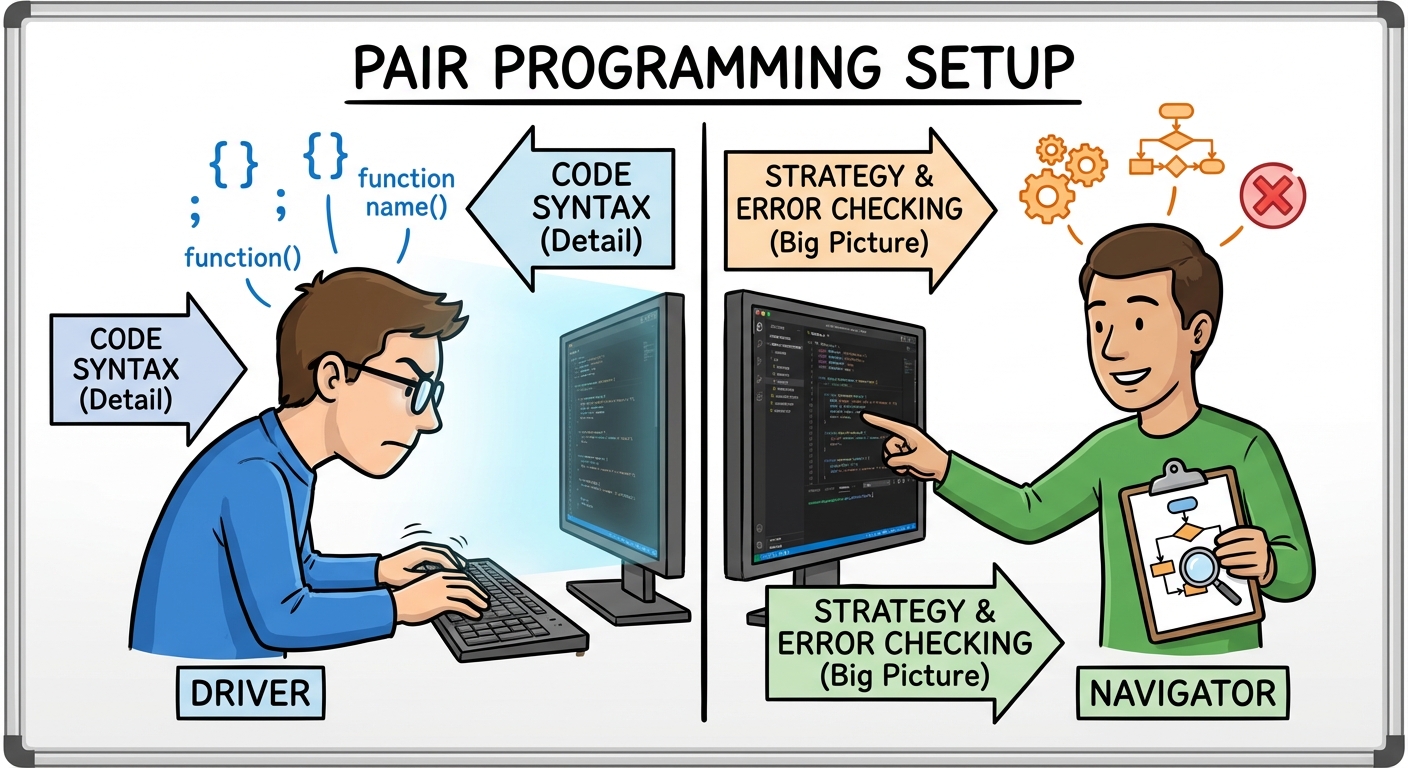
- The Driver: Sits at the computer, manipulates the keyboard/mouse, and writes the actual code. They focus on the immediate syntax and structure.
- The Navigator: Observes the driver, reviews the code as it is written, keeps track of the "big picture" design, and suggests solutions.
- The Switch: Partners must switch roles frequently during the session to maximize effectiveness.
Program Function and Purpose
Before writing code, developers must understand what they are building. Students often confuse a program's purpose with its function (Topic 1.2).
Definitions
- Program Purpose: The problem the program solves or the specific goal it achieves. It answers the question, "Why does this exist?"
- Example: "To provide entertainment during a commute" or "To connect buyers with sellers of vintage tables."
- Program Function: The behavior of the program during execution. It answers the question, "What does it actually do?"
- Example: "The user taps the screen to make a bird fly," or "The app takes a photo and filters it."
Computing Innovations
A computing innovation includes a program as an integral part of its function. All computing innovations generally follow the Input-Process-Output model:
- Input: Data sent to a computer for processing (e.g., mouse clicks, audio files, keystrokes, sensor data).
- Process (Transform): The algorithm modifies the data.
- Output: The information sent back to the user or system (e.g., sound, visual display, haptic feedback).
Program Design and Development
The development process (Topic 1.3) is rarely a straight line from start to finish. It is Iterative and Incremental.
The Development Life Cycle
- Investigation & Reflection: Interviewing users, identifying needs, and scoping the problem.
- Design: creating flowcharts, diagrams, or pseudocode before implementing.
- Prototyping: Building a "rough draft" of the program.
- Testing: checking for errors.

Iterative vs. Incremental
- Iterative Process: You refine the whole program repeatedly. You design, test, get feedback, and revise. The product improves with each version (iteration).
- Incremental Process: You break the program into smaller pieces and build them one at a time. You finish one feature before starting the next.
Documentation
Documentation is written text that accompanies code.
- Program Documentation: Explains how the program works, how to use it, and acknowledges any code segments or media assets (images/sounds) created by others.
- Comments: Text inside the code useful for the programmer but ignored by the computer. Comments are essential for collaboration so team members understand logic.
Note: Acknowledging the creator of a library or media asset is not just polite; it is an ethical requirement for intellectual property (IP) compliance in CSP.
Identifying and Correcting Errors
Debugging (Topic 1.4) is the process of finding and fixing errors. There are four distinct types of errors you must know for the exam.
1. Syntax Errors
A violation of the programming language's grammar rules. The computer does not understand what you are asking it to do, so the code will not run.
- Cause: Typos, missing semicolons, unmatched parentheses, or using undeclared variables.
- Example (Pseudocode):
text
a ← 10
DISPLAY (A)
Why is this an error? Variable names are case-sensitive.ais defined, butAis not. The language does not know whatAis.
2. Runtime Errors
The code runs, but an event occurs during execution that causes the program to crash (abort) violently.
- Cause: Identifying outside the bounds of a list, dividing by zero, or infinite loops.
- Example:
text
x ← 0
DISPLAY (5 / x)
Result: The program starts, sees the division by zero, and halts immediately.
3. Logic Errors
The program runs and completes without crashing, but it produces the wrong result or behaves unexpectedly. These are the hardest to fix because the computer doesn't give you an error message.
- Cause: Flawed algorithms, incorrect boolean operators (AND vs OR), or improper order of operations.
- Example:
text
score ← 95
IF (score > 90)
{
   DISPLAY("Grade: A")
}
IF (score > 80)
{
   DISPLAY("Grade: B")
}
Intended Output: "Grade: A"
Actual Output: "Grade: A Grade: B"
Why? The logic didn't account for mutual exclusivity. A score of 95 is greater than 90 and greater than 80. The programmer should have usedELSE IF.
4. Overflow Errors
An error that occurs when a computer attempts to handle a number that is outside the defined range of values (too big or too precise).
- Technical Context: Computers store numbers using a fixed number of bits (e.g., 32-bit integers). If a calculation exceeds the maximum value that 32 bits can hold, the odometer rolls over or crashes.
- Example:
text
x ← 2000000000 * 3000000000
DISPLAY (x)
The result is too large for a standard integer variable to hold, resulting in an overflow.
Debugging Tools
- Hand Tracing: Manually tracking variable values line-by-line using pencil and paper.
- Print Debugging: Adding temporary
DISPLAYorPRINTstatements to check the value of variables at specific points in the code. - Visualizers: Software that visually draws the state of the memory.
Common Mistakes & Pitfalls
Confusing Purpose and Function:
- Mistake: Describing the function as "To help people learn math."
- Correction: That is the purpose. The function is "The app displays equations and checks the user's input."
Syntax vs. Logic:
- Mistake: Thinking a program that prints the wrong answer has a syntax error.
- Correction: If it prints anything at all, the syntax is likely correct. If the answer is wrong, it is a Logic Error.
Ignoring the Human Element:
- Mistake: Assuming collaboration is only about speed.
- Correction: The primary AP CS benefit of collaboration is reducing bias.
Inputs are not just Keyboards:
- Mistake: Forgetting that inputs include sensor data (GPS, Accelerometer), network packets, and audio.
Assuming Comments Run:
- Mistake: Thinking comments slow down the program.
- Correction: Comments are stripped out or ignored during execution; they affect human readability, not machine performance.