AP CSP Unit 4: The Infrastructure of the Internet & Computing Systems
4.1 The Internet: Structure and Design
Defining the Internet
The Internet is not a single device or a centralized cloud; it is a network of networks linking billions of devices together globally. It is designed to be open, decentralized, and scalable.
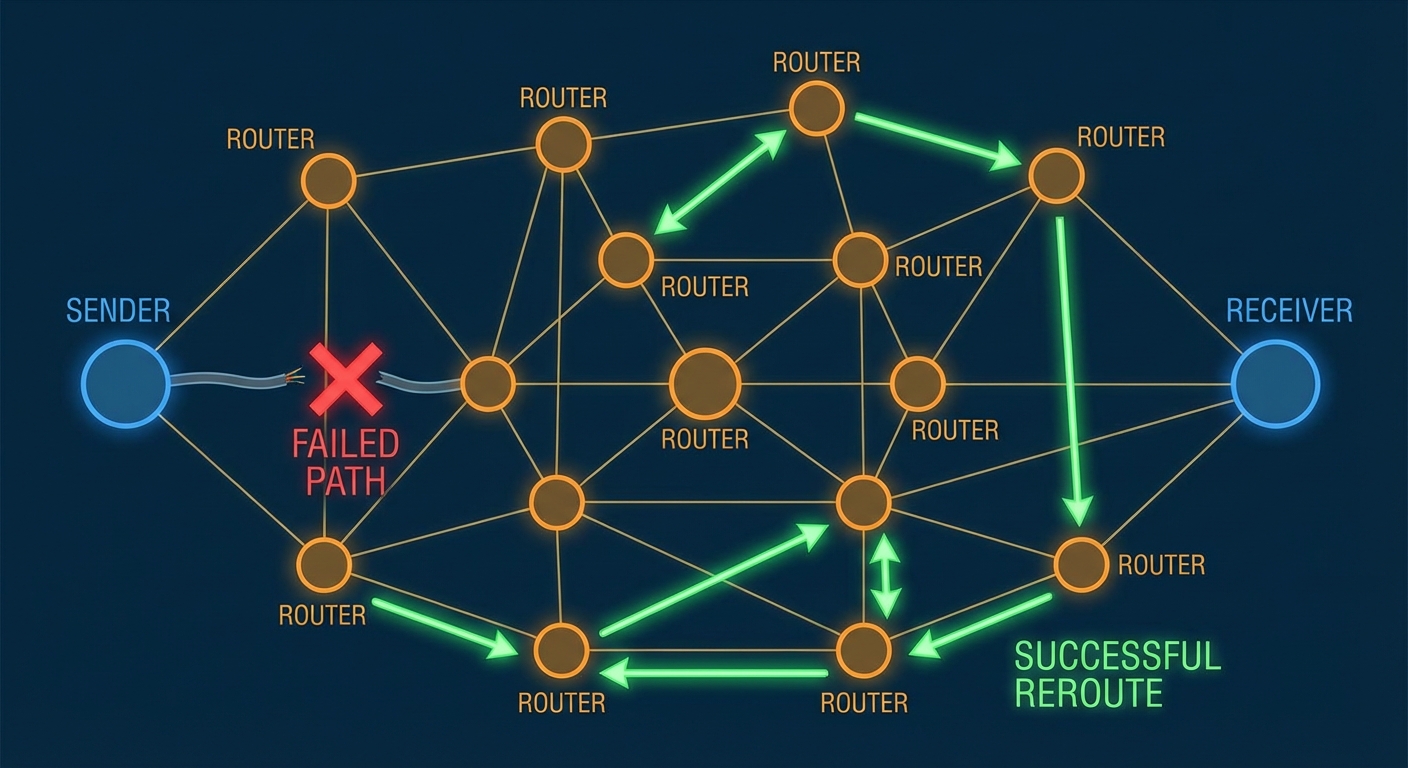
- Decentralized: There is no single control point. If one part of the internet goes down, the rest continues to function.
- Open Standards: The internet relies on open protocols that are publicly available and non-proprietary. This ensures that devices from different manufacturers (e.g., an Apple iPhone and a Windows Server) can communicate seamlessly.
- IETF (Internet Engineering Task Force): A loosely organized collection of citizens and engineers who develop and promote voluntary Internet standards and protocols (like TCP/IP).
Protocols
A Protocol is a set of rules that defines how data is formatted and processed. It acts like a language or a handshake agreement between computers.
Analogy: Protocols are like diplomatic etiquette. Even if two diplomats speak different native languages, they agree on a specific language (English) and format (handshakes, formal letters) to communicate effectively.
The Layers of the Internet
The internet is abstracted into layers. Higher-level layers depend on lower-level layers to function.
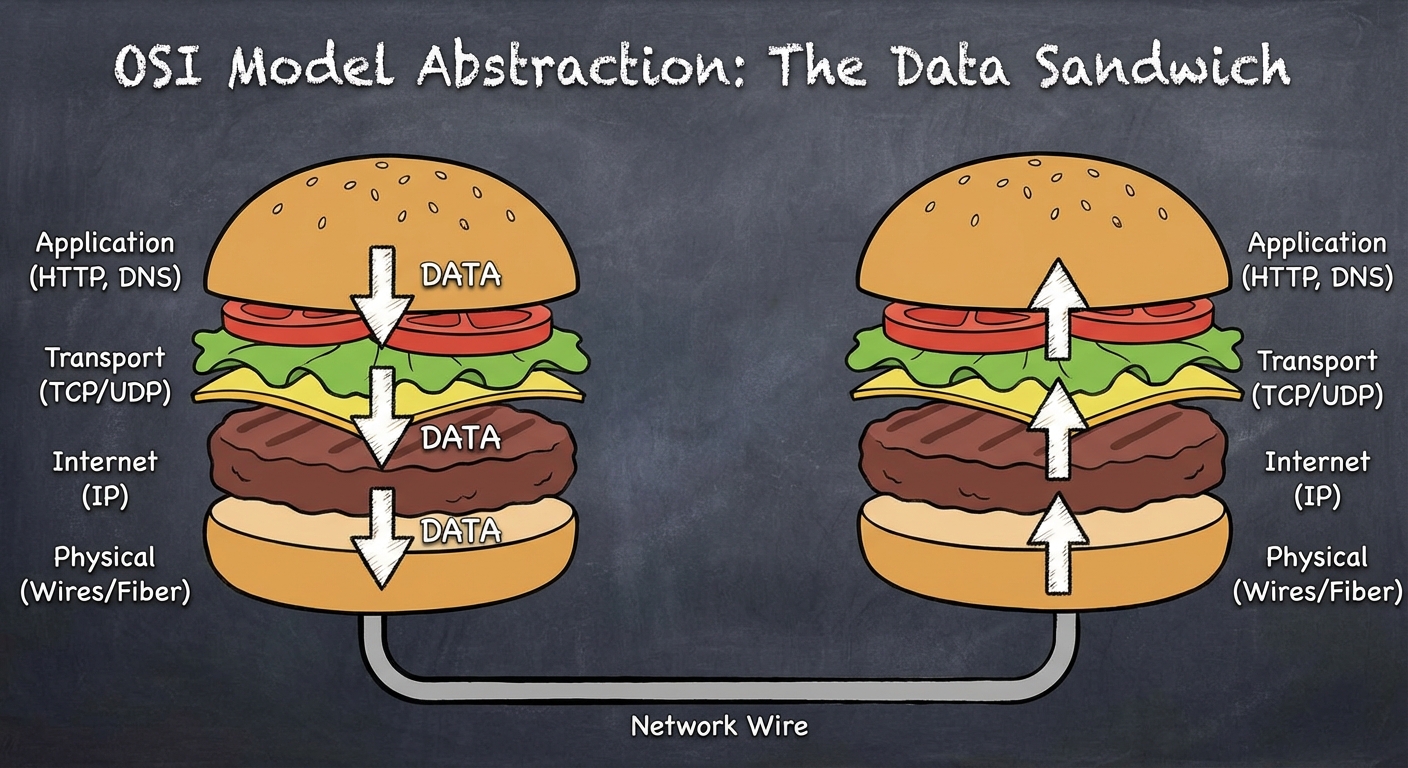
- Application Layer: Where the user interacts (HTTP, DNS).
- Transport Layer: Breaks down and reassembles data (TCP, UDP).
- Internet Layer: Routes the data across networks (IP).
- Network Interface/Physical Layer: The physical hardware (fiber optics, copper wires, Wi-Fi radio waves).
4.2 Routing and Addresses
IP Addresses
Every device connected to the internet needs a unique address to send and receive data, known as the Internet Protocol (IP) Address.
There are currently two standards in use:
- IPv4 (Internet Protocol version 4):
- Uses 32 bits.
- Format: Four numbers (0-255) separated by dots (e.g.,
172.16.254.1). - Limit: Approximately 4 billion unique addresses (which we have run out of).
- IPv6 (Internet Protocol version 6):
- Uses 128 bits.
- Format: Hexadecimal numbers separated by colons.
- Limit: $3.4 \times 10^{38}$ addresses (enough for every grain of sand on Earth to have an IP).
Routing
A Router is a computing device that passes information from one network to another.
- Dynamic Routing: Routers do not have a fixed map. They decide the best path for a packet at that exact moment based on traffic, congestion, or broken lines.
- Cost: In routing terms, "cost" isn't usually money; it refers to time, latency, or reliability.
Key Concept: Data sent over the internet does not follow a single, dedicated line (like an old telephone call). It passes through many different routers (hops) to reach its destination.
4.3 Data Transmission: Packets and Protocols
Packet Switching
When you send a file (like an email or image), it is not sent as one giant continuous stream. It is broken down into small chunks called Packets.
Metadata: Each packet contains the data (payload) plus metadata, including:
- Source IP Address
- Destination IP Address
- Sequence Number (for reassembly)
The Journey:
- File is chopped into packets.
- Packets are sent individually.
- Packets may take different routes to the destination.
- Packets may arrive out of order.
- The receiving computer reassembles them based on sequence numbers.
TCP vs. UDP
These are the two main protocols responsible for transporting packets (Transport Layer).
| Feature | TCP (Transmission Control Protocol) | UDP (User Datagram Protocol) |
|---|---|---|
| Reliability | High. Guarantees delivery. | Low. No guarantee. |
| Mechanism | Sends a confirmation (ACK) for every receipt. Resends lost packets. | Fire and forget. No confirmation sent. |
| Speed | Slower (due to error-checking). | Faster. |
| Use Cases | Emails, Web Browsing, File Transfers, Banking. | Live Video Streaming, Online Gaming, VoIP. |
Mnemonic: TCP = Totally Consistent Packets. UDP = Unreliable Data Passing.
4.4 The Domain Name System (DNS) & HTTP
DNS: The Phonebook of the Internet
Humans are bad at remembering IP numbers (142.250.190.46), but good at remembering names (google.com). The Domain Name System (DNS) translates human-readable domain names into IP addresses.
How it works:
- User types
www.example.com. - Computer asks a DNS Resolver: "What is the IP for example.com?"
- If the resolver doesn't know, it asks the Root Server, then the TLD (Top Level Domain) server (like .com or .org).
- The IP address is returned to your computer.
- Your computer connects to that IP.
DNS Hierarchy & Scalability:
DNS is hierarchical. No distinct server knows every address. This allows the system to scale indefinitely as the internet grows.
HTTP and HTTPS
- HTTP (HyperText Transfer Protocol): The protocol used for transmitting web pages over the Internet. It is a "call and response" protocol (Client sends GET request; Server sends response).
- HTTPS (HTTP Secure): Uses SSL/TLS (Secure Sockets Layer / Transport Layer Security) to encrypt the communication. This ensures that even if a hacker intercepts the packets, they cannot read the data (like passwords or credit card numbers).
Exam Tip: The World Wide Web != The Internet. The Internet is the infrastructure (wires/routers/IP). The World Wide Web is a service built on top of the internet that uses HTTP to link pages.
4.5 Fault Tolerance and Redundancy
A critical requirement of modern systems is Reliability.
Redundancy
Redundancy means having extra components (like duplicate routers or backup hard drives) that are not strictly necessary to functioning, but serve as a backup in case of failure.
Fault Tolerance
Fault Tolerance is the ability of a system to continue operating without interruption properly in the event of the failure of one or more of its components.
- Connection Redundancy: Because the internet is a mesh of connections, if one cable is cut or one router loses power, the system automatically routes packets around the failure. There is no single point of failure.
Scalability
Scalability is the capacity for the system to change in size and scale to meet new demands. The internet is scalable because:
- Protocols are open.
- Router architecture is hierarchical.
- Adding a new device doesn't require "turning off" the internet.
4.6 Parallel and Distributed Computing
As computational problems get larger, a single processor often isn't fast enough. We use two main strategies to solve this.
Sequential Computing (The "Normal" Way)
Instructions are executed one after the other.
- Time taken = Sum of time for all steps.
Parallel Computing
A computational model where the program is broken into smaller sequential operations, some of which are performed simultaneously on multiple processors (shares memory).

The Speedup Formula:
To calculate how much faster a parallel solution is, we use:
Example Problem:
A task takes 40 seconds to run on one processor. On a parallel system with 4 processors, it takes 10 seconds. What is the speedup?
Limitations of Parallel Computing:
- Sequential Portion: Some operational steps (like setting up the data or combining the final results) simply cannot be parallelized.
- A parallel solution takes as long as its slowest parallel path plus the sequential steps.
Distributed Computing
A model in which multiple devices (computers/servers) communicate and coordinate their actions to solve a huge problem. They communicate via a network.
- Difference: Parallel = One computer, multiple cores. Distributed = Many computers, networked together.
- Purpose: Allows solving problems that are too massive for a single supercomputer to store or process (e.g., modeling climate change, Google Search indexing).
Distributed Denial of Service (DDoS)
This is a specific attack related to distributed systems. A DDoS attack occurs when a botnet (network of infected computers) floods a target server with requesting packets, overwhelming its bandwidth and making it inaccessible to legitimate users.
4.7 The Digital Divide
While the internet is a global network, access is not distributed equally. The Digital Divide refers to differing access to computing devices and the Internet, based on socioeconomic, geographic, or demographic characteristics.
- Factors: Cost of infrastructure, government censorship, remote geography, and digital literacy.
- Impact: Groups without access have lower educational and economic opportunities, widening the gap between developed and developing areas.
Summary of Common Mistakes
Confusing WWW and Internet:
- Mistake: Thinking they are synonyms.
- Correction: The Internet is the tracks; the WWW is the train running on them. You can use the internet (Email, Skype, Online Gaming) without using the Web (HTTP).
Latency vs. Bandwidth:
- Mistake: Thinking they both just mean "speed."
- Correction: Bandwidth is the width of the pipe (how much data can happen at once). Latency is the length of the pipe (how long it takes a single bit to get there). High bandwidth doesn't guarantee low latency.
Speedup Calculation:
- Mistake: Assuming adding more processors always results in perfect speedup (e.g., 2 processors = 2x speed).
- Correction: There is always overhead (communication time) and sequential parts that limit efficiency. The speedup is never perfectly linear indefinitely.
Routing Knowledge:
- Mistake: Thinking routers know the whole path to the destination.
- Correction: Routers only know their direct neighbors. They pass the "hot potato" to the neighbor they think is closest to the destination.