Big Idea 1: Foundations of Creative Development
Computing is not a solitary activity—it is a creative, collaborative field driven by the desire to solve problems. This unit explores how developers work together, how programs are designed, and how errors are managed.
Collaboration in Computing
Collaboration in computer science is the practice of multiple people working together to create a computing innovation. Effective collaboration is essential for handling the complexity of modern software.
Benefits of Diverse Perspectives
When a development team includes members with different backgrounds, experiences, and skill sets, the resulting software is usually better.
- Bias Reduction: A diverse team is more likely to identify potential biases in algorithms or user interfaces (e.g., facial recognition software that works equally well for all ethnicities).
- Error Detection: Different people think differently; one person might spot a logic error that another missed.
- Broader Accessibility: Integrating diverse feedback ensures the program meets the needs of a wider range of users, including those with disabilities.
Pair Programming
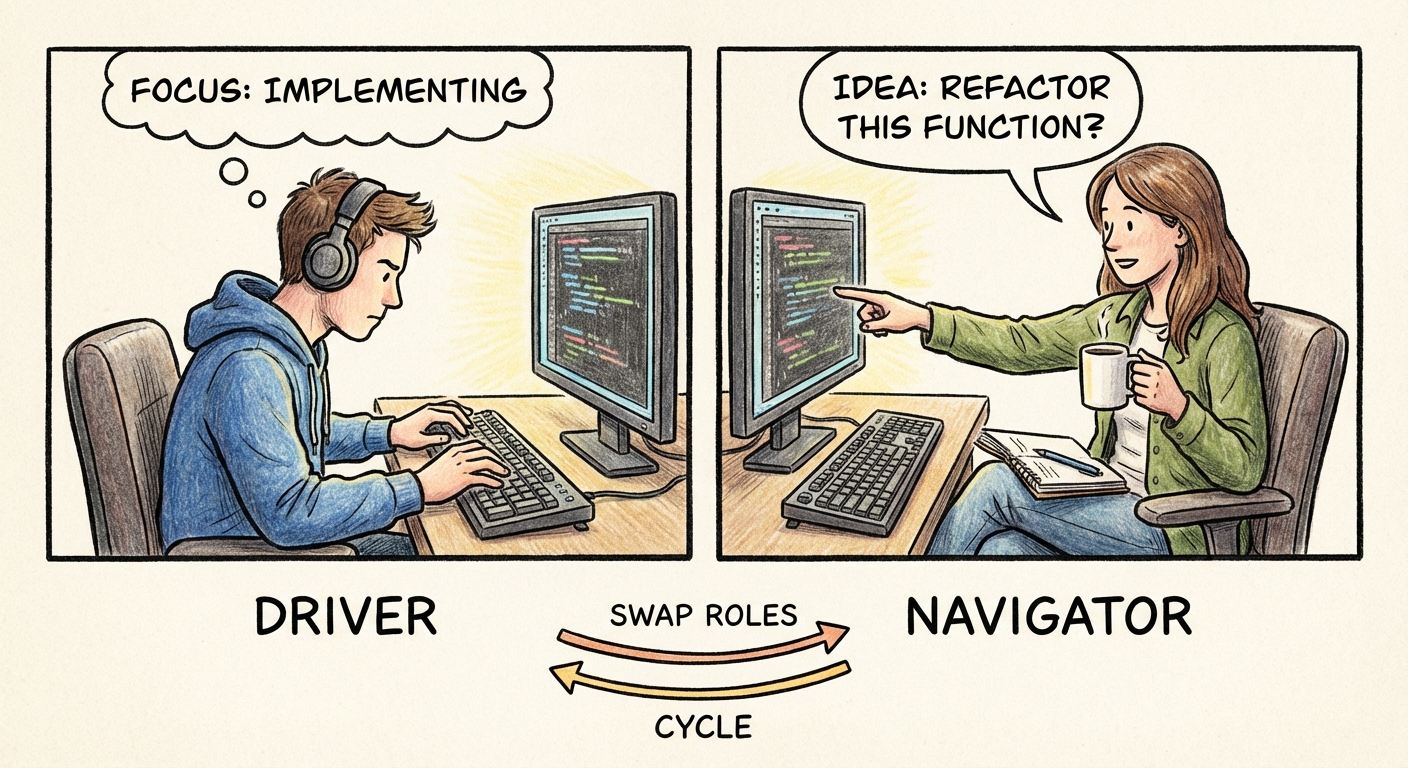
One of the most specific collaboration models tested in AP CSP is Pair Programming. This involves two programmers working at a single workstation.
| Role | Responsibilities |
|---|---|
| The Driver | Controls the keyboard and mouse. They write the actual code. |
| The Navigator | Reviews the code in real-time, thinks about the "big picture" design, and spots errors. |
Key Rule: The two programmers must switch roles frequently. Pair programming is not one person working while the other watches; it is an active dialogue.
Program Function and Purpose
Students often confuse what a program does with why it was built. You must be able to distinguish between these two concepts in a written response.
1. Program Purpose
The purpose is the "why." It describes the problem the innovation is engaging with or the creative expression it enables.
- Example: "The purpose of this app is to help students manage their study time effectively to reduce stress."
2. Program Function
The function is the "how" or the "what." It describes the specific behaviors of the program during execution.
- Example: "The function of the app is to allow users to input task names, set timers, and receive notifications when the time expires."
Memory Aid: Purpose = Problem Solved. Function = Features.
Program Design and Development
Software does not appear magically; it goes through a lifecycle.
Development Processes
AP CSP emphasizes two overlapping methodologies:
- Iterative Development: The process of refining and revising the program. You design, code, test, and then cycle back to improve the design based on the testing. It is a cycle, not a straight line.
- Incremental Development: The process of breaking a big problem into smaller pieces (decomposition) and building the program one piece (increment) at a time. You ensure one part works before adding the next.

The Design Phase
Before writing code, developers investigate the problem. This involves:
- investigation: Surveys, user interviews, and direct observation to understand user needs.
- Specifications: Defining the inputs, outputs, and requirements.
- Documentation: Keeping a record of how the program works. This includes comments within the code.
Code Documentation
Comments are ignored by the computer but are crucial for humans. They help collaborators understand your logic and help you remember what you did when you revisit the code later.
# This function calculates the area of a circle
# Input: radius (number)
# Output: area
def calculate_area(radius):
    pi = 3.14  # Approximation of Pi
    return pi * (radius ** 2)
Identifying and Correcting Errors
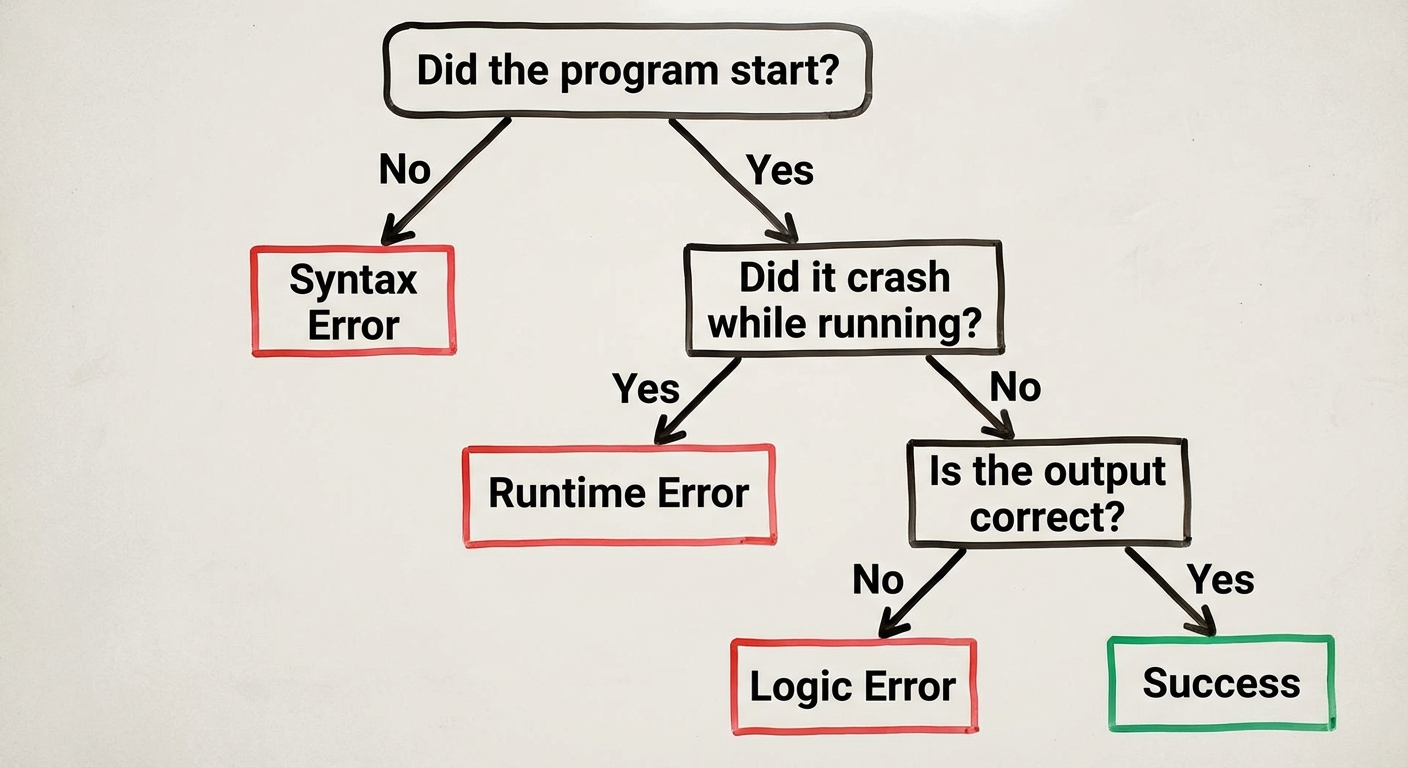
Debugging is a core skill. You must be able to identify three specific types of errors.
Types of Errors
| Error Type | Definition | Symptom | Example |
|---|---|---|---|
| Syntax Error | A violation of the programming language's rules (grammar). | The code fails to compile or start. | Missing a semicolon, unmatched parenthesis, or typing printt instead of print. |
| Runtime Error | An error that occurs while the program is running. | The program crashes (aborts) during execution. | Dividing by zero, or trying to access the 10th item in a list of only 5 items. |
| Logic Error | The program runs and does not crash, but produces the wrong result. | The output is incorrect or acts unexpectedly. | Using + instead of *, or a loop that repeats one too many times. |
Debugging Strategies
- Hand Tracing: Manually tracking the value of variables line-by-line on paper. This is the best way to find logic errors.
- Test Cases: Creating specific inputs with known/expected outputs to verify the program works. You must test:
- Normal data: Standard inputs.
- Boundary data: Edge cases (e.g., if input must be > 0, test 0 and 1).
- Erroneous data: Invalid inputs to ensure the program handles them gracefully.
- Visualizations: Using flowcharts or print statements to see the flow of execution.
Common Mistakes & Pitfalls
- Logic vs. Runtime Confusion: Students often think that if a program produces the wrong math, it's a runtime error. It is not unless the program crashes. If it gives you
4when the answer should be8, that is a Logic Error. - Ignoring the "Navigator": In Pair Programming questions, students sometimes assume the Navigator just fetches coffee. The Navigator is active—reviewing code and keeping track of the big picture.
- Ambiguous Purpose: When asked for the purpose of a program, do not say "to accept input." That is a function. State the impact or goal (e.g., "to facilitate communication").
- Skipping Edge Cases: When designing tests, students often forget to test the boundaries (e.g., the first and last validation condition). This is where "off-by-one" logic errors usually hide.