Comprehensive Guide to Big Idea 3: Algorithms and Programming
Variables and Assignments
Definitions & Concepts
Variables are abstract placeholders (names) used to store data values that a program needs to execute. They are the fundamental unit of data storage in programming.
- Data Abstraction: Variables provide the lowest level of data abstraction. Instead of knowing the specific binary memory address (e.g.,
0x7F...), the programmer uses a name (e.g.,score) to access the value. - Data Types: While some languages require you to declare types, AP CSP Pseudocode handles types dynamically. Common types include:
- Integers: Whole numbers (e.g.,
5,-10). - Numbers (Floats): Numbers with decimals (e.g.,
3.14,0.05). - Strings: Ordered sequences of characters enclosed in quotes (e.g.,
"Hello World","123 Main St"). Note:"123"is a string, not a number, and cannot be used directly in math calculations. - Booleans: Values that are either
trueorfalse.
- Integers: Whole numbers (e.g.,
Assignment Operators
Assignment is the process of setting a variable's value. The AP CSP exam uses the left-facing arrow notation.
This reads as "Evaluates the expression on the right and assigns the result to the variable on the left."
Key Rules:
- Destructive: Assigning a new value overwrites the old value completely.
- Directional: Data always moves from Right to Left. You cannot write
10 ← score.
The "Swap" Pattern
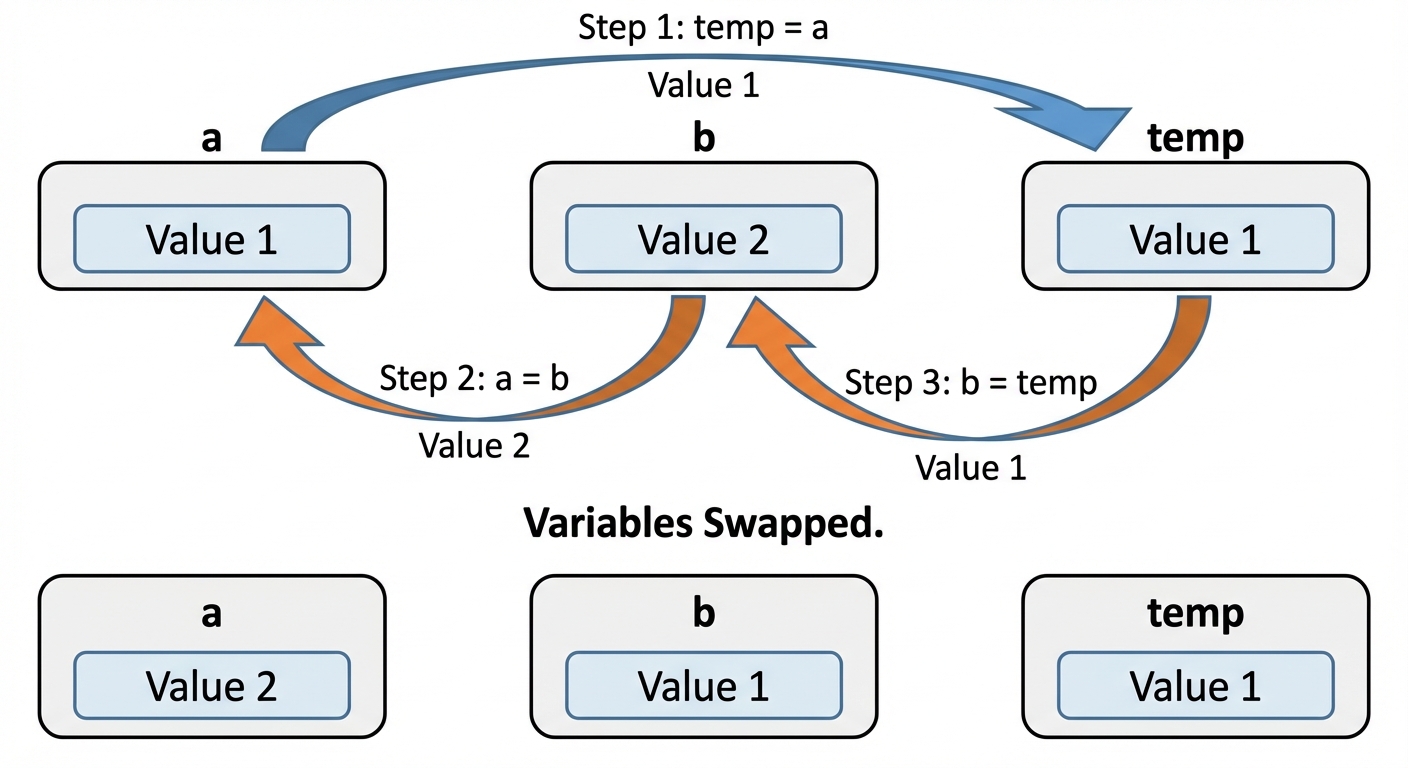
A frequent exam question asks how to swap the values of two variables, a and b. This requires a temporary variable.
// Incorrect (Data Loss)
a <- b  // a takes b's value, old 'a' is lost
b <- a  // b takes the new 'a' (which is b), so both are now 'b'

// Correct (Using Temp)
temp <- a
a <- b
b <- temp
Data Abstraction: Lists
List Fundamentals
A List is an ordered collection of elements. It allows programmers to refer to a large set of data using a single variable name, reducing complexity.
- Element: An individual value in a list.
- Index: The position of an element in the list.
CRITICAL AP CSP RULE: AP CSP Pseudocode uses 1-based indexing. The first item is at index 1, not 0.
Consider the list: grades ← [95, 88, 72]
| Index | Value |
|---|---|
| 1 | 95 |
| 2 | 88 |
| 3 | 72 |
List Operations
The AP Exam Reference Sheet provides specific methods for manipulating lists:
| method | Description |
|---|---|
INSERT(list, i, value) | Shifts elements at and to the right of index i over, then puts value at index i. Increases length by 1. |
APPEND(list, value) | Adds value to the very end of the list. Increases length by 1. |
REMOVE(list, i) | Deletes the item at index i. Elements to the right shift left to fill the gap. Decreases length by 1. |
LENGTH(list) | Returns the number of items currently in the list. |
Lists and Strings
Strings act essentially like lists of characters. You can access parts of a string using an index, iterate through them, and concatenate them.
- Concatenation: Joining two strings.
"Race" + "car"results in"Racecar".
Control Structures
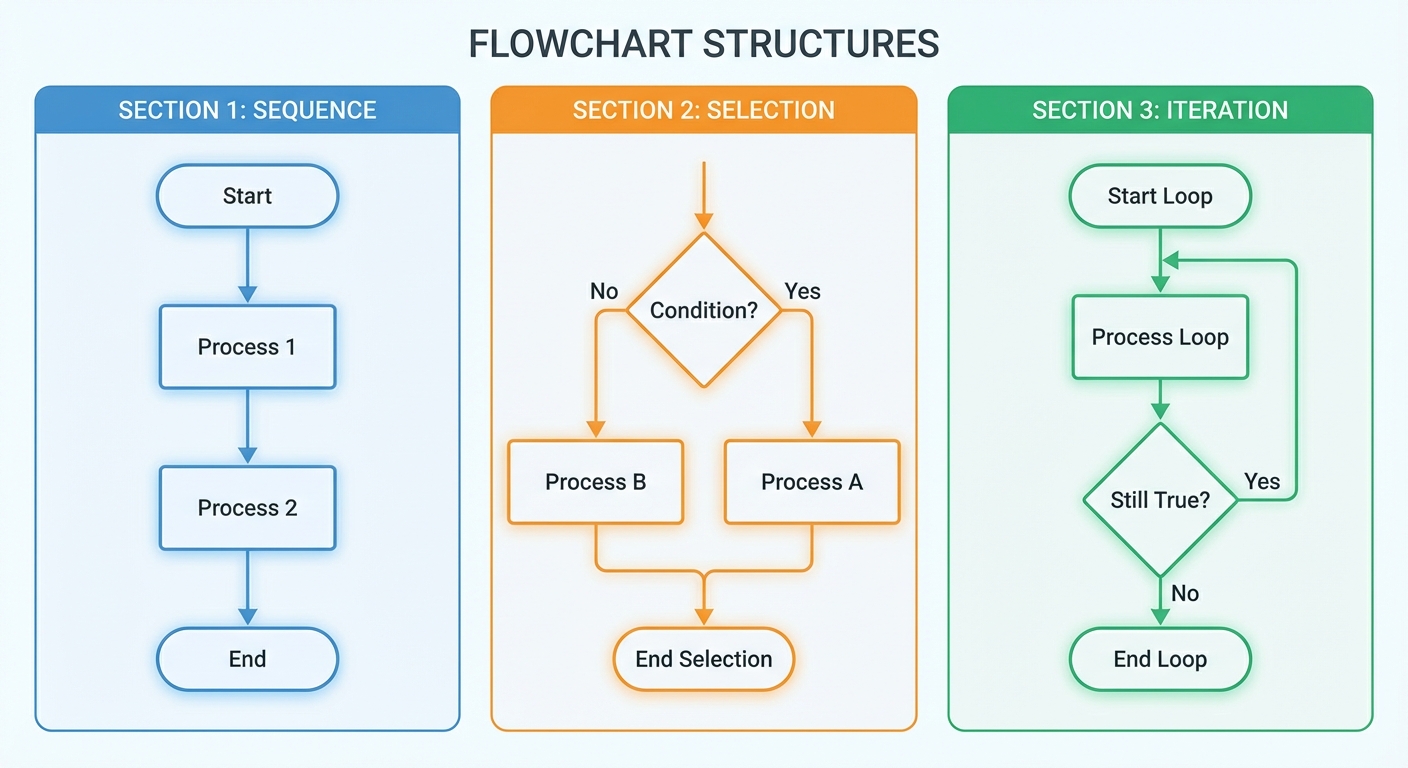
Algorithms are built using three fundamental building blocks.
1. Sequencing
Sequencing is the application of each step of an algorithm in the order in which the code statements are given. If the order is changed, the outcome usually changes.
2. Selection (Conditionals)
Selection determines which parts of an algorithm are executed based on a condition being true or false. This is achieved using IF statements.
- Boolean Expressions: The condition inside the IF statement check.
- Relational Operators:
=,≠,>,<,≥,≤. - Logic Operators:
NOT condition: Inverts the value.condition1 AND condition2: True only if both are true.condition1 OR condition2: True if at least one is true.
Nested Conditionals:
Placing an IF statement inside another IF statement allowing for complex logic trees.
IF (age ≥ 16)
{
   IF (passTest)
   {
      DISPLAY("License Granted")
   }
   ELSE
   {
      DISPLAY("Retake Test")
   }
}
ELSE
{
   DISPLAY("Too young")
}
3. Iteration (Loops)
Iteration is a repetitive portion of an algorithm. It repeats a specified number of times or until a given condition is met.
Types of Loops in CSP:
- REPEAT n TIMES: Runs the block exactly
ntimes. - REPEAT UNTIL (condition): An indefinite loop. It runs while the condition is false. It stops the moment the condition becomes
true.- Warning: This is the opposite of a "While" loop found in Python/Java, which runs while true.
- FOR EACH item IN list: A traversal loop. It automatically runs once for every element in the list. The variable
itemis assigned the current value in the list for that iteration.
Algorithms & Searching
Definitions
- Algorithm: A finite set of instructions that accomplish a task.
- Algorithm Construction: Algorithms can be combined (sequenced), selected, and iterated to create new, more complex algorithms.
Standard Algorithms
You must be able to recognize these patterns in code:
- Sum/Average: Initialize
total ← 0. Loop through list adding each item tototal. For average, dividetotalbyLENGTH(list). - Max/Min: Initialize
maxValto the first item in the list. Loop through the rest;IF item > maxVal, updatemaxVal.
Search Algorithms
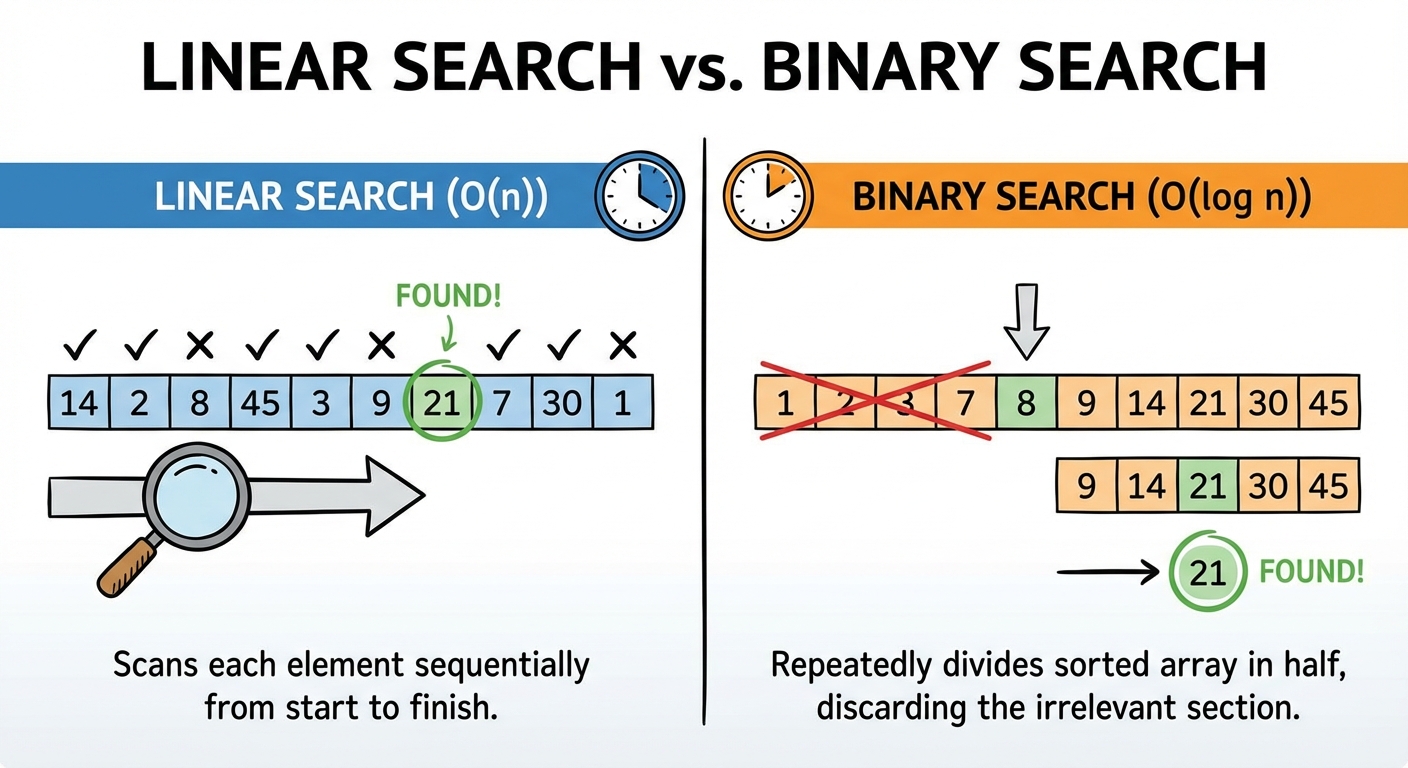
Searching is the process of finding a specific target value within a list.
Linear Search (Sequential Search)
- Method: Check the first item, then the second, then the third, and so on.
- Requirements: Data does not need to be sorted.
- Efficiency: Checks every element in the worst case (Linear complexity).
Binary Search
- Method: Find the middle element. If the target is lower, eliminate the top half. If higher, eliminate the bottom half. Repeat on the remaining half.
- Requirements: Data MUST be sorted to work.
- Efficiency: Much faster than linear search for large datasets. It grows logarithmically.
- Example: If you have 100 items, Linear search might take 100 steps. Binary search takes $\approx 7$ steps ($2^7 = 128$).
Procedures and Libraries
Procedural Abstraction
A Procedure (often called a function) is a named group of programming instructions that may have parameters and return values.
- Abstraction Idea: Procedures allow programmers to use a block of code without needing to know how the code works internally, only what it does. This reduces complexity and allows for code reuse.
Parameters and Arguments
- Parameter: The variable defined in the procedure definition (the placeholder).
- Argument: The actual value sent to the procedure when it is called.
PROCEDURE calculateArea(width, height) // width/height are Parameters
{
   RETURN width * height
}

// Usage:
area ← calculateArea(10, 5) // 10 and 5 are Arguments
Libraries and APIs
- Library: A collection of procedures that are useful for creating programs.
- API (Application Programming Interface): Specifications for how the procedures in a library behave and how they can be used. It documents what parameters are needed and what is returned.
Simulations and Randomness
Randomness
Non-deterministic behavior is crucial for games, modeling, and cryptography.
RANDOM(a, b): A standard CSP procedure that returns a random integer betweenaandb(inclusive).
Simulations
Simulations are computer programs that mimic real-world events or systems (e.g., traffic patterns, solar systems, disease spread).
- Purpose: Used when real-world testing is too dangerous, too expensive, too slow (evolution), or too fast (particle physics).
- Abstraction: Simulations are abstractions. They simplify reality by removing details that are not relevant to the study.
- Bias: Because simulations are programmed by humans and rely on simplified models, they may contain bias or produce results that do not perfectly match reality.
Algorithm Efficiency and Limitations
Measuring Efficiency
We measure efficiency not by seconds (time), but by the number of steps required as a function of the input size ($N$).
- Reasonable Time (Polynomial): The number of steps is a polynomial function of the input size (e.g., $N$, $N^2$).
- Examples: Linear Search, Simple Sorts, basic math.
- Unreasonable Time (Exponential/Factorial): The number of steps grows exponentially as input increases (e.g., $2^N$, $N!$).
- Examples: Cracking strict passwords, The Traveling Salesperson Problem.
- As $N$ gets slightly larger, the time required becomes technically impossible (thousands of years).
Heuristics
When a problem is "unreasonable" (too slow to solve exactly), we use a Heuristic.
- Definition: An approach that produces a solution that is "good enough" or approximate, typically in a reasonable amount of time, but is not guaranteed to be the optimal/perfect solution.
Solvability
- Decidable Problem: A problem for which an algorithm can be written to produce a correct "yes" or "no" answer for every possible input.
- Undecidable Problem: A problem for which no algorithm can be constructed that is always capable of providing a correct yes-or-no answer.
- Classic Example: The Halting Problem (Can a computer program determine if another program will run forever or stop? Answer: No, it is undecidable).

Common Mistakes & Pitfalls
0-based vs. 1-based Indexing:
- Mistake: Assuming
list[1]is the second item (like in Java/Python). - Correction: In AP CSP,
list[1]is the first item.list[LENGTH(list)]is the last item.
- Mistake: Assuming
The "Robot" Orientation:
- Mistake: Forgetting that
MOVE_FORWARD()depends on the direction the robot is currently facing. - Correction: Always track the robot's current heading (
ROTATE_LEFT/RIGHTchanges heading, not position).
- Mistake: Forgetting that
REPEAT UNTIL Logic:
- Mistake: Thinking the loop runs while the condition is true.
- Correction:
REPEAT UNTIL (x > 5)runs while x is 5 or less. It stops as soon as x is > 5.
Binary Search Requirements:
- Mistake: Trying to use Binary Search on a list like
[10, 50, 20, 30]. - Correction: Binary search fails on unsorted lists. You must use Linear Search or sort the data first.
- Mistake: Trying to use Binary Search on a list like
Swapping Variables:
- Mistake: Writing
a ← bfollowed byb ← a. - Correction: This results in both variables holding the initial value of
b. You effectively deleted the value ofa. Always use atempvariable.
- Mistake: Writing