Big Idea 4: Interconnected Computing Systems
Big Idea 4: Interconnected Computing Systems
The Architecture of the Internet
Before diving into the mechanics, we must distinguish between two concepts often used interchangeably: The Internet and the World Wide Web (WWW). The Internet is the physical network of connected computing devices (hardware and infrastructure), while the WWW is a system of linked pages, programs, and files accessed via the Internet using protocols like HTTP.
Network Structure and Routing
The Internet is a distributed system, meaning there is no single central computer controlling it. Instead, it is a network of networks composed of:
- Computing Device: Any machine that can run a program (e.g., computer, smartphone, smart thermometer).
- Computing System: A group of computing devices and programs working together for a common purpose.
- Path: The series of connections between a sender and a receiver.
When you send an email, the data travels from your device to a router, which forwards it to another router, and so on, until it reaches the destination. A fundamental property of this system is Dynamic Routing.
- A path is not fixed. The path between two devices can change based on traffic congestion or broken cables.
- Routers choose the "cheapest" or fastest path currently available.

Data Transfer: Packet Switching
The Internet does not send large files (like a movie) as a single continuous stream. Instead, it uses Packet Switching.
- Breaking Down: The file is broken into small chunks called packets.
- Addressing: Each packet is wrapped with metadata, including the destination IP address, source IP, and sequence number.
- Independent Routing: Packets may take different paths to the destination. Packet A might go through London, while Packet B goes through Paris.
- Reassembly: The receiving device reorders the packets based on their sequence numbers to reconstruct the original file.
Note: Because packets take different paths, they often arrive out of order.
Protocols: The Language of the Internet
For devices from different manufacturers (e.g., an iPhone and a Windows Server) to communicate, they must follow an agreed-upon set of rules called a Protocol. The Internet relies on Open Protocols (standardized, public, and free to use), maintained by organizations like the IETF (Internet Engineering Task Force). This openness is why the Internet can scale indefinitely.
The Common Protocols
| Protocol | Full Name | Function | Analogy |
|---|---|---|---|
| IP | Internet Protocol | Assigns unique addresses to devices; routing. | The postal address system. |
| TCP | Transmission Control Protocol | Ensures reliability. Checks if all packets arrived; requests resends if not. Slow but accurate. | Registered mail with return receipt. |
| UDP | User Datagram Protocol | Sends packets fast without checking for errors or ordering. Used when speed > accuracy (video streaming, gaming). | Throwing a paper airplane. |
| HTTP(S) | Hypertext Transfer Protocol (Secure) | Requests and transmits web pages. | The conversation between customer and waiter. |
| DNS | Domain Name System | Translates human-readable names (www.google.com) to IP addresses (142.250.190.46). | The phone book (contacts list). |
Detailed Look: DNS (Domain Name System)
Computers don't understand domain names like example.com; they only understand IP addresses. When you type a URL, your computer queries a DNS server.
- Hierarchy: DNS is hierarchical. If a local server doesn't know the address, it asks a "root" server, which directs it to a ".com" server, and so on.
- Scalability: Because DNS is distributed across many servers, it can handle billions of requests per day.

Fault Tolerance and Reliability
Crucial to the Internet's design is Fault Tolerance: the ability of a system to continue operating properly in the event of the failure of some of its components.
Redundancy
Fault tolerance is primarily achieved through Redundancy—the inclusion of extra components that are not strictly necessary to functioning, in case of failure in other components.
- Redundant Paths: If a specific cable is cut or a router loses power, protocols (like TCP/IP) automatically reroute traffic through an alternative path.
- Result: The failure of a single point does not shut down the entire network. This makes the Internet extremely reliable.
Parallel and Distributed Computing
As computing problems get larger, a single processor often isn't fast enough. We use multiple processors or computers to solve problems faster.
Sequential vs. Parallel Computing
- Sequential Computing: Operations are performed in order, one at a time.
- Total Time = Sum of time for all steps.
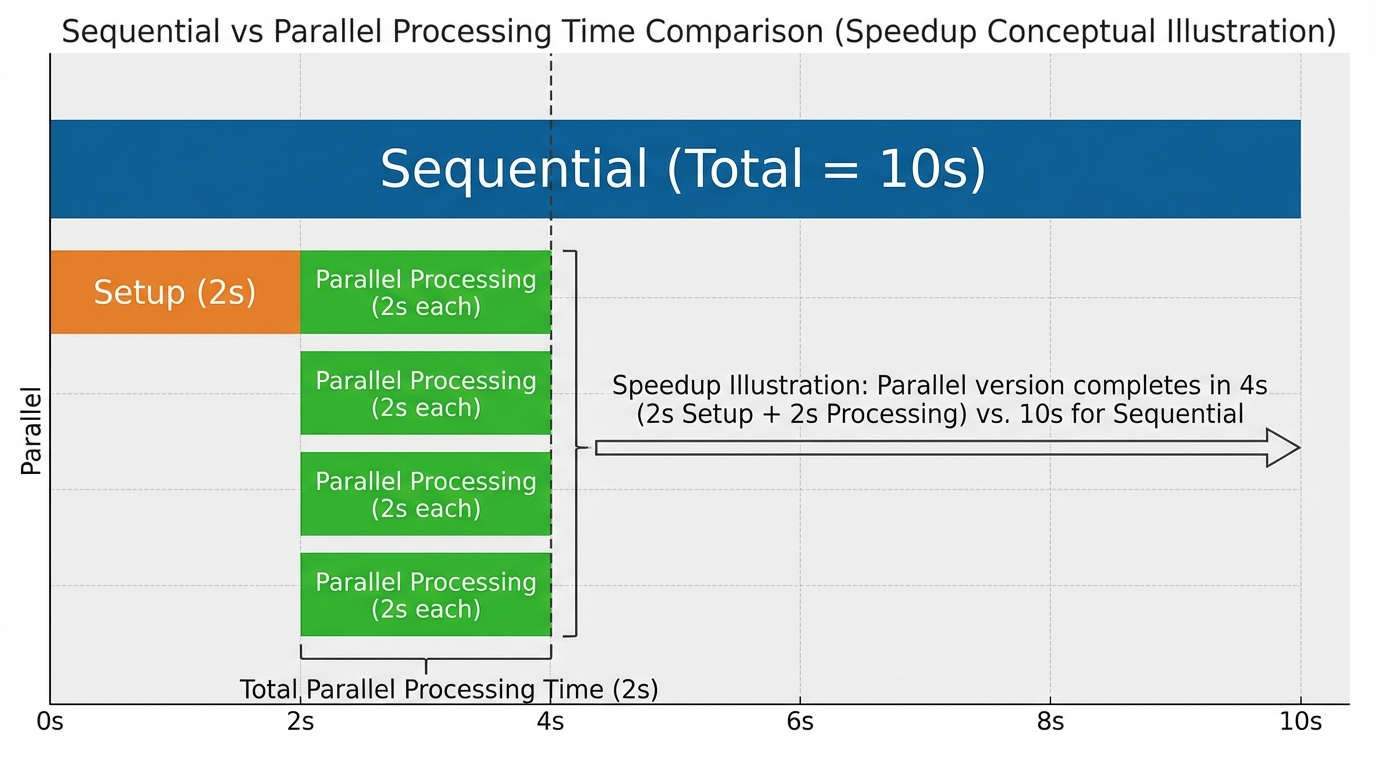
- Parallel Computing: The program is broken into smaller sequential operations, some of which are performed simultaneously on multiple processors within one computer.
- Total Time = Time of the longest parallel section + Time of sequential sections.
Distributed Computing
Distributed Computing is similar to parallel computing but involves multiple independent computers (often distinct devices networked together) working on a shared problem. This allows for massive scale (e.g., Google's search index or folding@home).
Speedup and Efficiency
We measure the benefit of parallelization using Speedup.
If a task takes 100 seconds sequentially and 50 seconds in parallel, the speedup is $100/50 = 2$.
Limitations:
- Parallel execution time is limited by the sequential portion of the solution. If 20% of a task must be done sequentially (like setting up the data), you can never speed up the process infinitely, no matter how many processors you add.
- Overhead: Organizing parallel processes takes time. Adding too many processors can actually slow things down due to the communication overhead required to coordinate them.
Common Mistakes & Pitfalls
- Internet vs. WWW: Students often think they are the same. Remember: The Internet is the road (infrastructure); the WWW is the traffic (web pages) using HTTP.
- Parallel Efficiency: A common misconception is that doubling the computers cuts the time exactly in half. This is rarely true due to overhead (setup time and merging results).
- Latency vs. Bandwidth:
- Bandwidth is the maximum amount of data that can be sent in a fixed amount of time (width of the pipe).
- Latency is the time it takes for a single bit to travel from sender to receiver (length of the pipe).
- TCP vs. UDP: Remember that TCP guarantees delivery (reliability) at the cost of speed. UDP chooses speed over reliability. Streaming video acts glitchy (UDP) rather than stopping to buffer endlessly (TCP) because dropping a few frames is better than pausing the stream.