AP Computer Science Principles: The Societal and Ethical Impact of Computing
5.1 Beneficial and Harmful Effects of Computing
Computing Innovations
Definition: A computing innovation includes a program as an integral part of its function. It can be physical (e.g., self-driving car), non-physical software (e.g., picture editing app), or a conceptual computing concept (e.g., e-commerce).
Computing innovations generally arise to solve a specific problem or satisfy a curiosity. However, once released, they often have unintended consequences.
- Collaboration: The Internet allows massive scale collaboration (e.g., Git, Google Docs), enabling people to work together asynchronously across the globe.
- Communication: Video conferencing, social media, and SMS have redefined how we maintain relationships and conduct business.
Impact Analysis
A single innovation can have both positive and negative impacts. These impacts can be on society, the economy, or culture.
| Innovation | Beneficial Effects | Harmful Effects / Risks |
|---|---|---|
| Targeted Advertising | Businesses reach specific customers; Consumers see relevant products. | Privacy invasion; "Echo chambers" or filter bubbles; Manipulation of user behavior. |
| Machine Learning / AI | Rapid medical diagnosis; Efficient route planning; Fraud detection. | Job displacement; Algorithmic bias; Lack of accountability for errors. |
| Social Media | Global connectivity; Platform for social movements; Rapid news dissemination. | Cyberbullying; Spread of misinformation; Addiction/Mental health issues. |
| GPS | easy navigation; Location tracking for emergency services. | Stalking/Privacy loss; Over-reliance on technology leading to loss of spatial skills. |
Unintended and Unforeseen Consequences
Programmers and businesses attempt to predict how an innovation will be used, but they cannot foresee everything.
- Example: The World Wide Web was designed for scientists to share research. An unintended consequence was the rise of e-commerce and streaming entertainment.
- Example: Social media was designed to connect friends. An unintended consequence was its use for spreading political propaganda or coordinating riots.
5.2 The Digital Divide
Definition and Scope
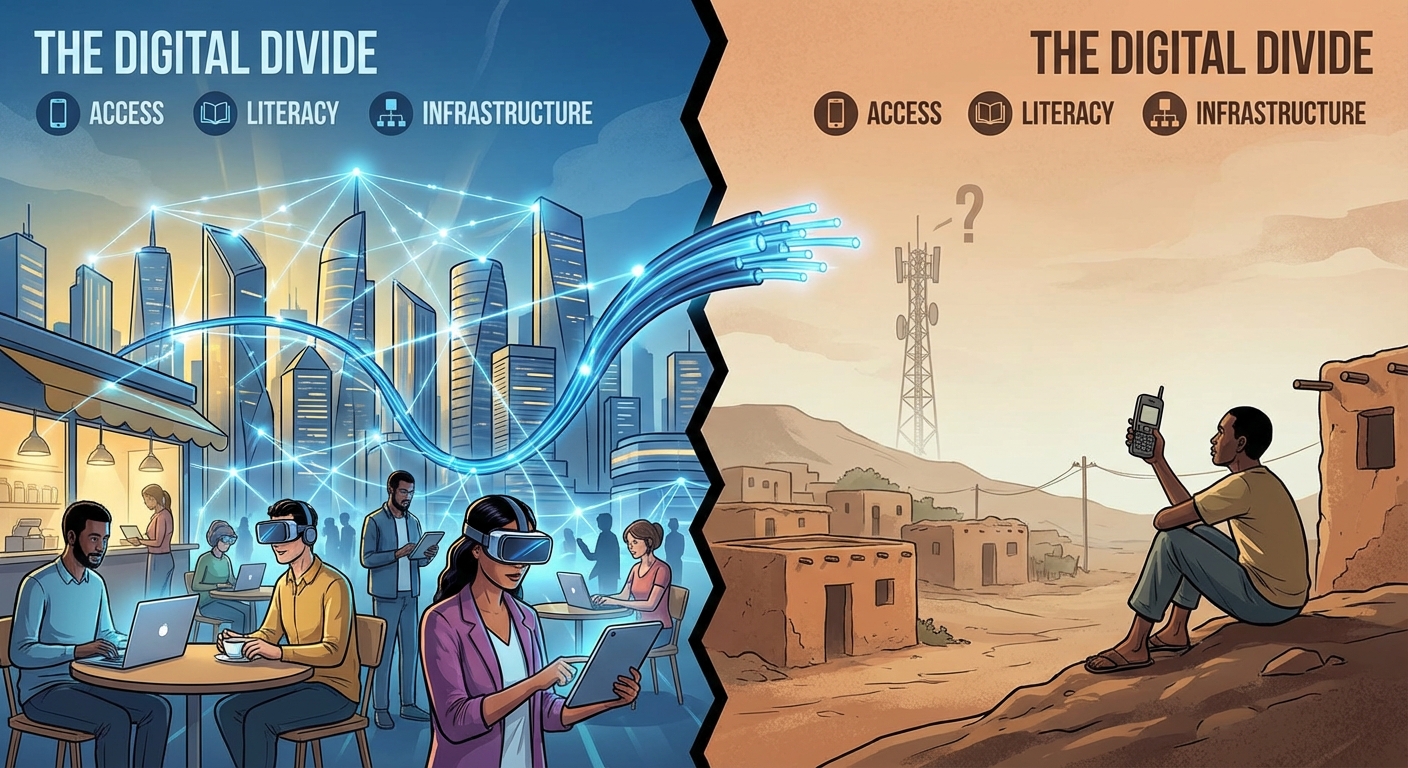
The Digital Divide: The gap between those who have access to the Internet and modern computing resources and those who do not.
This is not just about owning a computer. It encompasses:
- Access: Physical access to high-speed broadband.
- Knowledge: Digital literacy (knowing how to use the tools).
- Utility: The ability to use technology to participate in modern society (jobs, government services).
Factors Contributing to the Divide
- Socioeconomic Status: High-speed internet and modern devices are expensive.
- Geographic Location: Rural or remote areas often lack infrastructure (fiber/cell towers) compared to urban centers.
- Demographics: Age, disability, and education levels affect adoption rates.
Impact of the Divide
Those on the wrong side of the divide face limited access to:
- Education: Online learning resources and research.
- Employment: Job postings and remote work opportunities.
- Civic Participation: Voting information, government forms, and news.
5.3 Bias in Computing
Sources of Bias
Computers and algorithms are often viewed as "neutral," but they can perpetuate human biases. Algorithmic Bias occurs when a computing system reflects the implicit values of the humans who are involved in coding, collecting, or selecting data.
Key Concept: Bias usually does not come from the code syntax itself, but from the data used to train the system or the design choices of the developers.
- Training Data Bias: If an AI is trained on historical hiring data where men were preferred over women, the AI will learn to reject female candidates.
- Developer Bias: If a facial recognition team consists only of people with light skin, they may fail to test the software on darker skin tones, resulting in higher error rates for those demographics.
Real-World Examples
- Criminal Justice: Predictive policing algorithms sending patrols to historically over-policed neighborhoods, creating a feedback loop.
- Credit/Loans: Algorithms denying loans to specific zip codes (digital redlining).
- Medical AI: Skin cancer detection apps performing poorly on darker skin due to a lack of diverse training images.
Example: How Data Creates Bias (Python Concept)
# Conceptual example of bias in conditional logic vs data

# Scenario A: Explicit Logic Bias (Rare/Bad Coding)
if user.gender == "female":
    salary_offer = base_salary * 0.9  # Explicitly biased code

# Scenario B: Data Bias (Common/Implicit)
# The algorithm calculates offer based on historical trends in the database.
# If the database contains years of underpaying women, the model copies that pattern.
salary_offer = model.predict(user_skills, historical_data)

# In Scenario B, the code looks "clean" but the outcome is biased.
5.4 Crowdsourcing and Citizen Science
Crowdsourcing
Definition: The practice of obtaining information, funding, or input into a task by enlisting the services of a large number of people, typically via the Internet.
- Benefits: Scales up workforce cheaply; gathers diverse perspectives; solves problems computers cannot solve alone.
- Examples:
- Waze: Users report traffic/police, benefiting all drivers.
- Wikipedia: Collective knowledge creation.
- Kickstarter: Crowdfunding capital for projects.
Citizen Science
This is a specific type of crowdsourcing where the public helps with scientific research.
- Foldit: Gamers solve protein folding structures that aid medical research.
- Zooniverse: People classify galaxies from telescope images because human eyes are better at spotting faint patterns than current algorithms.
5.5 Legal and Ethical Concerns
Intellectual Property (IP)
Anything a person creates (code, art, text) is their Intellectual Property. In the digital age, IP is easily copied and distributed, leading to ethical conflicts.
- Copyright: Automatically grants the creator legal protection against unauthorized copying. You do not need to apply for it; it exists the moment the work is created.
- Plagiarism: Presenting someone else's work as your own. Just because an image is on Google Images does not mean it is free to use.
Creative Commons (CC)
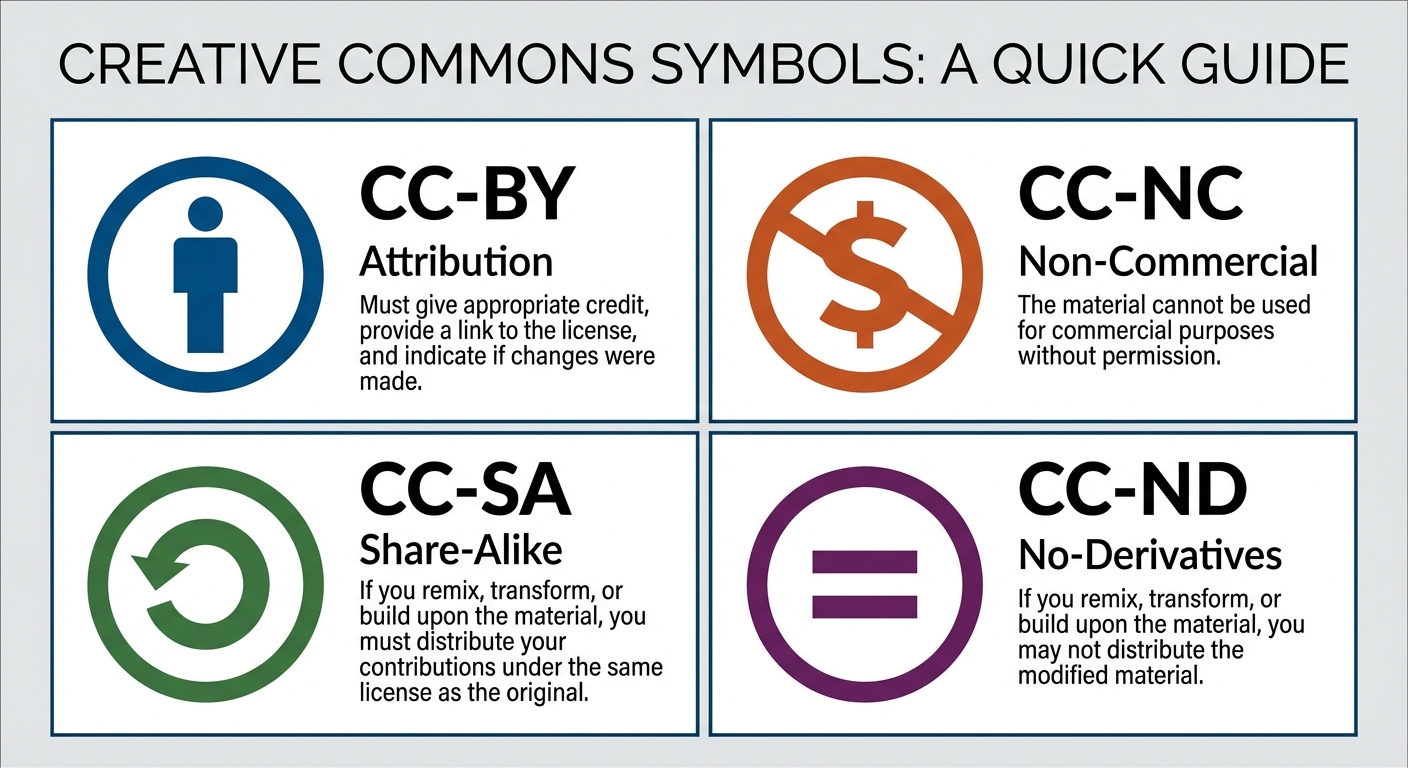
Creative Commons is a public copyright license that enables the free distribution of an otherwise copyrighted "work." It allows authors to declare exactly how others can use their work.
| Icon / Code | Name | Meaning |
|---|---|---|
| BY | Attribution | You must credit the creator. (Required for all CC). |
| NC | Non-Commercial | You cannot make money from this work. |
| SA | Share-Alike | If you modify it, you must license your new work under the same terms. |
| ND | No-Derivatives | You can share the work but cannot edit or remix it. |
Open Source vs. Open Access
- Open Source Software: The source code is made freely available for possible modification and redistribution. (e.g., Linux, Firefox, Python).
- Benefits: Community collaboration, transparency, rapid security fixes.
- Open Access: Online research output (journals, government data) free of restrictions on access (e.g., no paywall) and free of restrictions on use.
5.6 Safe Computing & Privacy
Personally Identifiable Information (PII)
Definition: Information that can identify, contact, or locate a single person, or identify an individual in context.
- High Risk PII: Social Security Number, Biometric Data, Passport Number (Immediate identity theft risk).
- Moderate Risk PII: Date of Birth, Address, Phone Number (Can be combined to steal identity).
- Data Aggregation: Tech companies combine non-PII (like search history + zip code + device ID) to re-identify users.
Authentication Measures
To protect PII and systems, we use:
- Strong Passwords: Long, complex combinations of characters.
- Multi-Factor Authentication (MFA): Requires at least two pieces of evidence to log in.
- Something you know (Password).
- Something you have (Phone, YubiKey).
- Something you are (Biometrics/FaceID).
Cybersecurity Threats (Malware)
- Virus: Malicious code that attaches to a legitimate program and spreads when that program is run.
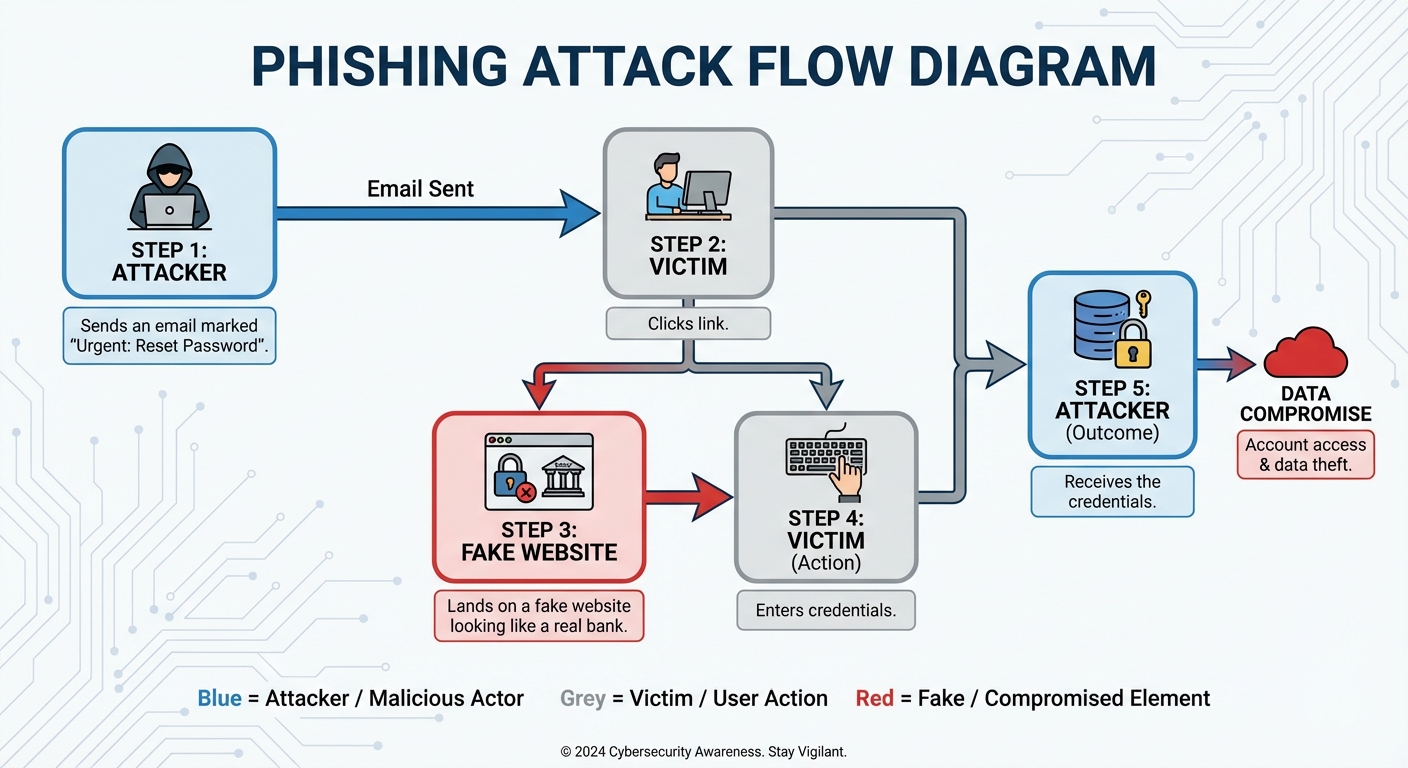
- Phishing: A social engineering attack where emails/sites masquerade as trustworthy entities to trick users into revealing PII (e.g., a fake Bank of America email).
- Prevention: Check URL domains, do not click suspicious links.
- Keylogging: Software that records every keystroke to steal passwords.
- Rogue Access Point: A wireless access point that gives unauthorized access to secure networks.
Encryption & Security
While the mechanics of encryption are often covered in "The Internet" unit, its impact is covered here.
- Encryption: Scrambles data so only authorized parties can read it.
- Public Key Encryption: Used for secure web browsing (HTTPS). It uses a Public Key to encrypt data and a Private Key (kept secret by the receiver) to decrypt it.
- Certificate Authorities (CA): Issue digital certificates that verify a website is who they say they are (the little lock icon in the browser).
Common Mistakes & Pitfalls
Confusing "Open Source" with "Freeware":
- Mistake: Thinking open source just means "free cost."
- Correction: Open source means the code is viewable and editable. Freeware (like Discord) costs $0 but you cannot see or change the code.
Assuming the Digital Divide is only about Hardware:
- Mistake: Thinking giving everyone a laptop solves the digital divide.
- Correction: Without high-speed internet infrastructure and digital literacy training, the hardware is useless.
Creative Commons Attribution:
- Mistake: Thinking you don't need to cite CC images because they are "free."
- Correction: Almost all CC licenses require Attribution (BY). You must cite the source.
Bias in Algorithms:
- Mistake: Believing computers are neutral/objective.
- Correction: Algorithms amplify the bias found in the data they were fed. Garbage in, garbage out.
Phishing vs. Hacking:
- Mistake: Thinking phishing requires advanced coding skills.
- Correction: Phishing is "social engineering" (tricking the human), not necessarily exploiting a software bug.