AP CSP Study Guide: Data Handling & Abstraction
Variables and Assignment Operations
At the core of all programming is the ability to store and manipulate values. In AP Computer Science Principles, understanding how computers handle data is the first step toward building complex algorithms.
defining Variables
A Variable is an abstraction inside a program that provides a named memory location to store a value. The value stored can change (vary) during the execution of the program.
- Data Types: Variables can hold numbers, Booleans (true/false), strings, or lists.
- Naming: Good variable names are descriptive (e.g.,
scoreoruserNamerather thanxora) to make code readable.
The Assignment Operator
The assignment operator allows a program to change the value represented by a variable. In the AP CSP Exam Reference Language (pseudocode), this is represented by an arrow pointing to the left.
This command means: "Evaluate the expression on the right, and store the result in the variable on the left."
Key Rule: Assignment is NOT algebra.
- In algebra, $x = x + 1$ is impossible.
- In programming,
x ← x + 1means "take the current value of x, add 1 to it, and save the result back into x."
Example: Sequencing Assignments
Consider the following code trace:
a ← 10
b ← 20
a ← b
b ← a
DISPLAY(b)
Trace:
abecomes 10.bbecomes 20.atakes the value ofb(20).btakes the current value ofa(which is now 20).- Output: 20.
The Swap Algorithm
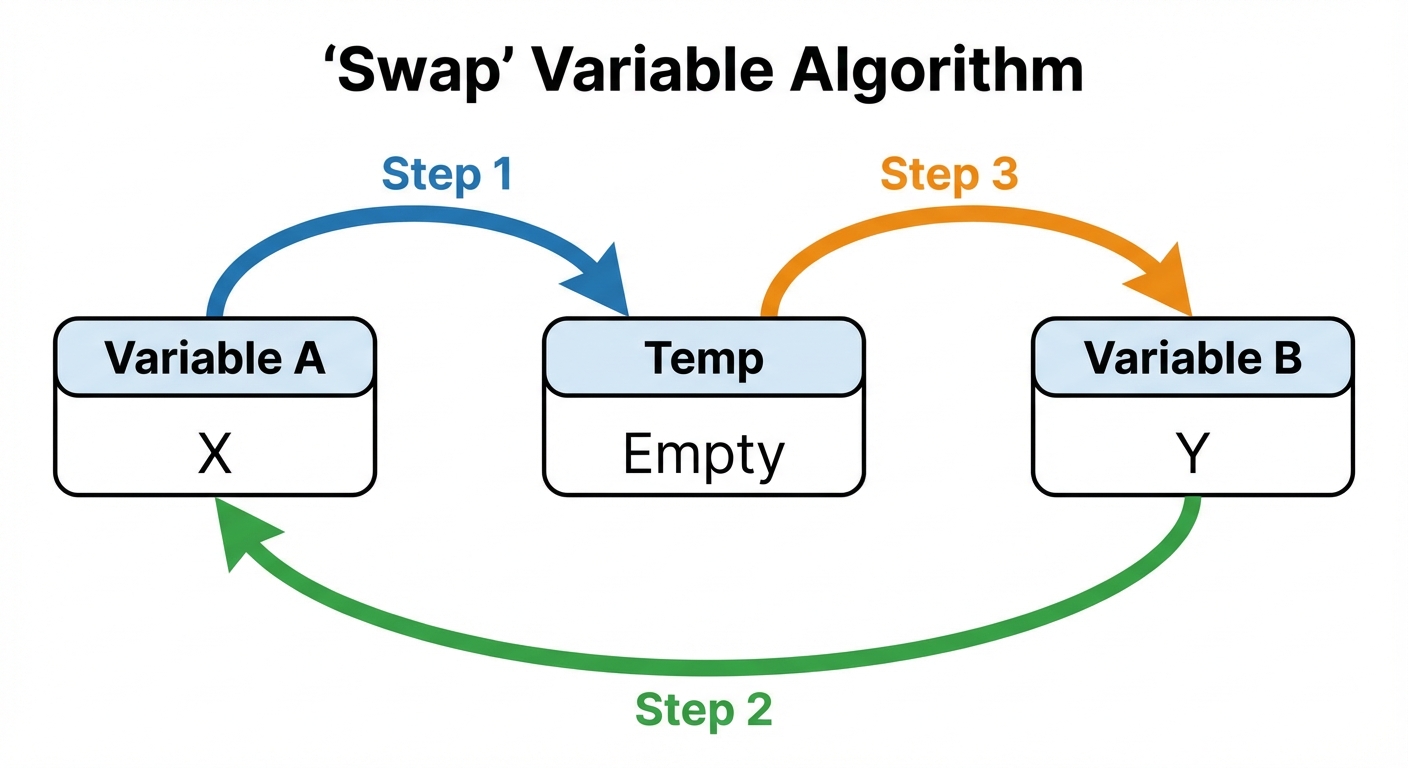
A frequently tested concept is swapping the values of two variables. You cannot simply write a ← b followed by b ← a, as this overwrites the original value of a before it can be moved to b (as seen in the example above).
To swap correctly, you need a temporary variable:
temp ← a   (Save a's value)
a ← b      (Overwrite a with b)
b ← temp   (Overwrite b with the saved value)
Mathematical Expressions
Computers process numerical data using arithmetic operators. While addition, subtraction, multiplication, and division are standard, AP CSP heavily emphasizes the MOD operator.
Arithmetic Operators Table
| Operator | Symbol (AP CSP) | Description | Example |
|---|---|---|---|
| Addition | $+$ | Adds two values | 3 + 2 evaluates to 5 |
| Subtraction | $-$ | Subtracts right from left | 3 - 2 evaluates to 1 |
| Multiplication | $*$ | Multiplies two values | 3 * 2 evaluates to 6 |
| Division | $/$ | Divides left by right | 6 / 2 evaluates to 3 |
| Modulus | $\text{MOD}$ | Remainder of division | 7 MOD 3 evaluates to 1 |
Understanding MOD
The MOD operator returns the remainder when two numbers are divided.
Formula logic:
Examples:
- $10 \text{ MOD } 3 = 1$ (3 goes into 10 three times, remainder 1)
- $12 \text{ MOD } 4 = 0$ (4 divides 12 evenly, remainder 0)
- $3 \text{ MOD } 10 = 3$ (10 cannot go into 3, so the remainder is the original number)
Real-World Applications of MOD:
- Even/Odd Check: If
num MOD 2is 0, the number is even. - Time Calculation: Converting minutes to hours. (e.g., If you have 130 minutes,
130 MOD 60gives you the remaining 10 minutes). - Cryptography: Used heavily in encryption algorithms.
Randomness
The command RANDOM(a, b) generates a random integer between a and b, inclusive.
RANDOM(1, 10)could return 1, 10, or any integer between them.
Strings
A String is an ordered sequence of characters (letters, numbers, symbols) enclosed in quotation marks.
String Concatenation
Concatenation is the process of joining two or more strings together to form a new, numeric string. In AP CSP pseudocode notation, this often looks like:
result ← "Tree" + "House"
Result: "TreeHouse"
Some pseudocode versions use a specific function:CONCAT(str1, str2)
Example
word1 ← "AP"
word2 ← "CSP"
num ← 20

# Note: Numbers are often cast to strings automatically in high-level concatenation
phrase ← word1 + " " + word2
DISPLAY(phrase)
Output: "AP CSP"
Data Abstraction: Lists
As programs grow, managing individual variables (like score1, score2, score3…) becomes inefficient. This is where Data Abstraction comes in. By creating a list, you give a name to a collection of data, allowing you to manage complexity.
What is a List?
A List is an ordered collection of elements. An element can be a number, string, or another list.
Indexing (The "Index 1" Rule)
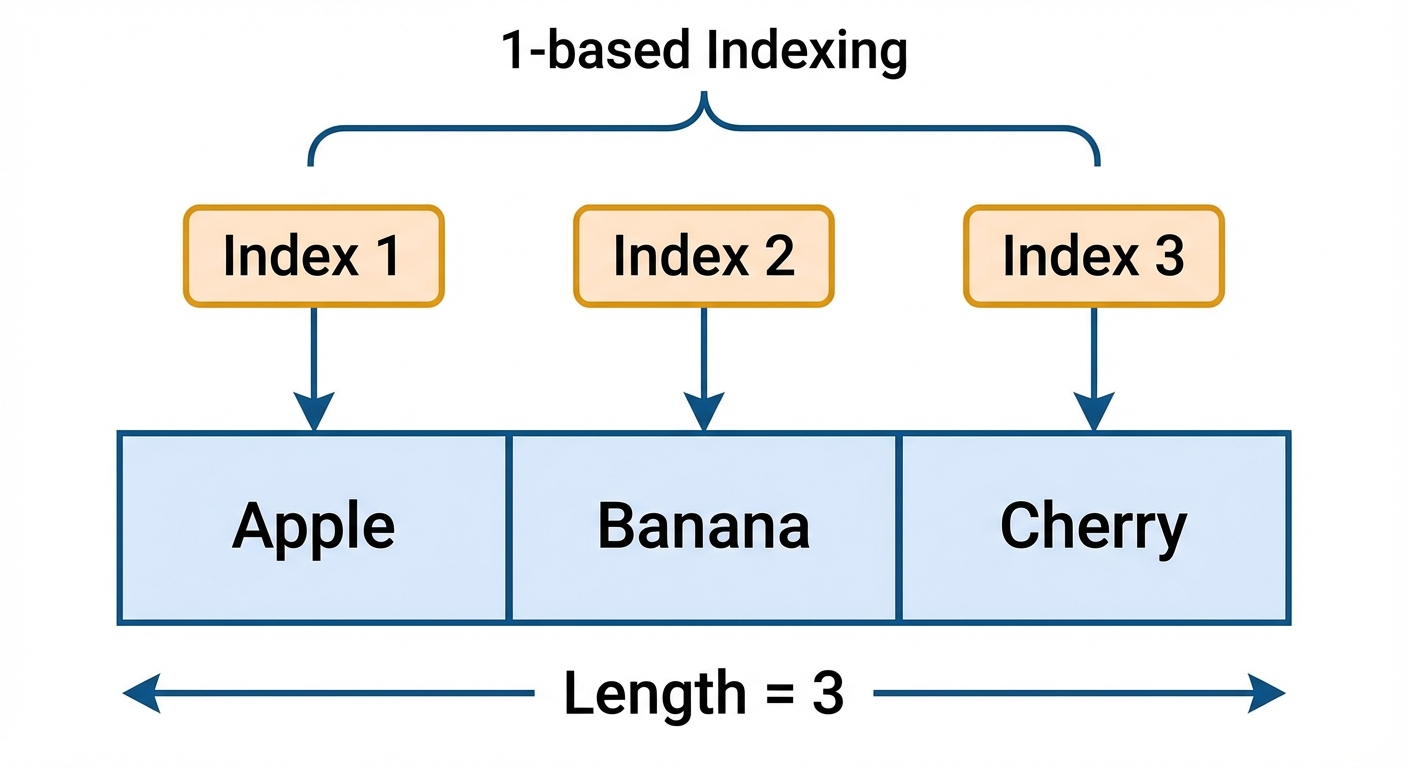
Unlike many industry programming languages (like Java or Python) that start counting at 0, AP CSP Reference Language lists are 1-based.
- The first item is at index 1.
- The last item is at index
LENGTH(list).
Given myColors ← ["Red", "Blue", "Green"]:
myColors[1]is "Red".myColors[2]is "Blue".myColors[0]produces an error.
List Operations
| Operation | Syntax | Effect |
|---|---|---|
| Access | list[i] | Retrieving value at index $i$. |
| Assign | list[i] ← val | Overwrites the value at index $i$. |
| Length | LENGTH(list) | Returns the total count of items. |
| Insert | INSERT(list, i, val) | Shifts items at and after index $i$ to the right, then places val at index $i$. Increases length by 1. |
| Append | APPEND(list, val) | Adds val to the very end of the list. Increases length by 1. |
| Remove | REMOVE(list, i) | Deletes item at index $i$. Shifts subsequent items left. Decreases length by 1. |
Worked Problem: List Manipulation
numList ← [10, 20, 30]
INSERT(numList, 2, 15)
REMOVE(numList, 3)
APPEND(numList, 5)
DISPLAY(numList)
Step-by-Step Solution:
- Start:
[10, 20, 30] INSERTat index 2: The value 20 shifts to index 3. 15 goes into index 2.- List is now
[10, 15, 20, 30].
- List is now
REMOVEat index 3: The item at index 3 is 20. It is removed. 30 shifts left.- List is now
[10, 15, 30].
- List is now
APPEND5: Adds 5 to the end.- Final List:
[10, 15, 30, 5].
- Final List:
Common Mistakes & Pitfalls
Confusing Assignment Direction:
- Mistake:
10 ← score - Correction: Always
variable ← value. The variable (container) must be on the left.
- Mistake:
Zero-Indexing vs. One-Indexing:
- Mistake: Assuming the first item in a list is at index 0 (common if you code in Python/Java/JS outside class).
- Correction: In AP CSP exam questions, always start counting at 1.
Index Out of Bounds:
- Mistake: Trying to access
list[4]when the list only has 3 items. - Correction: Check the
LENGTH(list)before accessing high indices.
- Mistake: Trying to access
MOD Operator Logic:
- Mistake: Thinking
a MOD bbehaves like division. - Correction: Remember it calculates the remainder. If the first number is smaller than the second (e.g.,
2 MOD 5), the result is the first number (2).
- Mistake: Thinking
String vs. Number Addition:
- Mistake: Thinking
"5" + "5"equals10. - Correction: Strings concatenate.
"5" + "5"equals"55".
- Mistake: Thinking