Unit 3 Notes: Advanced Procedural Abstraction and Algorithmic Logic
Developing Procedures
A Procedure (often called a function or method in specific programming languages) is a named group of programming instructions that may have parameters and return values. Procedures are the building blocks of Procedural Abstraction, which allows a solution to a large problem to be based on the solution of smaller sub-problems.
Parameters vs. Arguments
One of the most vital distinctions in AP CSP is understanding how data is passed into procedures.
- Parameters: The input variables defined in the procedure's header. They act as placeholders.
- Arguments: The actual specific values passed into the procedure when it is called.
# DEFINING the procedure
# 'target_score' is the PARAMETER (placeholder)
def check_winner(target_score):
    if current_score > target_score:
        return True
    else:
        return False

# CALLING the procedure
# 50 is the ARGUMENT (actual value)
is_game_over = check_winner(50)
Return Values
Procedures can either execute an action (like printing to a screen) or calculate and pass back data to the main program using a return statement. Once a return statement is executed, the procedure ends immediately. As programmers, we utilize procedures to reduce code duplication and improve readability.
Libraries and APIs
Modern programming relies heavily on existing code. You rarely write everything from scratch.
Using Libraries
A Library is a collection of pre-written procedures that you can import into your program.
- Modularity: Libraries allow you to simplify complex programs by abstracting away the details of how a specific task (like drawing a circle or generating a random number) is performed.
- Collaboration: Libraries facilitate collaboration, allowing specialized teams to maintain specific code bases while others use them.
Application Programming Interfaces (APIs)
An API provides the documentation and specifications for how the procedures in a library behave and how they should be used.

When using an API, you do not need to understand the implementation (the code inside the library), only the interface (what arguments it needs and what it returns).
Algorithmic Efficiency
Not all algorithms are created equal. We measure efficiency based on how the execution time (number of steps) grows as the input size grows.
Search Algorithms
There are two primary search algorithms you must know for the exam:
Linear Search (Sequential Search)
- Process: Checks each element one by one from the start.
- Requirement: Data can be unsorted.
- Efficiency: As data doubles, execution time doubles.
Binary Search
- Process: Repeatedly divides the search interval in half.
- Requirement: Data MUST be sorted.
- Efficiency: As data doubles, execution time increases by only one step.
| Feature | Linear Search | Binary Search |
|---|---|---|
| Data Structure | Unsorted or Sorted Lists | Sorted Lists ONLY |
| Best Case | 1 step (found at index 0) | 1 step (found at middle) |
| Worst Case | $N$ steps (item not found) | $\log_2 N$ steps (roughly) |
Reasonable vs. Unreasonable Time
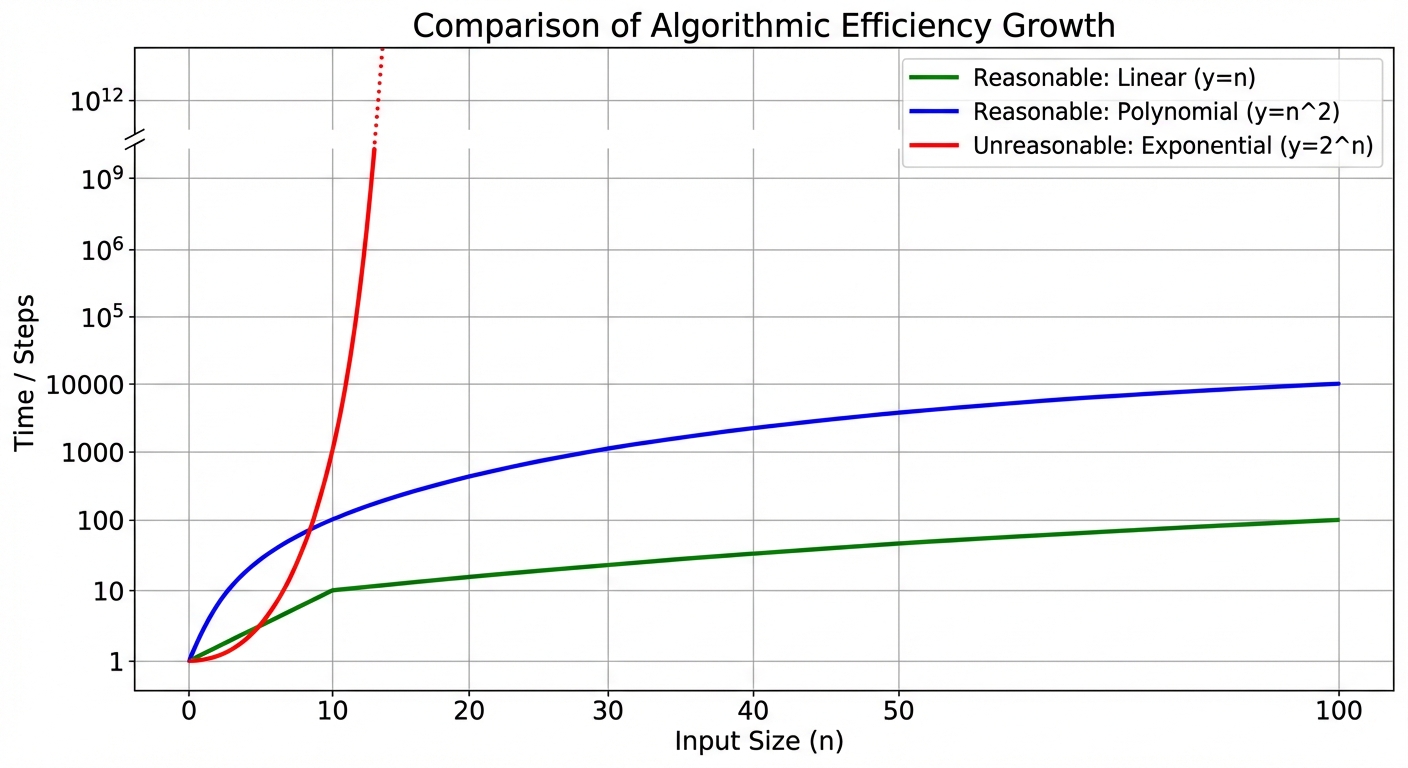
Computer scientists classify algorithms based on their "time complexity"—the relationship between the input size ($n$) and the number of steps required.
Reasonable Time: The number of steps is a polynomial function of the input size (e.g., constant, linear, square).
- Examples: $n$, $n^2$, $100n$.
- Note: Just because an algorithm is "reasonable" doesn't mean it is fast for huge data, but it is theoretically solvable.
Unreasonable Time: The number of steps grows exponentially or factorially.
- Examples: $2^n$ (Exponential), $n!$ (Factorial).
- For large data sets, these problems cannot be solved in a useful timeframe.
Heuristics
When a problem requires an algorithms that runs in unreasonable time (like the Traveling Salesperson Problem), we often use a Heuristic.
- Definition: A technique that provides an approximate solution (it might not be the perfect or optimal solution) but produces a result in valid time.
- Goal: Trade accuracy/optimality for speed.
Undecidable Problems
Is there an algorithm for everything? No.
- Decidable Problem: An algorithm can be constructed to answer "yes" or "no" for all inputs (e.g., "Is this number even?").
- Undecidable Problem: A problem for which no algorithm can be constructed that is always capable of providing a correct yes-or-no answer.
The Halting Problem
The classic example of an undecidable problem. It asks: "Can we write a program that looks at any other computer program and determines if that program will eventually stop (halt) or run forever?"
Alan Turing proved mathematically that this is impossible. You cannot create an algorithm that checks all other algorithms for infinite loops without running into a paradox.
Simulations
Simulations allow us to mimic real-world phenomena using computer programs. They rely on abstraction to strip away unnecessary details (e.g., a flight simulator might mimic wind resistance but ignore the color of the upholstery).
Benefits vs. Drawbacks
| Benefits | Drawbacks/Limitations |
|---|---|
| Safety: Test scenarios that are dangerous in real life (e.g., crashing a car). | Simplification: Since real life is complex, simulations must make assumptions. |
| Cost: Cheaper than building physical prototypes. | Bias: Programmers may inadvertently introduce bias in the rules governing the simulation. |
| Time: Can speed up time (simulate evolution) or slow it down (simulate chemical reaction). | Accuracy: The results are only as good as the model; they may not match reality perfectly. |
Randomness in Simulations
Simulations often use random number generators to model the unpredictability of the real world (e.g., rolling dice, weather fluctuations, stock market changes).
Common Mistakes on the AP Exam
- Binary Search on Unsorted Data: Students often choose Binary Search as the most efficient option for a list of numbers without checking if the list is sorted. If the list is unsorted, Binary Search does not work.
- Confusing Parameters and Arguments:
- Remember: Parameters are Placeholders (in the definition).
- Remember: Arguments are Actual values (in the call).
- Undecidable vs. Intractable:
- "Undecidable" doesn't mean "takes a long time." It means "logically impossible to write an algorithm for it."
- "Unreasonable/Intractable" means "we have an algorithm, but it takes too long (exponential time)."
- Heuristics: A heuristic does not guarantee the best solution; it guarantees a good enough solution closer to reasonable time.